
Choose a theme from store context
Set the business, reader, and products for AI suggestions.

A Shopify app for blog teams running the whole store
Connect the work after publishing, not only the writing. Save directly to Shopify, understand article response, and let people make the final decision on every AI suggestion.
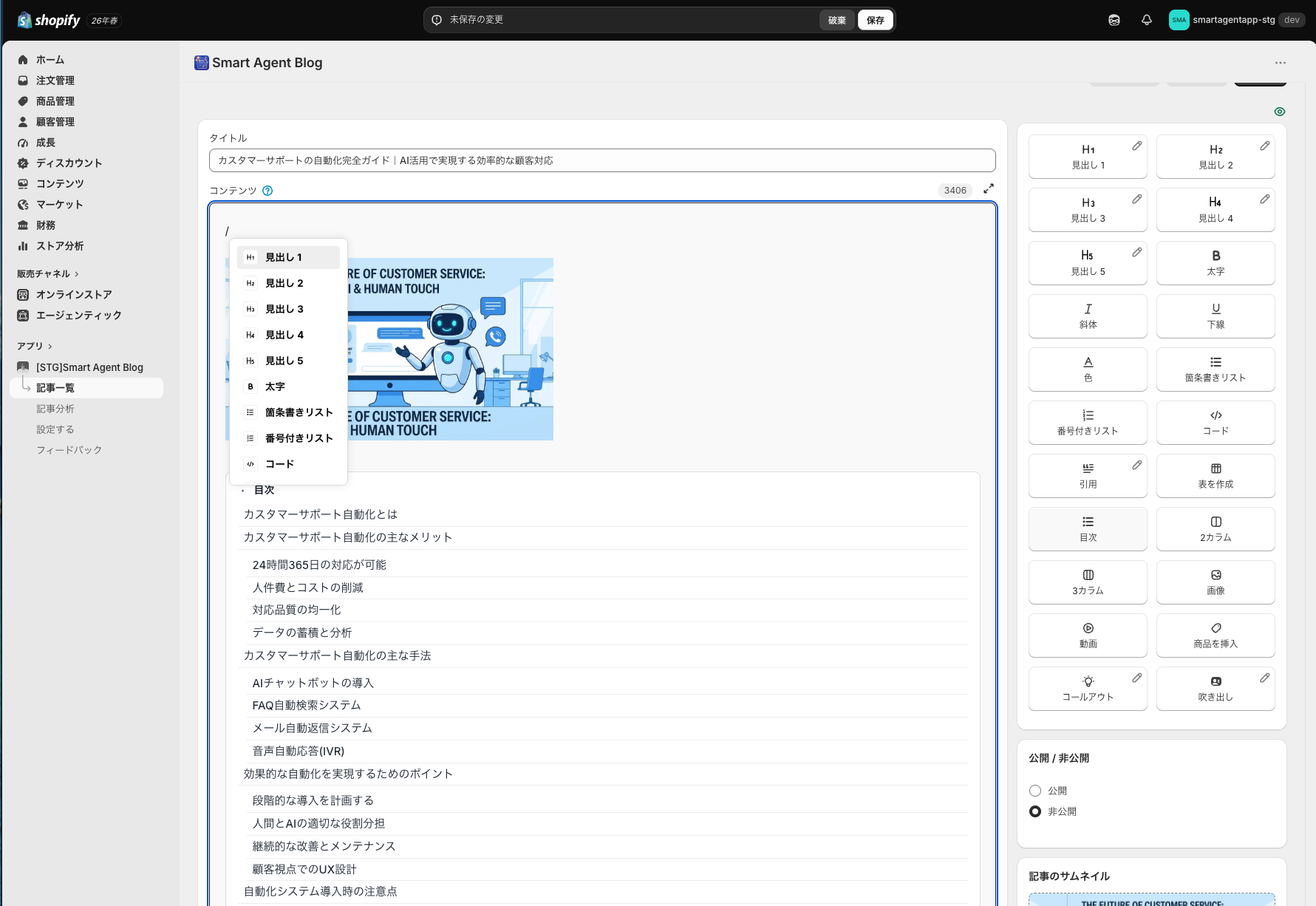
Use the same editor, toolbar, and block palette as the full app. Pencil icons open the real CSS design editor.
When one small team handles products, customers, ads, and content, blogging becomes something to do “when there is time.” Published articles are rarely revisited.
The work stops before the first line.
Copy, paste, and product details move by hand.
The archive grows, but the content does not.
Numbers are visible without becoming decisions.
Product facts and wording still need a human check.
This is not an app for producing posts in bulk. It creates a workflow where one article keeps growing through measurement, analysis, and revision.
Signals accumulate on the same article and shape the next improvement—all inside Shopify admin.
Set the business, reader, and products for AI suggestions.
Combine contents, tables, columns, and products.
Save directly as a Shopify blog draft or post.
Evaluate four dimensions based on article purpose.
Use CTR, engagement, freshness, or conversion rules.
Choose approval, draft, or automatic publishing.
The result feeds the next plan and improvement
Explore practical ideas for SEO, writing, and improving published articles.
Build the article in the same place it will be managed. Combine copy, contents, tables, product links, and rich blocks without exporting to another CMS.
Define the store, reader, products, tone, and publishing schedule. Reuse the same setup for scheduled or immediate generation.
Business summary
Target reader
Tone and language
Destination blog and author
Themes and keywords
Products to reference
Collections to reference
Flexible reference scope
Generation schedule
Publish day and time
Draft or automatic publishing
Email and generation history
Start by saving as a draft, then verify product facts and wording before publishing.
A traffic article and a product article should not be judged by the same metrics. Set the article purpose—or let AI classify it—and change the weighting accordingly.
Four article purposesHow readers arrive
Whether they continue
Whether they move forward
How the article supports purchase
Change the weighting by intent
Avoid strong conclusions from thin data
Prioritize one next improvement
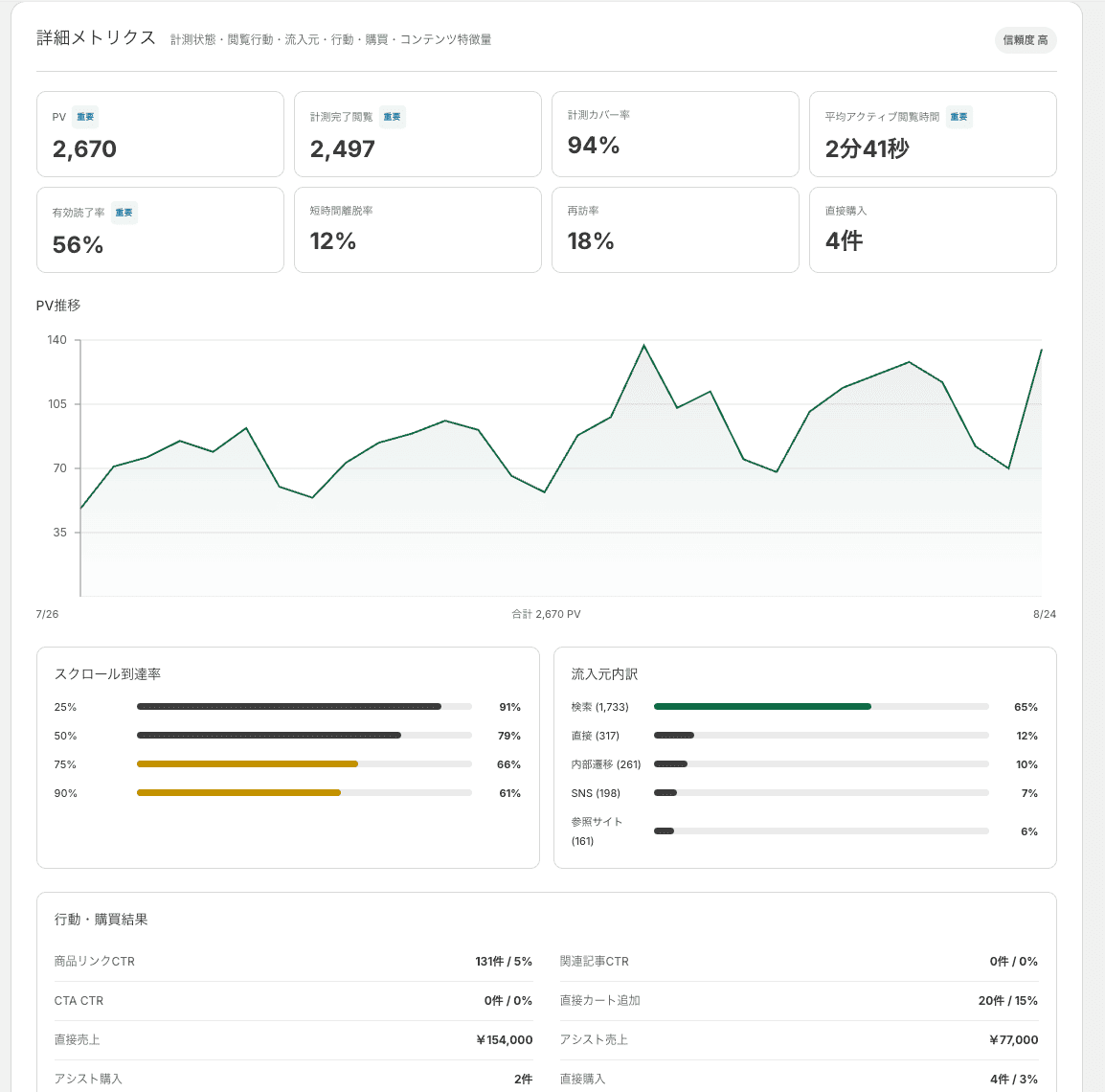
PV / active time / completion / short exits / returns / scroll depth / sources
Product CTR / related article CTR / CTA CTR / cart additions / purchases
Collection status / completed views / coverage / confidence / finalized data
Queries / impressions / clicks / CTR / position
This is more than proofreading. Choose which article deserves a rewrite and why from its measurements, then choose approval, draft, or automatic publishing.
For high-impression, low-CTR articles. Requires Search Console.
For high bounce or low completion.
For aging articles or declining traffic.
For traffic that does not lead to products, cart, or purchase.
See recent and popular articles, PV trends, generation history, and rewrite history together.
This describes operational change, not a guaranteed numerical result.
Start every time with a blank topic
Move between writing tools and Shopify
Copy product details by hand
Leave published posts untouched
See PV without knowing what to fix
Worry about automatic AI publishing
Receive themes shaped by store context
Build with reusable blocks
Save directly to Shopify
Measure reading and product actions
See purpose-aware recommendations
Compare and approve before applying
Short, task-based guidance from setup through improvement.
Analytics, AI Rewrite, custom CSS, and custom blocks vary by plan. Confirm the latest availability in the in-app plan page.
It keeps Shopify as the destination while adding AI planning, rich blocks, post-publish analytics, and data-informed rewrites in one app.
Only if configured that way. Draft and approval workflows let people review content first.
Yes. Analytics uses measurements collected after setup, and Rewrite can select existing articles by performance or freshness.
No. Connecting it adds query, impression, click, CTR, and position data and supports CTR-focused decisions.
Yes. Insert Shopify products in the editor and select products or collections as generation context.
Use drafts or approval. Compare changes, approve or reject them, and edit before publishing.
Yes. Analytics, AI Rewrite, custom CSS, and custom blocks vary by plan.
Create a draft, publish it, understand the response, and improve it—all inside Shopify admin.