

After customer support, fulfillment, and product updates, writing a blog post may be the task that never gets done. A blank editor also makes it hard to start in a short break.
Instead of completing everything in one sitting, separate drafting from review. Smart Agent Blog can prepare scheduled AI drafts while you focus on product accuracy and the experience only your store can contribute.
What you will learn
- Which writing tasks to delegate and which to review yourself
- How to start a manageable schedule
- How a specific brief can reduce revisions
Divide the work before choosing a schedule
Treat choosing a topic, outlining, drafting, fact-checking, and publishing as separate tasks. AI can provide a starting point for headings and explanations. You still decide which customer question matters, check product claims, and add real experience.
| Task | AI’s contribution | Your responsibility |
|---|---|---|
| Topic and draft | Develop an article from the configured theme | Choose a useful customer question |
| Product explanation | Draft using selected product information | Verify specifications and suitability |
| Final article | Provide editable material | Add experience, images, and accurate links |
Think of the output as a draft to review, rather than an article that must be ready to publish.
Give the draft a specific purpose
“Write about bags” leaves too much undecided. Here is a fictional brief for a store selling work bags:
- Business overview: Work bags with guidance on size and storage.
- Theme: Choosing a bag for A4 documents.
- Target reader: Someone buying their first work bag.
- Products: A small selection of relevant published products.
Only use claims such as lightweight or water-resistant when the product specifications support them. Give the AI a reader and useful evidence rather than an unsupported conclusion.
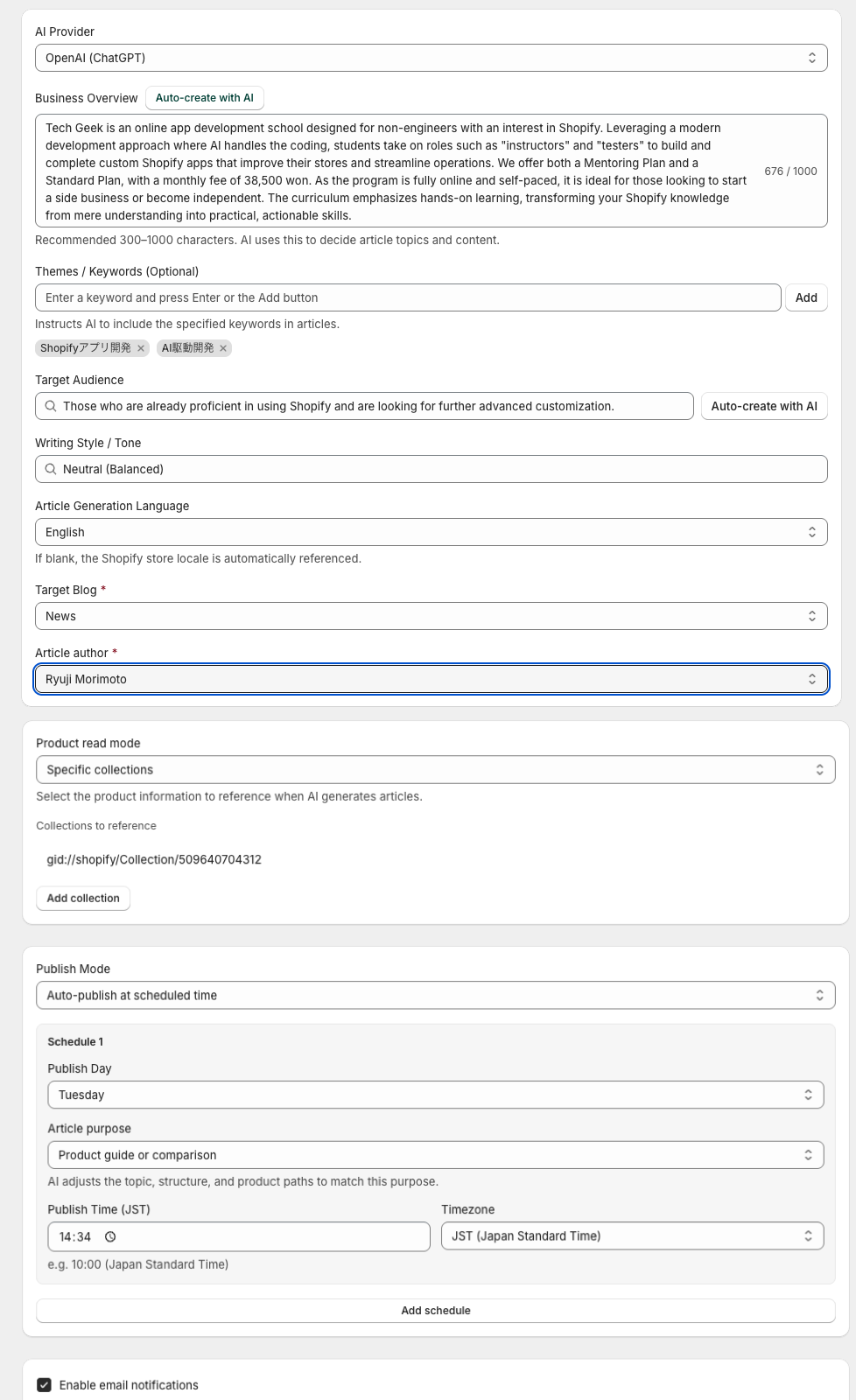
Schedule drafts at a pace you can review
- Open the scheduled AI blog proposal settings in Smart Agent Blog.
- Enable the feature and set your business overview, themes, audience, tone, and language.
- Choose the destination blog, author, and any products to reference.
- Choose draft saving with manual publication.
- Set the article purpose, day, time, and timezone, then save.
One draft a week is a possible starting routine, not a requirement. Align the schedule with a time when someone can review it. The configured time starts generation; completion can take several minutes. Generation and schedule limits depend on your plan. See the scheduled proposal guide for the full setup.
Review in three passes
First, facts: Check names, prices, materials, sizes, and sales conditions. Remove claims you cannot verify.
Second, store experience: Add real customer questions or staff observations. Do not present an AI-invented experience as something your team actually did.
Third, usability: Check headings, product destinations, and the mobile preview. The draft review guide provides a checklist.
If you repeatedly correct the same explanation, update the business overview or theme as well as the current draft.
Measure the work you still need to do
Fast generation does not save time if every draft needs extensive revision. Record briefing time, review time, and the number of posts you actually publish. If drafts accumulate, narrow the topic or product selection before increasing frequency.
Start with one useful brief and one reviewed draft. Once that routine works, adjust the volume to your team’s capacity.
For more on building a routine you can keep, see Shopify blog best practices.
Related reading: Tell your product story and add products to an article.
Learn more about Smart Agent Blog in the Shopify App Store.