

More page views do not necessarily explain whether a blog helps customers. Fewer views do not automatically mean failure either. Start with the article’s purpose and the behavior that would indicate it is useful.
Smart Agent Blog provides reading and product-action metrics. You do not need to give every metric equal importance.
Match the metric to the purpose
| Purpose | First questions to ask |
|---|---|
| Attract new readers | Are people arriving, and from where? |
| Explain how to use something | Are they reading the explanation? |
| Help choose a product | Do they inspect products and take buying actions? |
| Announce a limited campaign | What happens during the relevant period? |
A reader may resolve a care question without buying. That does not make the article useless. Conversely, high traffic with little reading may suggest a mismatch between the entrance and the content.
Use the four diagnostic scores as clues
Article analytics evaluates attraction, reading, calls to action and purchase contribution. The goal score combines metrics relevant to the selected article purpose. If the purpose is wrong, edit it and request reanalysis.
Scores use comparisons with articles of the same purpose, so avoid ranking unrelated article types by points alone. There is no separate “SEO score” in this view.
Keep different events separate
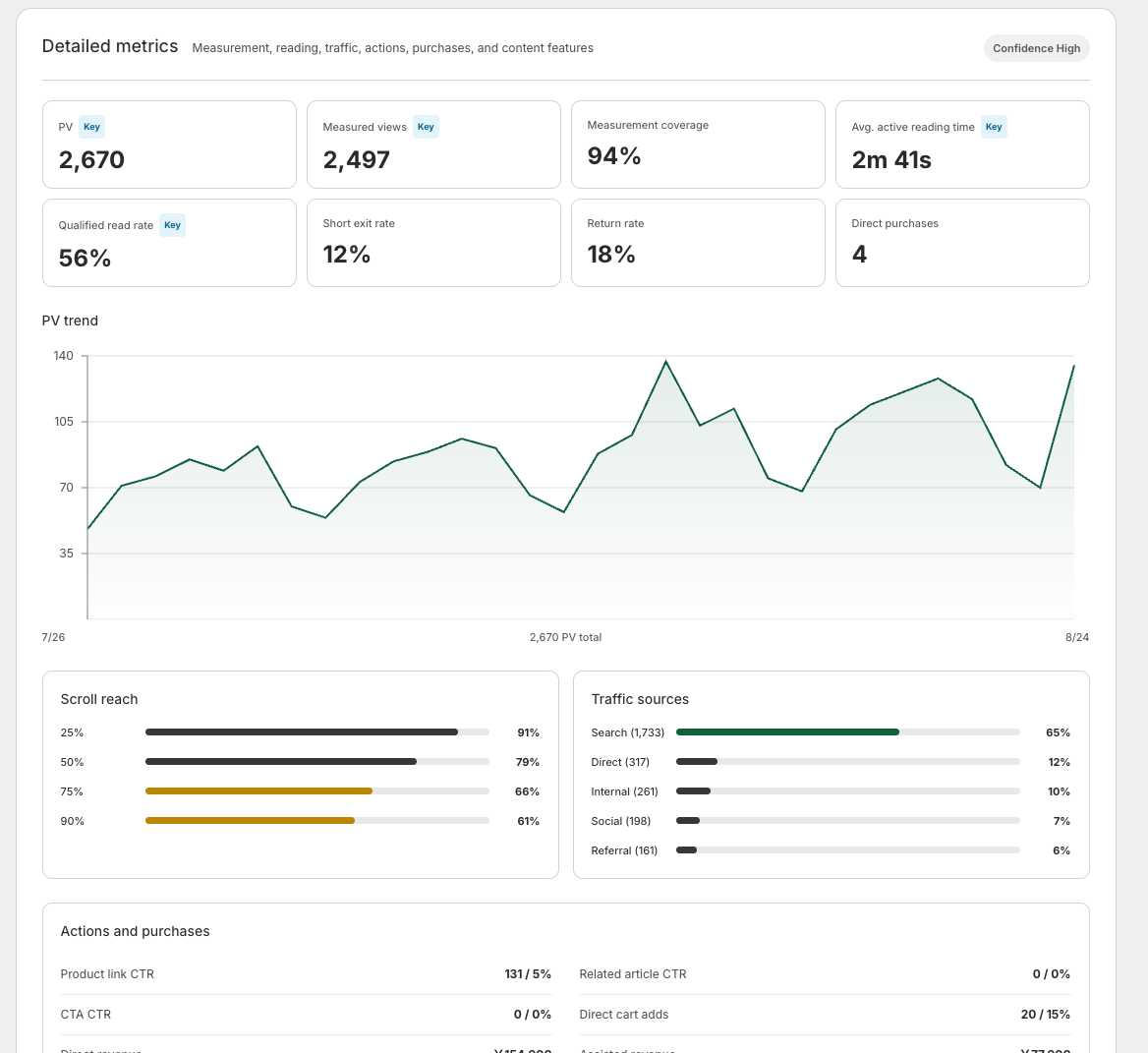
Page views are displays, not a count of unique people. Active reading time measures time actively spent viewing. Effective completion requires reaching 90% of the article and spending sufficient time reading.
A product click is not a purchase. Do not simply add direct and assisted purchase or revenue figures into a single total; check their attribution conditions. The metrics should not be treated as complete observation of every purchase.
Review the page in order
- Open article analytics from the article list or a saved editor page.
- Check the reporting period and purpose.
- Read the goal score and diagnostic scores.
- Inspect the detailed metrics behind them.
- Choose one suggestion and read the actual article.
The period is the finalized 30 days through yesterday. Limited data or too few comparable articles can result in a collecting-data status rather than a score.
Choose one useful improvement
For a reading-focused guide, clarify the opening. For a comparison, improve selection criteria and relevant product destinations. Aim to improve the experience represented by the metric, rather than increasing a number without understanding why it matters.
Once you know which numbers matter, you can review how readers arrive in the first place. See Shopify blog marketing.
Read the detailed steps in the user guide
Related reading: Should you change a post that is still collecting data?