
Page views are increasing, but visitors do not seem to explore your products. Publishing more posts may leave the same problem unresolved in the articles you already have.
Separate reading, product exploration, and buying into distinct steps. Smart Agent Blog’s article analysis and product insertion tools can help you decide where to look next.
What you will learn
- Why page views alone are not enough
- Five questions for reviewing a product path
- How to record and compare a change
1. Does the article match the reader’s goal?
Someone looking for care instructions may already own the product. Helping that person find an answer is valuable even without another immediate purchase.
For a comparison or buying guide, visiting a suitable product may be a more relevant next step. Decide on one intended action before assessing the article.
| Article | A useful action to review |
|---|---|
| Choosing a first work bag | Opening a relevant product page |
| Caring for an existing bag | Reaching the required instructions |
| Introducing a new range | Exploring the products or collection |
To review the whole route from post to purchase, see turning blog readers into buyers.
2. Do readers reach the recommendation?
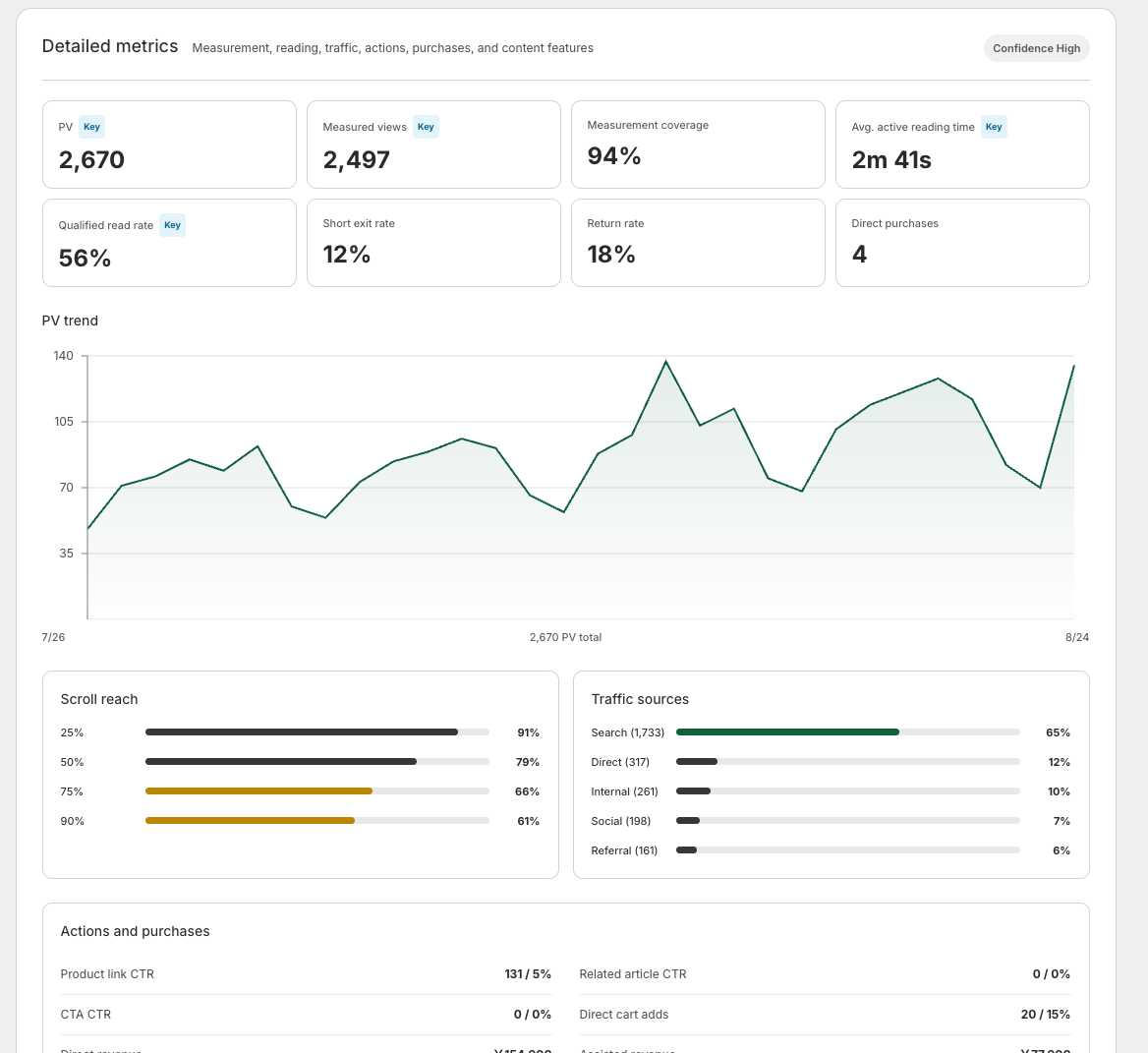
A product shown only at the end may be missed. Check scroll reach alongside the actual content. A drop does not necessarily mean poor writing: readers may have found their answer.
Consider placing the recommendation immediately after the explanation that makes the product relevant.
3. Have you explained why this product fits?
“Recommended for you” gives little information. Add a sentence about the intended user or occasion before the card.
A fictional example might connect commuting needs with a bag’s internal pockets. Verify the real specifications before making that claim. Smart Agent Blog can insert a card containing the product’s name, image, and price; see the product insertion article.
4. Does the destination answer the next question?
If the article discusses one product but links to the store homepage, visitors have to search again. Link to the relevant item or collection.
Check whether sizing, delivery conditions, and availability are clear on the destination page. When product clicks occur without purchases, the product page and offer also deserve attention.
5. Do you understand the measurement coverage?
Check the period, measured views, and measurement coverage before interpreting a small number. A zero in incomplete data is not proof that every reader took no action.
The analytics guide explains preparation and metrics such as product-link CTR. Clicks and purchases are different events. Review Shopify order data as well when assessing purchases.
Change one thing and record it
Start by changing either placement or wording in one article. Record the date, change, and metric you intend to review. Note differences in weekdays, campaigns, sales, and stock availability between periods.
Changing everything at once makes attribution difficult. With little traffic, observe a longer period rather than drawing a conclusion from a brief fluctuation.
Analysis recommendations and AI rewriting can provide ideas. Check each suggestion against the reader’s goal and actual product information. The approval-based rewriting workflow lets you review changes before accepting them.
Learn more about Smart Agent Blog in the Shopify App Store.