
Your post about the studio got great feedback but didn't sell much. Your comparison post sells, but you're not sure anyone reads it. When a blog's results are hard to read, the usual cause is measuring posts with different jobs against the same yardstick.
The short answer: decide on one purpose before you write, then match the structure, the path to products, and the way you judge results to that purpose. Judge a brand-building post by whether people actually read it. Judge a sales post by whether readers moved on to product pages and carts.
In Smart Agent Blog, article analytics switches what it measures based on each post's purpose, and AI Scheduled Blog Proposals lets you pick an article purpose for each schedule. This guide shows how to write both kinds of posts and how to set them up in the app.
- How brand-building posts and sales posts differ
- A simple way to sort posts into four purposes
- Structure and product links for each purpose, with fictional store examples
- Which results to look at for each purpose, and how Smart Agent Blog's analytics shows them
- How to set the article purpose for AI-generated drafts
Without a purpose, results are hard to judge
Blog posts do one of two broad jobs. Some introduce your store and the people behind it so readers become fans. Others help readers choose a product and buy it.
Mix the two up and a few things happen:
- You judge a brand post by sales, and call it a failure even though it's doing its job.
- You judge a sales post by page views, and miss that readers never reach the product.
- You pack story, comparison, and products into one post, and nobody can tell what it's for.
Sales posts that never point to a product are more common than you might think. While preparing proposals for Smart Agent Blog in August and September 2026, we reviewed the blogs of Shopify stores in Japan. Of the 88 posts we recorded, 66 (75%) had no link from the body to a product page. In 3 out of 4 posts, readers couldn't reach a product page from the text. If a post's job is to sell, that's a big miss.
Brand-building posts vs. sales posts
The two kinds of posts reach different readers through different doors. Structure and links should follow.
Brand-building posts
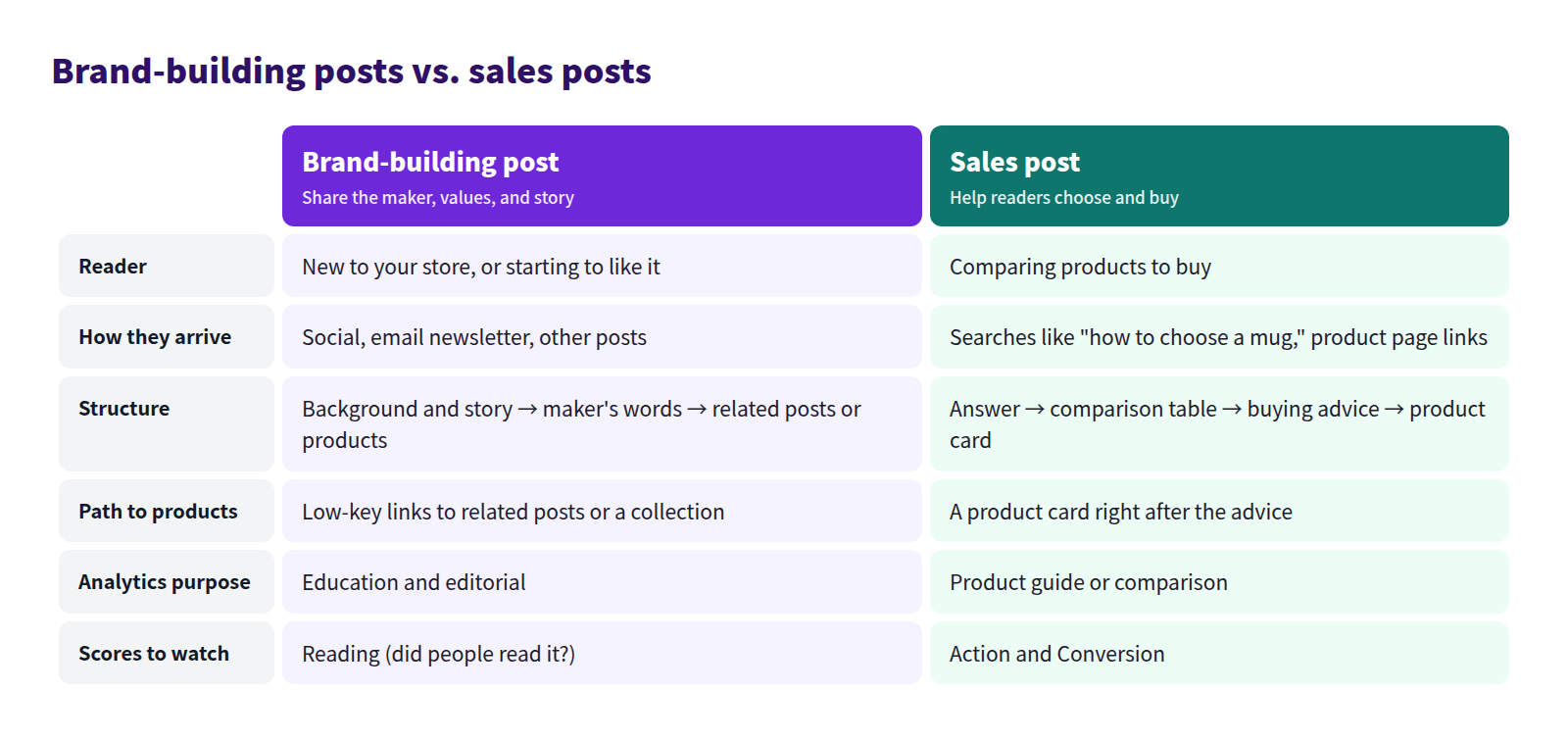
These share how you think, what you care about in materials, and how your products get made. Readers are new to your store or just starting to like it. They come from social media, your email newsletter, or other posts, and they aren't planning to buy right now.
What matters is that they read to the end and come away wanting to try something you make. Keep product links low-key and point to related posts or a collection.
Sales posts
These are buying guides, comparisons, and recommendations. Readers are comparing products. They arrive from searches like "how to choose a mug" or from a link on a product page.
What matters is giving an undecided reader an answer and a direct path to the product. Lead with the answer, show differences in a table, and place the product right after the advice.
Four article purposes
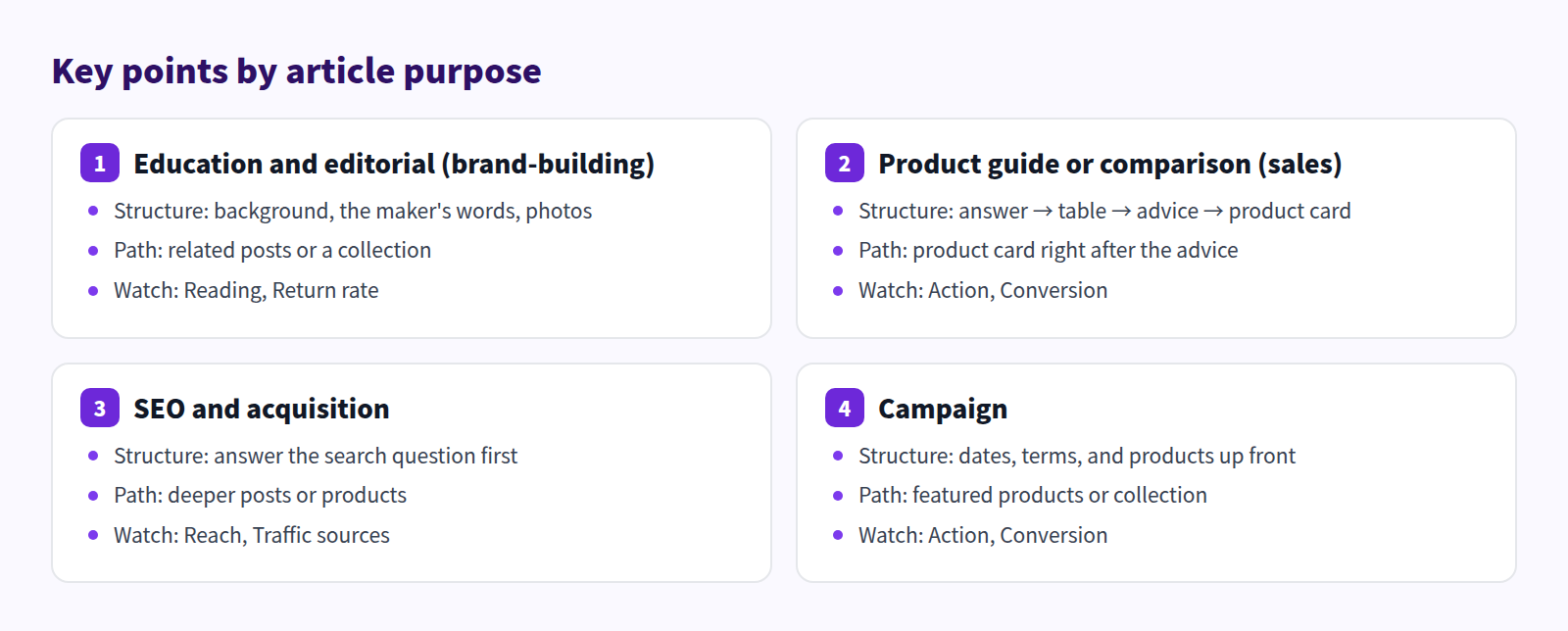
Splitting the two into four makes planning easier. Smart Agent Blog's article analytics uses the same four purposes.
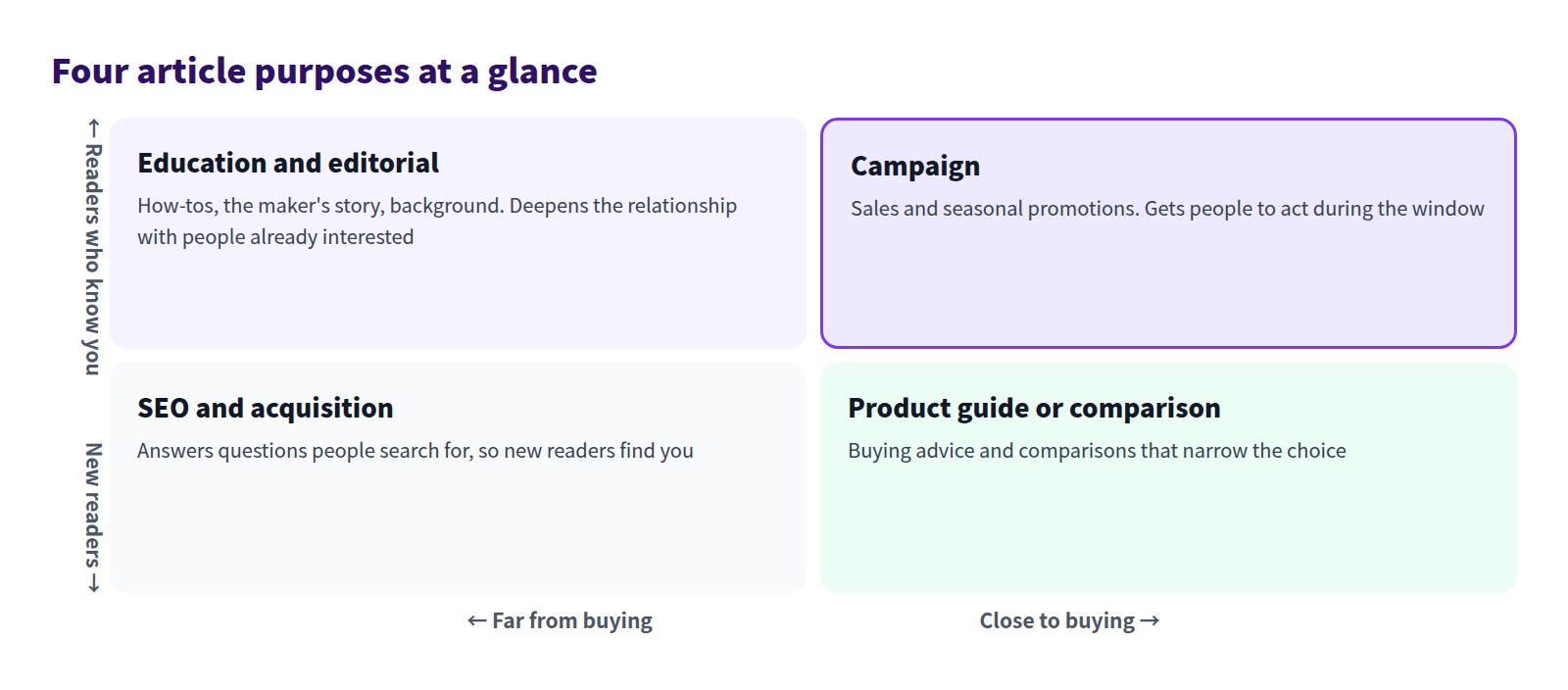
- SEO and acquisition: answers questions people search for, so new readers find you
- Education and editorial: how-tos, background knowledge, and the maker's story. Most brand-building posts land here
- Product guide or comparison: helps readers choose. This is the heart of sales posts
- Campaign: limited-time promotions and sales
You don't need all four. Just seeing which purposes your blog already covers, and which it's missing, makes it easier to decide what to write next.
Structure and links by purpose, with examples
We wrote two posts for a fictional pottery store, Nohara Pottery. Same store, same mugs, very different structure.
A brand-building post
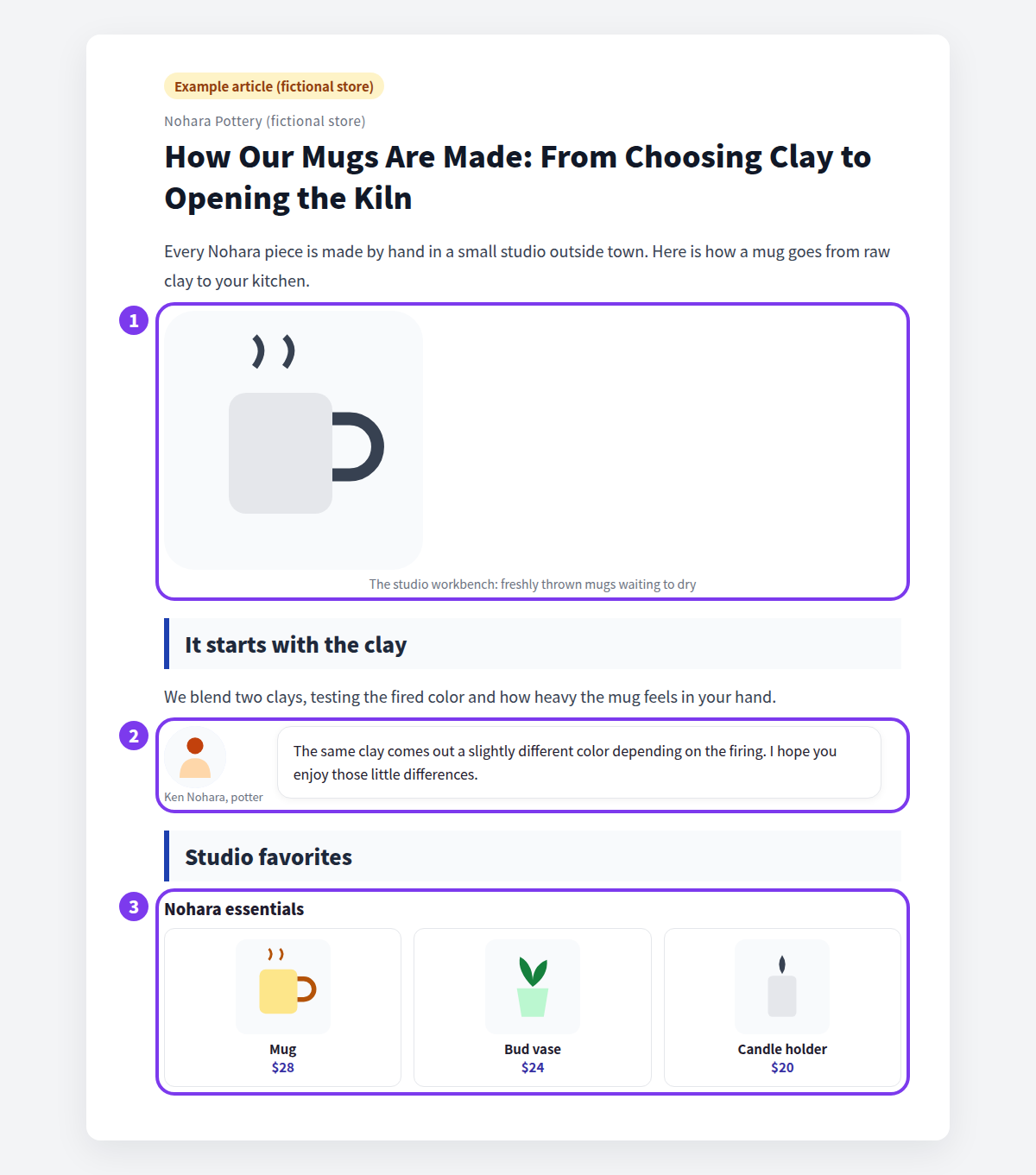
- Show the workplace: a photo of the workbench or freshly thrown mugs says more about the maker than a paragraph can.
- Let the maker speak: a line in the potter's own words, like "I hope you enjoy those little differences," is often the part of a brand post people remember.
- Keep the path to products at the end: instead of dropping products mid-story, show a few favorites as a collection after the story. Interested readers can browse; everyone else just enjoys the read.
A sales post
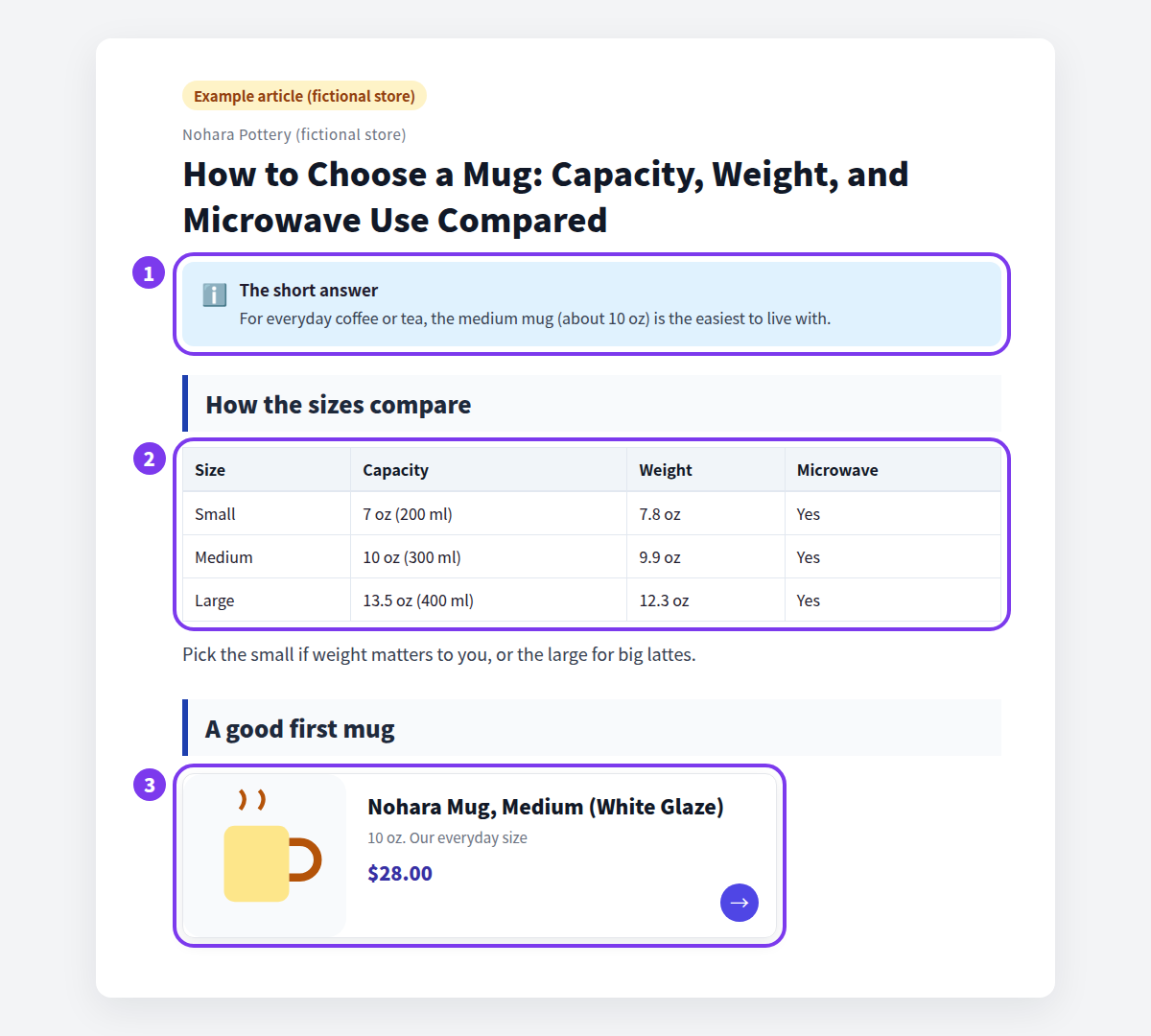
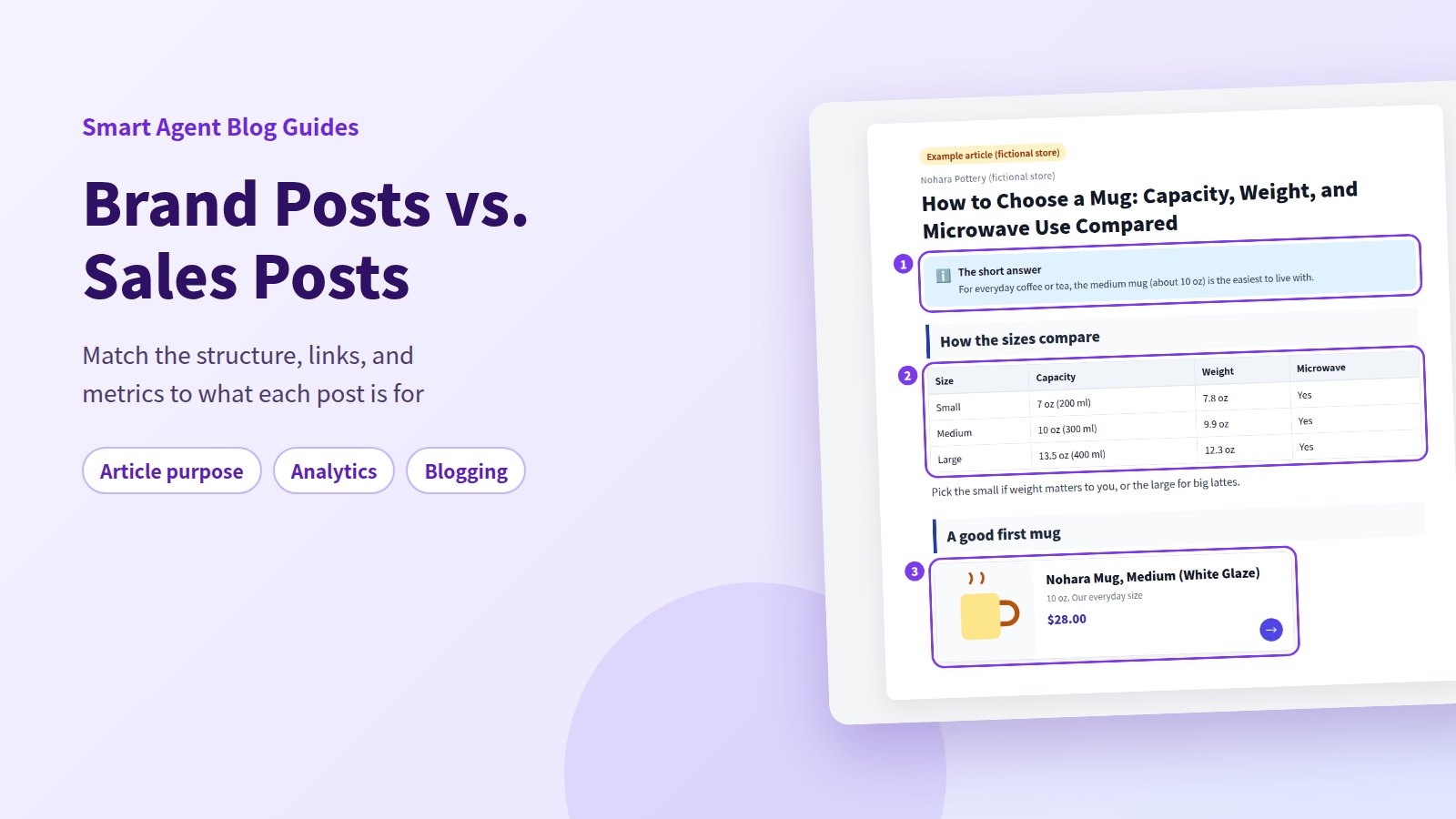
- Answer first: a callout at the top says the medium mug (about 10 oz) suits most people. Readers in a hurry can decide right there.
- Compare in a table: capacity, weight, and microwave use side by side. Differences are clearer in a table than in paragraphs.
- Product card right after the advice: the recommended mug appears just after the buying advice, with its image and price, one click from the product page.
Don't force two purposes into one post
A brand post with product cards scattered through it starts to feel like an ad, and readers drift away. A buying guide that opens with a long story loses the people looking for an answer.
If you want both, write two posts and link them. End the studio story with "Choosing your first mug? Read our buying guide," and link from the buying guide back to the studio story. Each post stays focused on one job.
Judge each purpose by the right results
Once you know the purpose, you know what to look at. Use this as a starting point:
| Purpose | What to look at | If it's low, check |
|---|---|---|
| Education and editorial | Did people read it through, and come back? | Length of the opening, paragraph breaks, number of photos |
| Product guide or comparison | Did readers go to product pages and add to cart? | Product card placement, clarity of the comparison table |
| SEO and acquisition | How many people read it, and did they come from search? | Title, words people would search for |
| Campaign | Did readers go to products during the campaign? | Whether dates, terms, and products are up front |
A brand post that earns little revenue but gets read closely is doing its job. A comparison post with lots of views but few clicks to products needs work. Page views also depend on how long a post has been live, the season, and whether you promoted it, so don't judge on views alone.
What Shopify can do out of the box
In Shopify, you create posts under Content > Blog posts. The standard rich text editor supports tables, images, embedded video (YouTube and Vimeo), and links, so the tables, photos, and text links in the examples above are all possible with built-in tools. There's no built-in card that shows a product's name, image, and price together.
What the built-in blog doesn't have is a way to set a purpose for each post and evaluate it on metrics that fit that purpose. You'd tag posts by purpose and compare numbers from your analytics tools yourself.
How to do it in Smart Agent Blog
In Smart Agent Blog, article analytics identifies each post's purpose and adjusts how it's evaluated. When AI drafts posts for you, you can set the purpose there too.
Check the purpose and results in article analytics
On the Pro plan, open a post's analytics with View analytics in the article list, or at the top of the editing screen for a saved post.
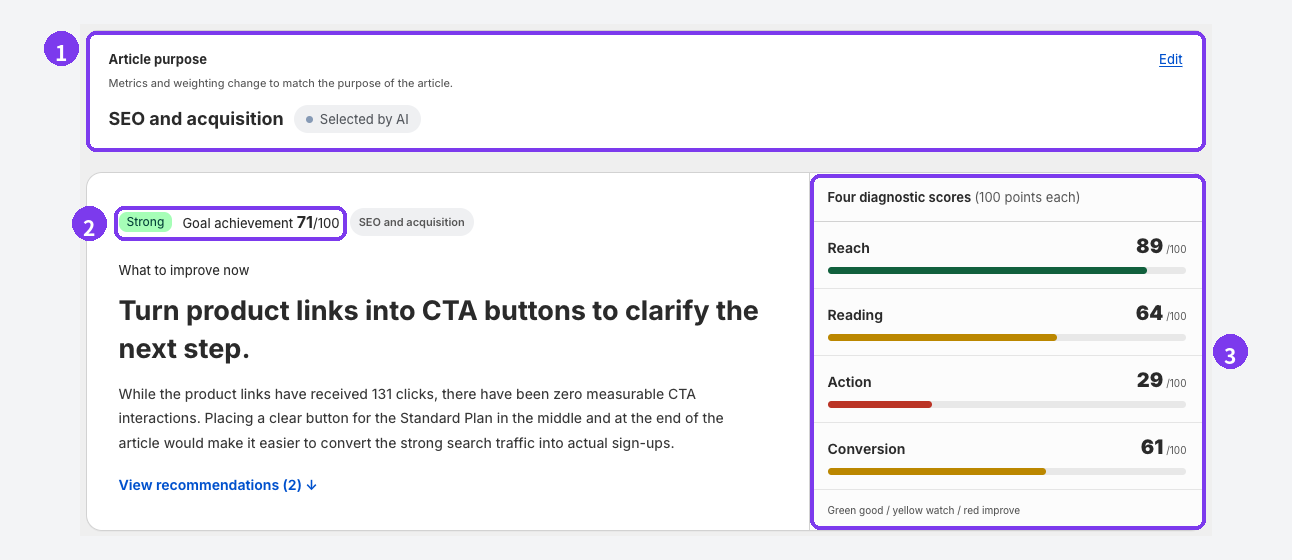
- Article purpose: one of SEO and acquisition, Education and editorial, Product guide or comparison, or Campaign. On the first analysis, AI picks one based on the content, labeled Selected by AI. If it's wrong, select Edit, choose the right purpose, and select Change and reanalyze. The metric weighting changes and the results are recalculated.
- Goal achievement: a score out of 100 that combines the metrics relevant to the purpose. 70 or above shows Strong, 50 or above On track, and below 50 Improvement opportunity. Beneath it, What to improve now gives the top recommendation.
- Four diagnostic scores: Reach (how many people read it), Reading (whether they read properly instead of leaving quickly), Action (whether product links, related articles, and buttons were selected), and Conversion (whether it led to cart adds and purchases), each out of 100.
Scores are calculated against your other posts with the same purpose, and the weighting follows the purpose too, so brand posts aren't held to the same standard as sales posts. Until there are enough comparable posts and views, you'll see Collecting data instead of a number. See Review article analytics for more.
Set the article purpose for AI drafts
In AI Scheduled Blog Proposals, each schedule has its own Article purpose. Open Setting, then select Manage for AI Scheduled Blog Proposals.
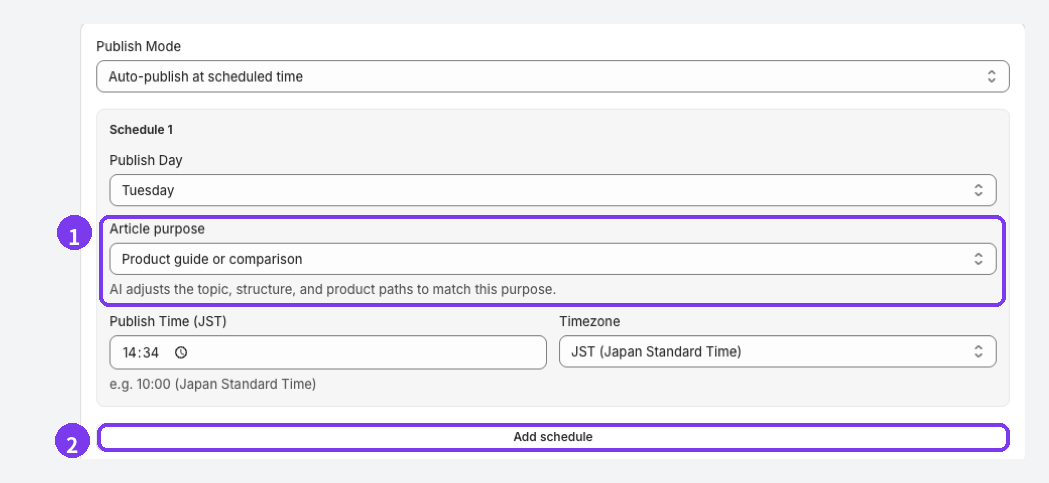
- Article purpose: choose Let AI decide, SEO and acquisition, Education and editorial, Product guide or comparison, or Campaign. The AI adjusts the topic, structure, and paths to products to match. If you're unsure, choose Let AI decide.
- Add schedule: depending on your plan, you can add more schedules (up to 5 on Pro). Each one can have a different purpose, so you could get an Education and editorial post on Mondays and a Product guide or comparison post on Thursdays.
For your first few posts, set Publish Mode to Save as draft (manual publish) and review before publishing. AI can describe features your products don't have. See Schedule AI article suggestions for the full setup.
Key points by purpose
Check this before you start writing.
For more on sales posts, see Get more clicks from blog posts to products and Comparison tables in blog posts.
For keeping that purpose consistent across a whole blog, see Shopify blog best practices.
FAQ
What if I want one post to build the brand and sell?
Pick one main purpose and treat the other as secondary. In a brand post, keep the body focused on the story and add products in one place at the end. If both matter equally, split it into two posts that link to each other. They'll be easier to read.
What if analytics picks the wrong purpose?
Select Edit next to Article purpose, choose the right one, and select Change and reanalyze. The label changes to Set manually, and the post is evaluated against the purpose you chose.
Which plans include article analytics and AI drafts?
Article analytics is available on Pro. AI Scheduled Blog Proposals can generate 2 articles in total on Free, 1 per month on Basic, and 15 per month on Pro. You can register 1 schedule on Free and Basic, and up to 5 on Pro. See Plans and usage limits.
Summary
- Brand-building posts and sales posts reach different readers through different doors.
- Decide on one purpose before writing, and shape the structure and product links around it.
- Judge brand posts by how they're read, and sales posts by clicks to products and cart adds.
- Smart Agent Blog's analytics adjusts evaluation to each post's purpose, and AI Scheduled Blog Proposals lets you set a purpose per schedule.
Pick three posts from your blog and write down which of the four purposes each one serves. That's your starting map.