
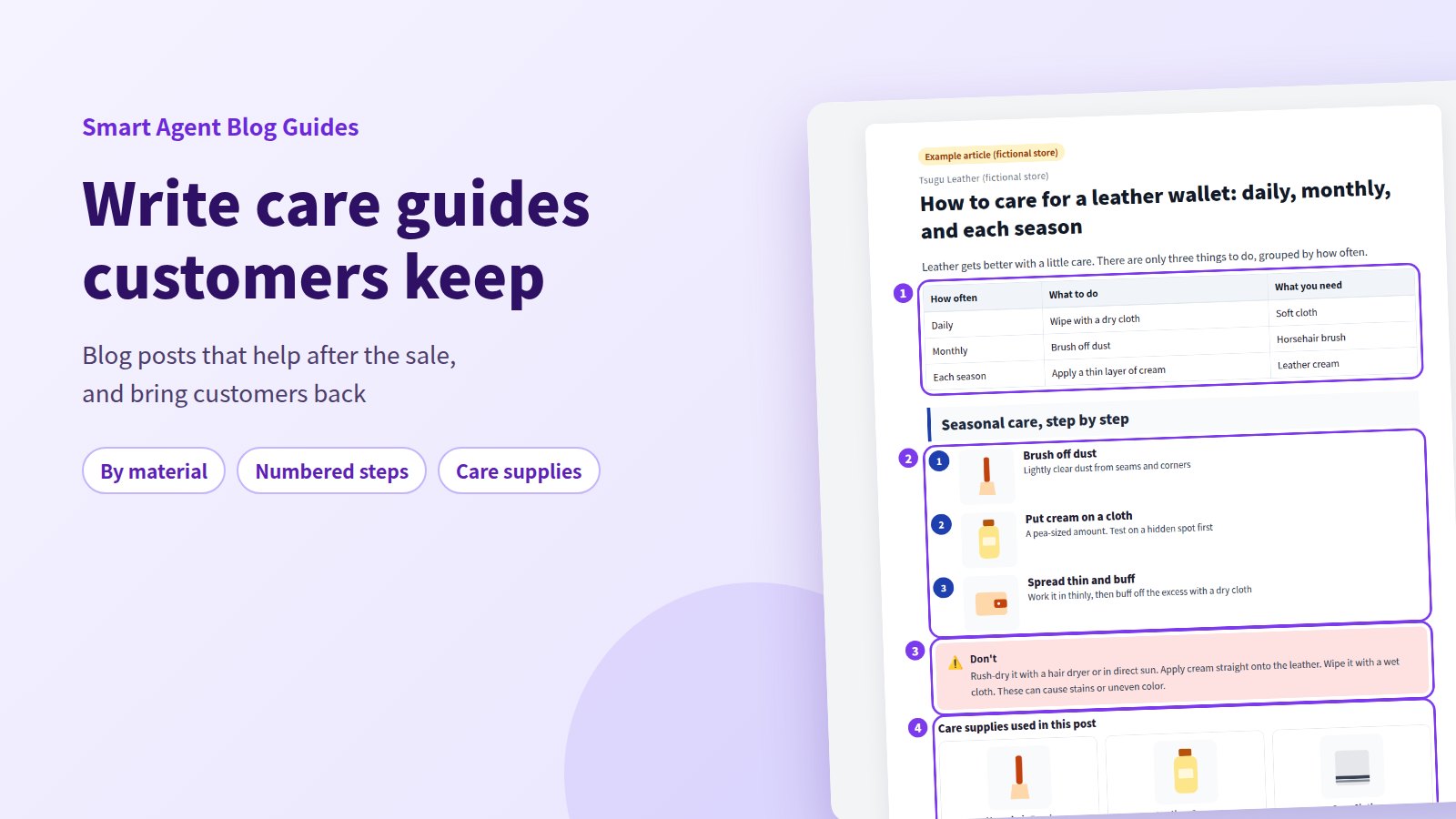
"What cream should I use on my leather wallet?" "It got caught in the rain. Now what?" If customers who've already bought from you send questions like these, they're telling you what to write next. When there's a clear answer waiting for them, they can keep enjoying what they bought for years.
The short answer: organize care information by material and by frequency, then add numbered steps with images, a clear list of don'ts, and the supplies readers need. A care guide becomes the place customers turn when they're unsure, and it gives them one more reason to think of your store when they need supplies or their next purchase. This guide covers how to build a care post, and how to do it in Smart Agent Blog.
- Why post-purchase readers deserve their own posts
- How to organize care information by material and frequency
- How to present steps, don'ts, and related supplies
- What the finished post looks like (fictional leather goods store)
- How to add numbered lists, callouts, and product cards in Smart Agent Blog, and let AI draft (with screens)
Customers who've already bought are readers too
Most store blogs are written to win new customers. But people who already own your product have plenty of questions too: how to prepare it for first use, how to handle it day to day, what to do when it gets dirty or wet. Posts that answer those questions become something customers rely on.
Care posts often leave out one thing: where to get the supplies. Readers finish wondering where to buy "that brush." While preparing proposals for Smart Agent Blog in August and September 2026, we reviewed blogs from Shopify stores in Japan. Of 88 posts we recorded, 66 (75%) had no link from the body to a product page. In 3 out of 4 posts, readers couldn't get to a product from the text. And among 113 posts, none used a card showing a product's name, image, and price.
Here's how a care post fits into the relationship after the sale:
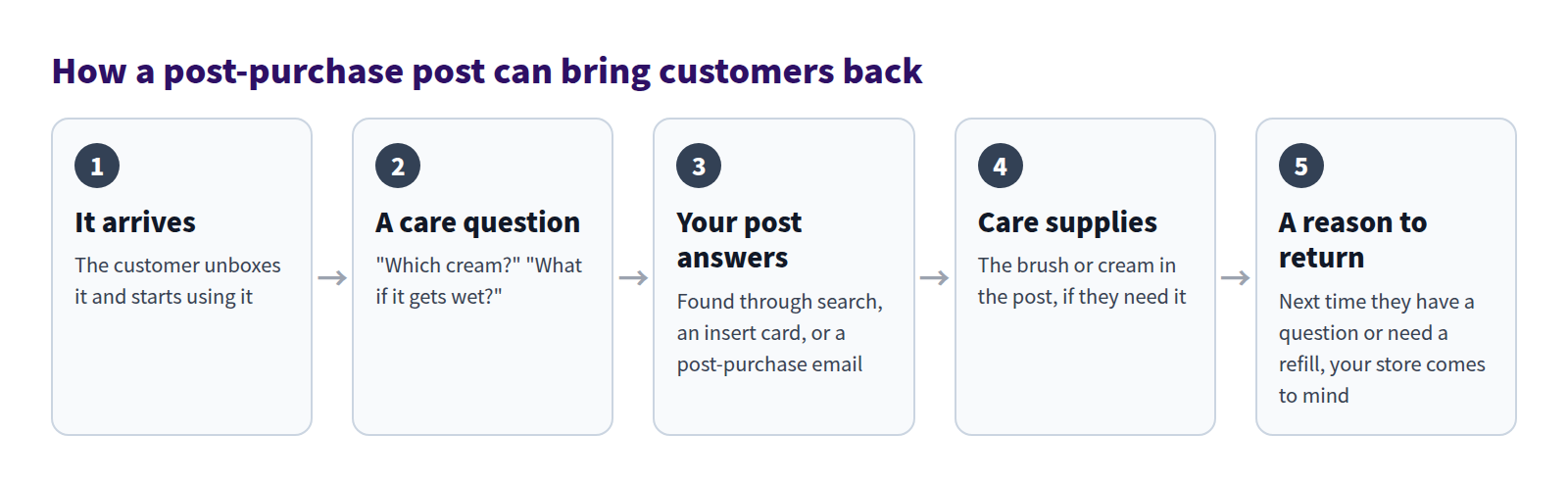
A care post won't guarantee a repeat order. But when your post helped someone out of a jam, your store is more likely to come to mind when they need supplies or something new. Staying useful after the sale is the whole point.
Care guides aren't the only posts that serve customers after the sale; the range of store blog use cases covers the others.
Organize care by material and frequency
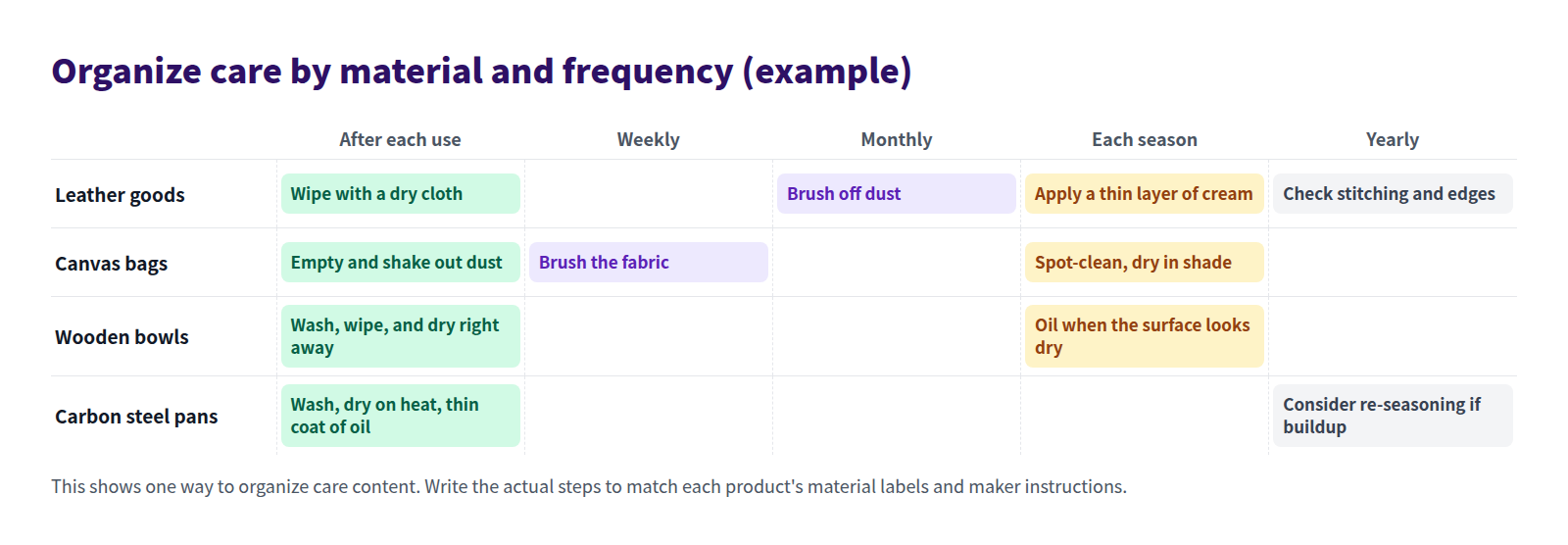
Care tips written as they come to mind end up long and hard to follow. Organize them on two axes first: material and frequency.
Decide what one post covers
Care depends heavily on material. Leather and canvas need different tools and have different don'ts. Keep each post to one material, or one group of products made from the same material. If you sell several materials, write a post for each and link them together.
Write one line per frequency
Grouping by "daily," "monthly," and "each season" lets readers find what to do today. Put a short table at the top with what to do and what you need at each frequency. Then give each frequency its own heading with the detailed steps.
Posts that include seasonal care can be reshared every season through social or email. One post, many uses.
Show steps with a numbered list and images
List care steps in order with a numbered list. Four things make them easy to follow:
- One action per step. "Brush off dust and apply cream" is two steps.
- Be specific about tools, amounts, and time. "A pea-sized amount" beats "a little," and "about five minutes" beats "a while."
- Show hands at work. A top-down photo of hands and tools shows how much pressure to use and where.
- Use video for motion. For things like brushing technique, a short clip says more than a paragraph.
Make sure every step matches the product's material labels and the maker's instructions. General care advice doesn't always apply to your products.
Put the don'ts in a callout
The worst care mistake is the well-meant one that damages the product. Keep don'ts out of the step list and highlight them in a callout:
- rush-drying with a hair dryer or in direct sun after it gets wet,
- applying cream or oil straight onto the product, and
- washing in a way the material can't take, such as a washing machine or dishwasher.
Add a short reason ("this can cause stains or uneven color") so readers understand and remember.
Don't overpromise. Skip "lasts forever" and "guaranteed to last," and stick to modest language like "helps prevent" or "can keep it looking good longer." For beauty and wellness products, never state effects as certain.
Point to supplies with product cards and collections
Show the tools and supplies you used right inside the post, so readers who want to follow along can pick them up easily:
- One item: a product card with name, image, and price.
- Several items, like a brush, cream, and cloth: a collection, shown as a grid.
Only show what the steps actually use. If a soft cloth from home works just as well, say so. A post that doesn't push earns more trust.
What the finished post looks like
Put it all together and you get something like this post from a fictional leather goods store:
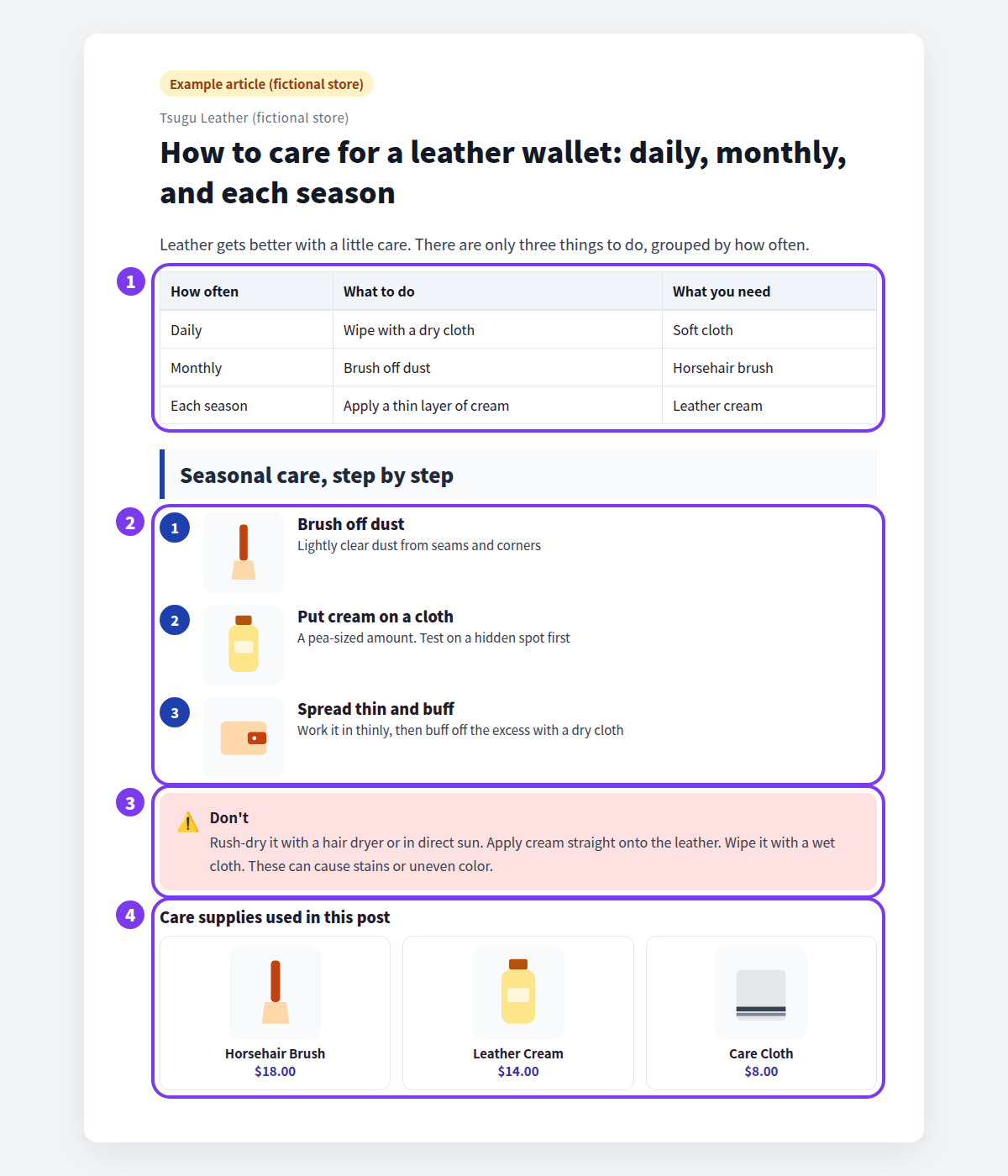
- Frequency table: what to do daily, monthly, and each season, and what you need, in one table.
- Numbered steps: seasonal care split into three illustrated steps.
- Don'ts: drying and cream mistakes, with the reason, in a callout.
- Care supplies: the brush, cream, and cloth from the steps, shown as a collection.
Get the post in front of customers who've bought
A care post only helps if people who bought the product find it. Once it's live, point to it from:
- the product description ("How to care for it"),
- a card in the package with the URL or a QR code,
- emails you send after purchase, such as shipping updates, and
- seasonal social posts or newsletters.
What Shopify can do on its own
You can write a care post with Shopify's built-in tools:
- The rich text editor under Content > Blog posts supports numbered lists, images, video (YouTube and Vimeo embeds), tables, and links.
- The Generate text icon (Shopify Magic) drafts text from your description.
What takes extra work, or isn't possible:
- Product links are typed URLs. There's no card with name, image, and price, and no grid of products from a collection.
- There's no menu option to box the don'ts like a callout.
- There's no automatic table of contents built from your frequency headings.
Building a care guide in Smart Agent Blog
In Smart Agent Blog's editor, every part of a care post is a block you add from the insert menu or by typing /.
Add steps, images, don'ts, and supplies
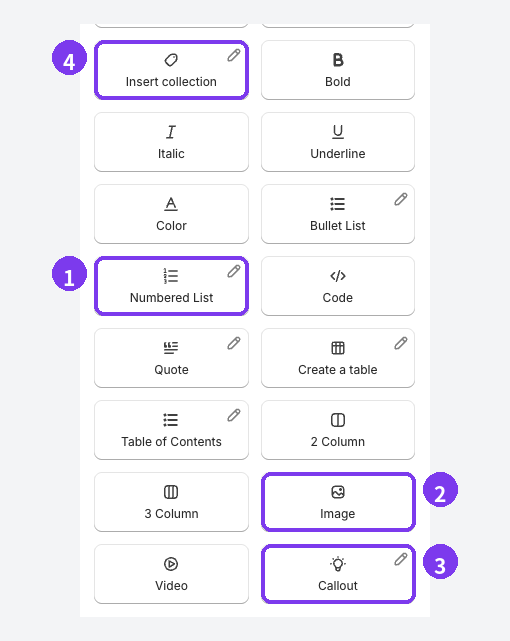
- Numbered List: lay out the care steps in order.
- Image: add from a URL, File Upload, or images already in Shopify. Dragging or pasting an image into the body also uploads it to Shopify automatically.
- Callout: highlight the don'ts.
- Collection Insert (labeled Insert collection in the menu): show several supplies from one Shopify collection.
For steps that need motion, use Video: a video file URL, a YouTube URL, File Upload, or a video already in Shopify.
To set up the collection block: choose Collection Insert, select one Shopify collection, then select Edit collection block in the inserted block. Adjust the heading, description, product limit, and desktop and mobile columns, then select Apply. Product data comes from the collection, so after changing its products or prices, open the storefront post to confirm the latest information shows.
Place a single product next to the don'ts

- Product card: Product Insert adds one item with name, image, and price, with a sold-out label when it's out of stock.
- Callout: with 2 Column, as shown, the don'ts and the right supply can sit side by side.
Let AI draft the post
You can also hand the first draft to AI Scheduled Blog Proposals.
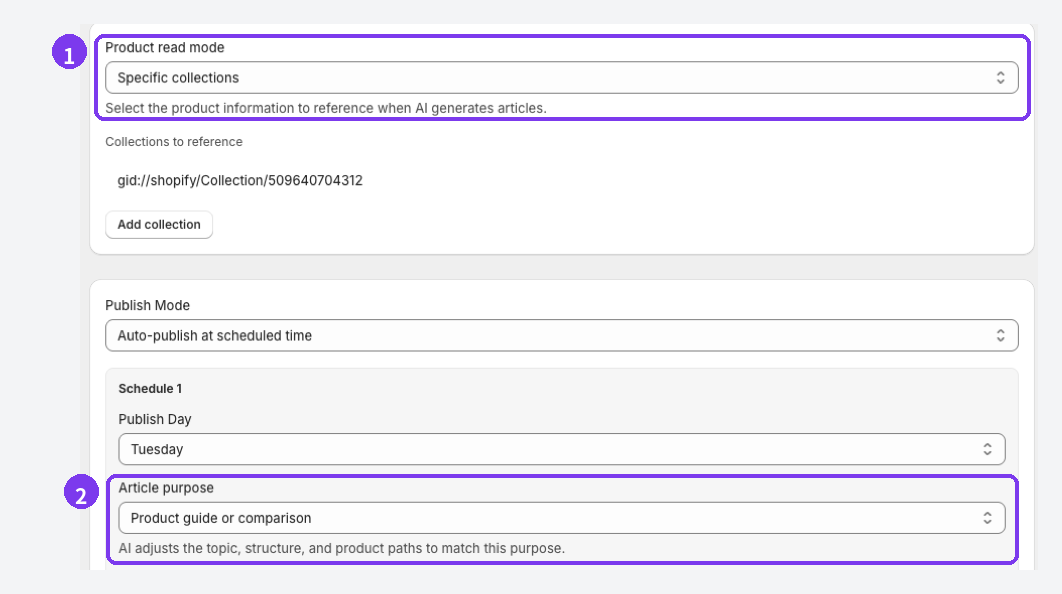
- Product read mode: choose Specific products and select the items you want care guides for. The user guide lists specific products as the best fit for posts about a product, its use, or its care.
- Article purpose: choose Education and editorial to steer the draft toward how-to and knowledge.
Also add a specific phrase to Themes / Keywords, such as "seasonal care for a leather wallet." The example screen shows Auto-publish at scheduled time, but set Publish Mode to Save as draft (manual publish) at first. AI can describe features a product doesn't have or state things nobody verified. Check the steps against the material labels and maker instructions, add product cards or a collection, and then publish.
Before you publish a care guide
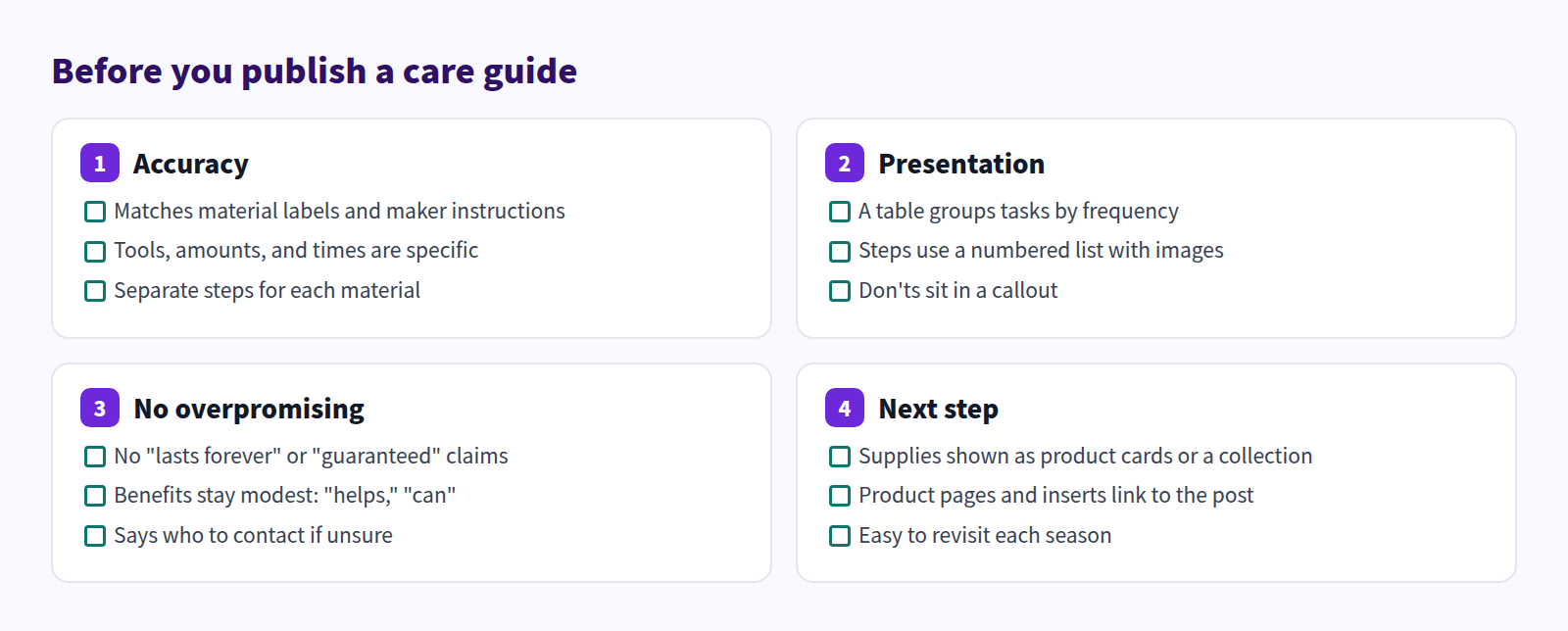
Check these four areas before publishing:
FAQ
Care differs by maker or product. How do I handle that?
Put the shared basics in one post, and give each product's differences their own heading. If they differ a lot, separate posts are easier to follow. Either way, the maker's instructions come first.
Is a care post worth it if I don't sell care supplies?
Yes. The main job of a care post is helping customers use what they bought for longer. Suggest what they can use from home, and use product cards for the products being cared for, or for replacements and add-ons.
How much can I say about results?
Describe the steps and what they do, and keep benefits modest: "helps," "can." Avoid "always" and "forever." For beauty, wellness, and food products, never state effects as certain.
Summary
- Customers who've already bought are readers too. Care posts stay useful long after the sale.
- Organize care by material and frequency, with a frequency table at the top.
- Use numbered steps with images, put don'ts in a callout, and don't overpromise.
- Show supplies with product cards or a collection, and link to the post from product pages and package inserts.
Pick the product you get the most after-purchase questions about, and start by writing its care steps by frequency.