
You published weekly when the blog was new. The most recent post is now six months old. One busy stretch, one skipped week, and it never came back. That is not a discipline problem. It is what happens when the schedule lives entirely in somebody's head.
There are two ways out. Write in batches when you have time and let Shopify's built-in scheduling stagger the publishing. Or have AI produce the drafts on a fixed day, leaving you with the review and the decision to publish. The first still needs writing time; the second needs review time only. This article covers both, plus the part that actually decides whether it sticks: which day you pick.
- Why blogs stop, and what to automate instead of trying harder
- How to schedule a post's publish date in the Shopify admin, step by step
- How to set the day, time, time zone and article purpose in Smart Agent Blog
- Splitting two schedules across the week so reviewing never piles up
- Schedule and generation limits by plan, and the hourly cap
Blogs do not stop because the writing gets hard
While preparing proposals for Smart Agent Blog, we reviewed the blogs of 110 Shopify stores in Japan between August and September 2026. About 40% of them (42 stores) had no blog posts, had stopped after a handful, or had not published for more than a year.
Read the posts on a stalled blog and it is obvious these stores could write. They did write — several times. What stopped them was skipping a week or two during a busy season. Once the rhythm breaks, restarting means deciding what to write about from scratch, and that is heavier than the original first post.
So the fix is not better articles. It is moving the rhythm outside your own head — something specific happening on a specific day, whether or not you feel ready.
Two different things get called automation
The word covers two separate jobs, and mixing them up leads to the wrong setting.
- Automating publication. A finished post goes live at a time you chose. That is Shopify's built-in future publishing
- Automating generation. A draft gets written on a fixed day and time. That is AI Scheduled Blog Proposals in Smart Agent Blog
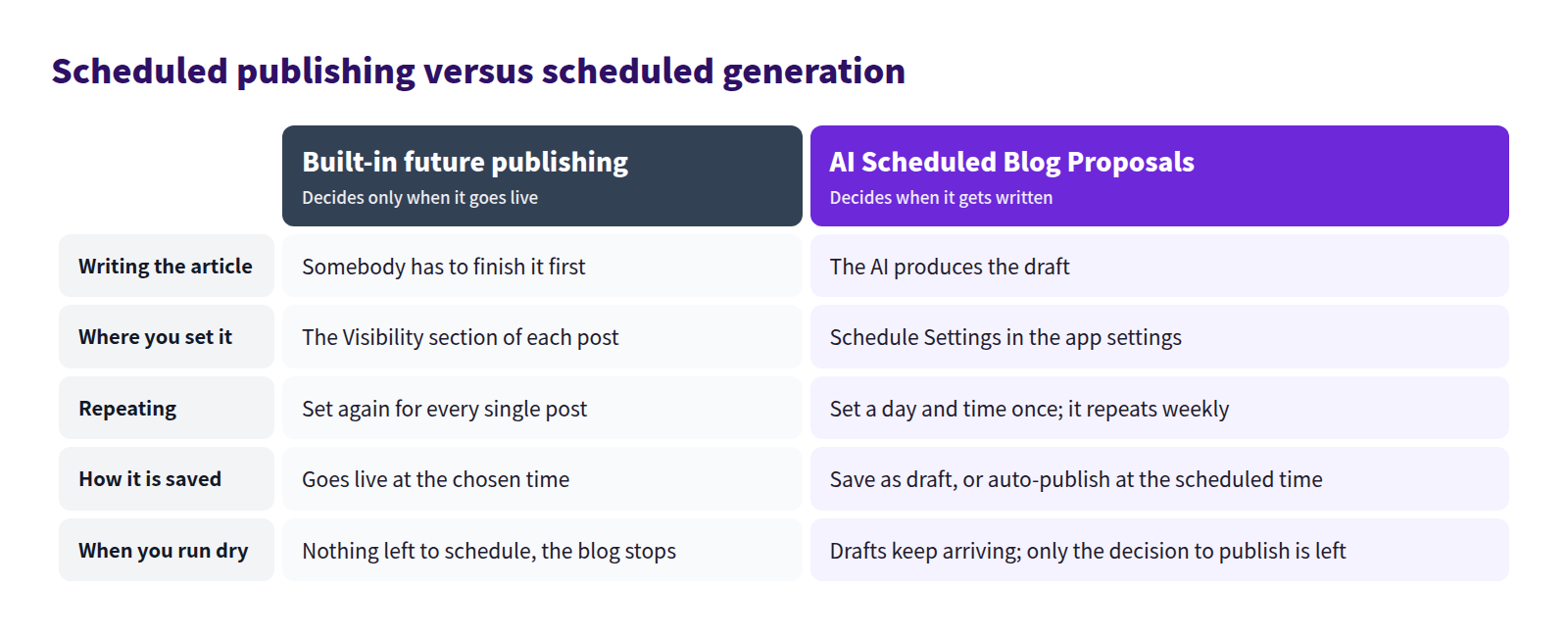
If writing time is not the bottleneck, scheduled publishing alone is enough. If writing time is the bottleneck, only automating generation changes anything.
What Shopify can do on its own: future publishing
Scheduling a blog post for a future date is built into the admin. No app required.
The steps
- In the Shopify admin go to Content > Blog posts and open the post (or select Add blog post).
- In the Visibility section, select the calendar icon.
- In the Set visibility date dialog, choose the date and time.
- Select Schedule publishing.
- Select Save.
A scheduled post shows the planned date and time next to Hidden in the Visibility section. The pencil icon changes it; the trash icon cancels the schedule entirely.
Future publishing is not limited to blog posts. Products, collections and pages can all be scheduled, which is how you line up a product launch and its announcement post to go live together.
Batch writing plus staggered publishing
The real value of scheduling is that it separates the day you write from the day you publish. Write when you have a clear block; publish on a drip.
- Book one block of two to three hours a month
- Draft three or four posts in it. They do not have to be finished to a polish
- Give each one a publish date so one goes out per week
- Book the same block next month
Nobody has to write weekly. Keeping one monthly appointment is enough to make the blog look like it updates every week. Having the topics listed in advance is what makes the batch day productive — see building a seasonal content calendar and scheduling campaign posts.
What future publishing cannot do
- It does not reduce the writing. What gets scheduled is the publish time of a post that already exists
- Every post is scheduled individually. There is no recurring setting
- There is no built-in way to generate drafts automatically. Even with Shopify Magic, someone opens the admin and triggers it
- When the backlog runs out, the blog stops
Miss the batch day twice and the whole thing collapses. If you want that failure mode designed out, automate the generation side.
Scheduling generation in Smart Agent Blog
In AI Scheduled Blog Proposals, you choose a day and a time, and an article is generated then. Open Setting, then Manage under AI Scheduled Blog Proposals.
Day, time and article purpose
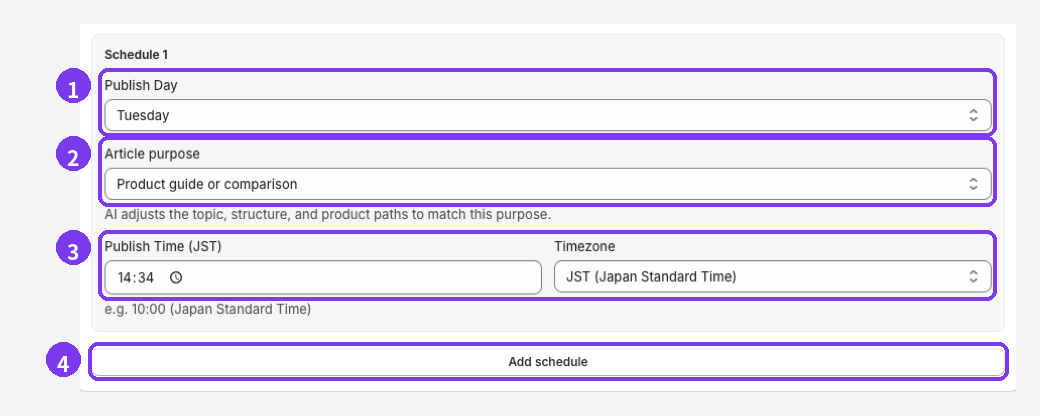
- Publish Day — one article is generated on this day, once a week
- Article purpose — pick whatever is closest to what you want. The AI adjusts the topic, the structure and the paths to products to match
- Publish Time and Timezone — confirm the time zone matches where you actually work
- Add schedule — adds another one. Depending on your plan the limit is reached and the button disappears
Select Save Settings at the bottom afterwards. The schedule is registered at save time, so save again whenever you change a day or a time.
How to choose the day
This is where it is won or lost. There is one rule: work backwards from the day you can review.
- The article is generated on the day and at the time you set, but generation takes a few minutes, so it may not exist at that exact minute
- Put the review in the same afternoon or the next day. Reviewing on the day it arrives is the habit that keeps the queue empty
- If nobody works weekends, do not generate on weekends. Generate Monday, review Tuesday
Using the article purposes
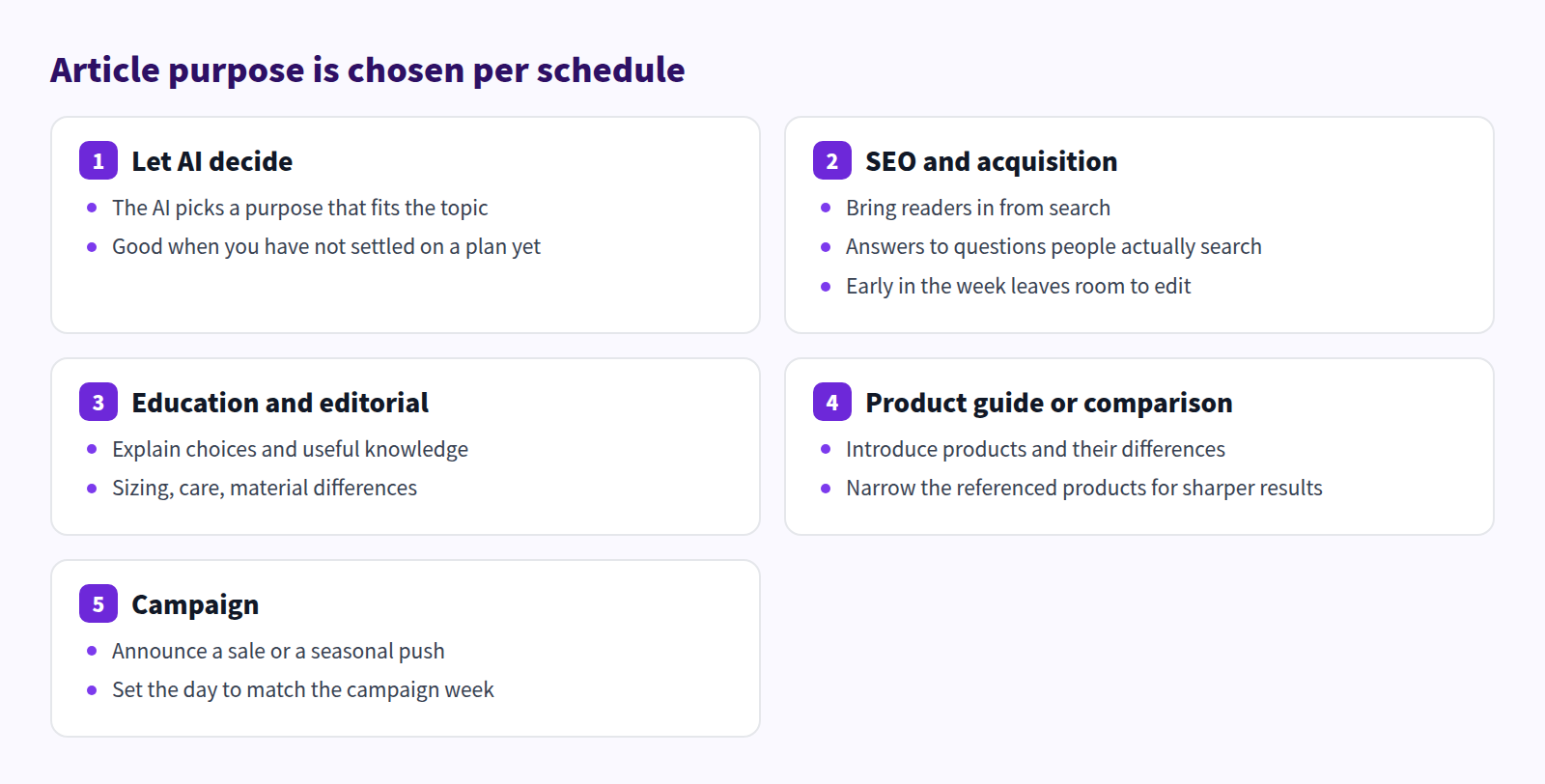
Each schedule can carry a different purpose. Two schedules with the same purpose tend to produce articles that feel like each other. When unsure, choose Let AI decide.
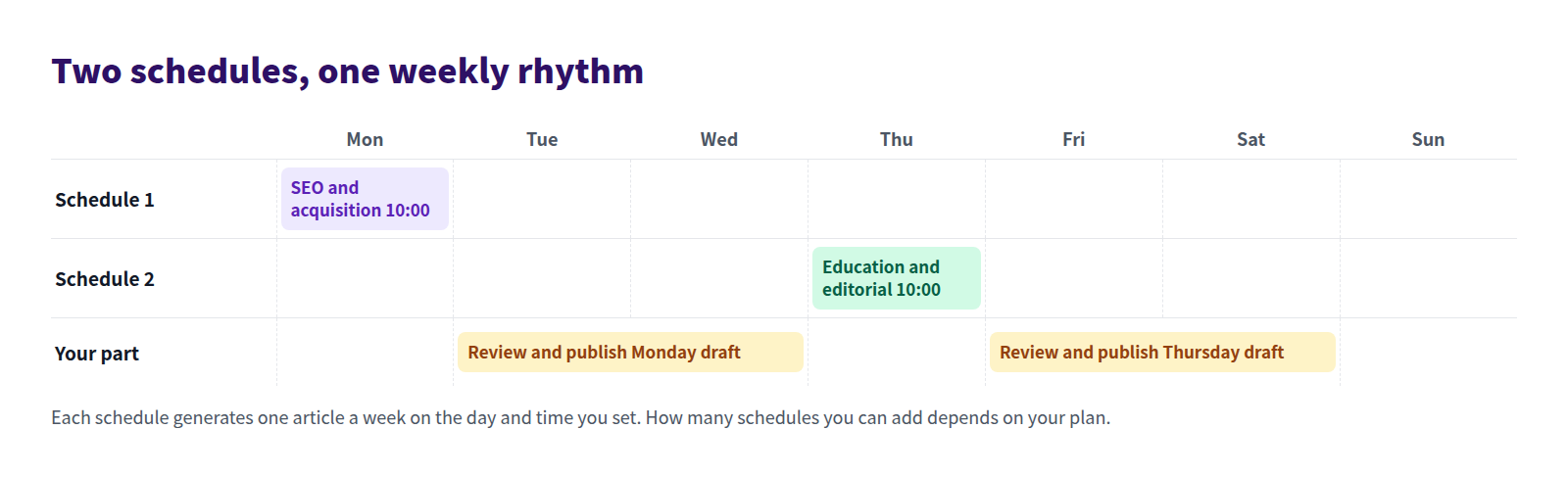
Staggering generation days and review days means no single day carries all the work.
A series compounds faster than scattered posts
Once posts arrive weekly, a running series beats unrelated one-offs.
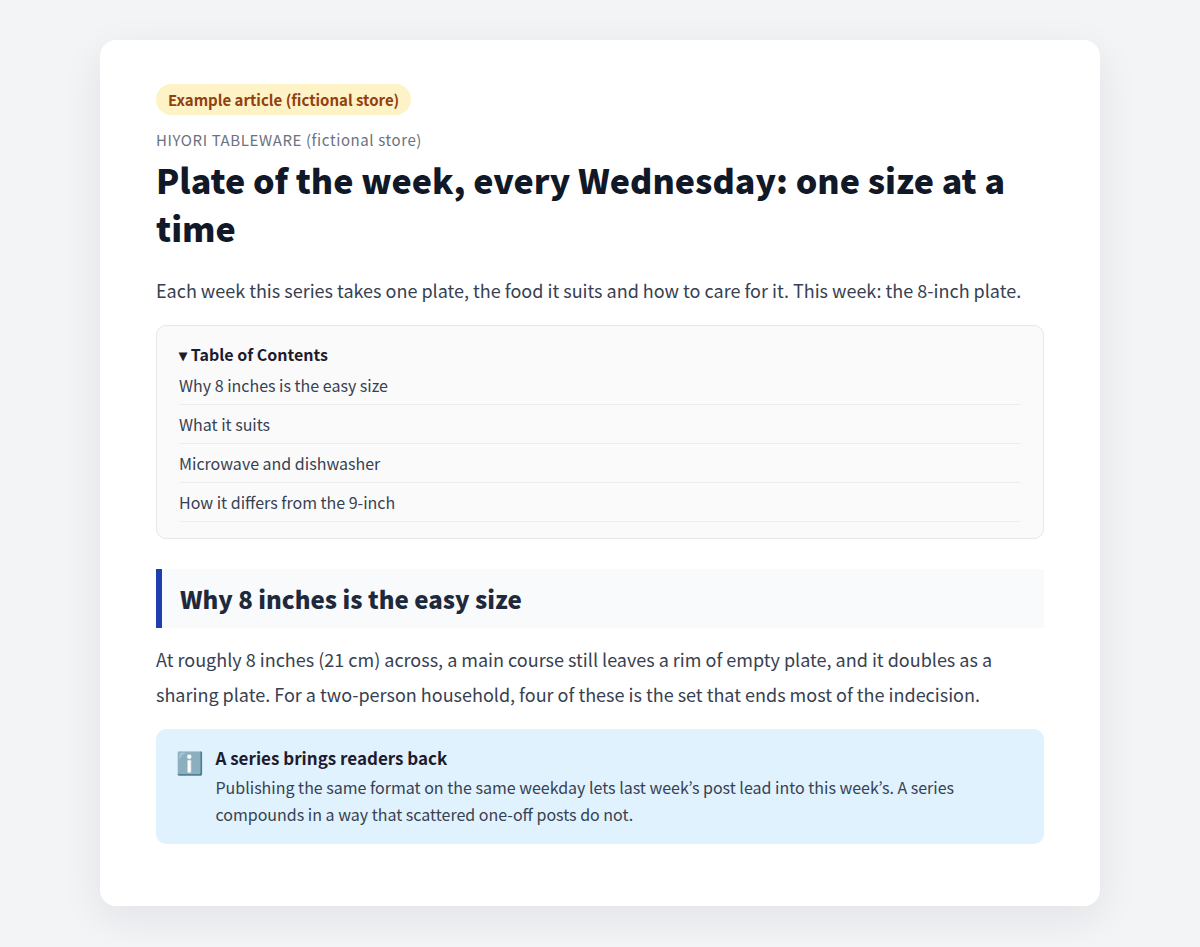
Registering a series angle such as "plate of the week" in Themes / Keywords keeps the AI on that spine while it picks a different product each time. What the AI knows about your store is covered in Shopify blog AI settings, and which products it may reference in Shopify blog AI product context.
Limits worth knowing before you plan
The number of schedules and generated articles depends on the plan.
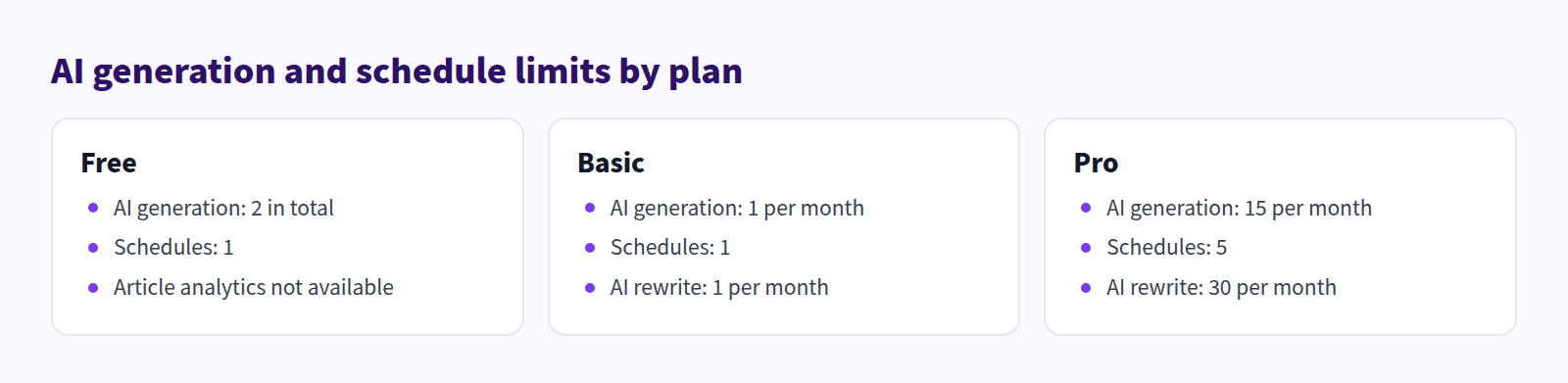
Separately from the plan, AI generation is capped at three articles per hour. Upgrading does not remove that cap; trying to generate several at once shows a message asking you to wait. Details are in Plans and usage limits.
Finished articles are saved to the target blog and recorded in the AI Auto Blog history on the home screen. How you find out that generation finished is covered in Shopify blog AI notifications, and what to do with the draft in Shopify blog AI draft review.
Automating generation does not automate the decision to publish. Keep the first several articles on Save as draft (manual publish).
Decide these first
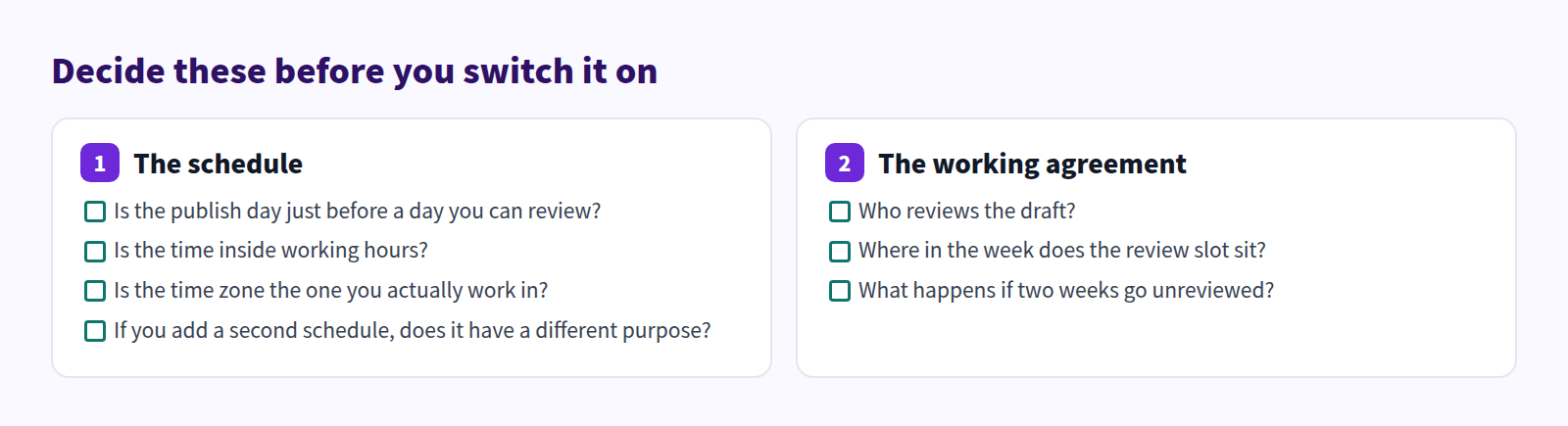
The item people skip is the last one: what happens after two unreviewed weeks. Unreviewed drafts pile up, the review turns into a project, and the blog stops for the second time.
Restarting a stalled blog is covered in when a Shopify blog is not updating, and the wider operating picture in Shopify blogging best practices.
Frequently asked questions
Nothing appeared at the scheduled time
Generation can take a few minutes. Check the AI Auto Blog history on the home screen for a "processing" status first. If the publishing mode is Save as draft (manual publish), the article is saved as Hidden, so look under Articles → Hidden. If it still has not appeared, see AI is not working.
Can a schedule run daily?
One schedule generates one article a week, on the day and at the time you set. To publish more often, register more schedules; how many you can register depends on your plan.
Is it safe to let it publish automatically?
Auto-publish at scheduled time publishes the article as soon as generation finishes. Bear in mind that AI can describe features your products do not have. If you want to check product details and wording first, stay on draft mode. The judgement call is laid out in Review an AI draft.
I saved the settings again and it still does not run
Disable the feature, save, then enable it and save again. That rebuilds the recurring registration. Also confirm the target blog, the article author and every schedule time are filled in.
Summary
- Blogs stop after a skipped week, because restarting costs more than the original post did
- Shopify's future publishing schedules a finished post, which suits batch writing and staggered publishing
- AI Scheduled Blog Proposals attaches the writing itself to a day and a time
- Choose the day by working backwards from when you can review; do not generate on days nobody works
- Schedules and generation counts are capped per plan, with a separate three-per-hour limit
Set one schedule for the day before a day you can review. Judge the rest on the draft that arrives.