
You are writing the posts. You are publishing them. And every time you open analytics, the blog's page views are still stuck in double digits. That is almost never a writing problem. It is a distribution problem.
Blog acquisition is not one clever tactic. It is five things chained together: getting found in search, getting chosen in the results, moving readers from one post to the next, re-delivering posts through social and email, and being legible to AI answer engines. This guide is a map of those five, so you can work out which link in the chain is broken at your store rather than guessing.
What happens after someone reads — how an article leads to a product page — is a separate job, covered in Shopify Blogs and Sales. This guide stops at the moment the article is opened.
- The six places blog acquisition typically stalls, and how to tell which one is yours
- What Shopify handles on its own: sitemaps, search engine listings, tags, and excerpts
- How to connect Google Search Console and get search performance delivered by email
- How to use traffic sources and the Reach score to decide which channel to grow
- What an article needs in order to be readable by both search engines and AI answers
Six places blog acquisition stalls
While preparing proposals for Smart Agent Blog in August and September 2026, we reviewed the blogs of 110 Shopify stores in Japan. About 4 in 10 (42 stores) had no posts, had stopped after a handful, or hadn't posted in over a year. Blogs stop for many reasons, but "we write and nobody reads it" is one of the biggest.
One more number matters directly here. Of the 78 articles whose structure we recorded, 27 (about 35%) had no headings at all. Headings are not only a readability device. Search engines and AI models both use them to work out what a page is about. An article without headings is hard for a person to scan and hard for a machine to summarise.
Break the problem apart and it sits in six places.
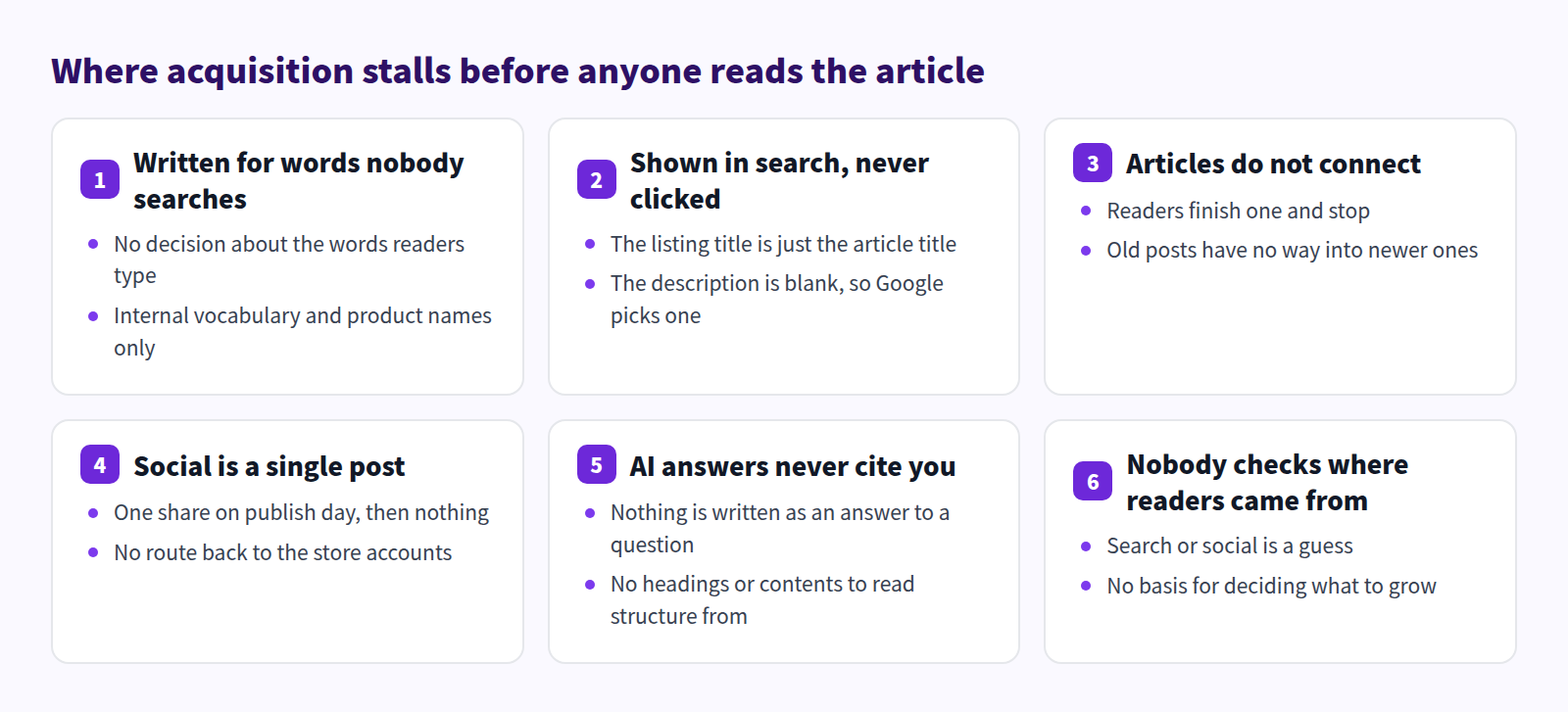
One and five are about how the article is written. Two is about how it looks in search results. Three and four are about re-delivery. Six is about measurement. You do not need all six at once — decide where your store is stuck, then read that section.
What Shopify handles on its own, without an app
Shopify ships with a real acquisition foundation. Reaching for an app before using it is the wrong order.
Your posts are already being submitted to search
Every Shopify store generates a sitemap.xml automatically, and it updates itself as you add content. It covers products and their main images, collections, blog posts, and web pages. So the moment you publish an article, it is already on the list that search engines read.
To hand that list to Google:
- Verify domain ownership in Google Search Console — one route is inserting the HTML tag into your theme's
theme.liquid. - Open Sitemaps under the Indexing section.
- Enter
sitemap.xmlas the filename. - Submit.
From then on, impressions, clicks, average CTR, and average position are available to you inside Google Search Console. None of that requires an app.
Control how the result looks
Under the article body, Search engine listing lets you edit the page title, meta description, and URL handle. Shopify allows 70 characters for the title and 320 for the description.
Leave them blank and Google falls back to your article title and a fragment of the body. The page still appears — it just appears in words you did not choose. Article titles versus SEO titles and Writing blog meta descriptions go into how to write each one.
Use tags and excerpts to keep readers inside the blog
Tags group posts by category or theme, and readers can select a tag to find related articles. You can also write a custom excerpt that controls how the post reads on the blog listing page; without one, Shopify shows an unformatted fragment of the body.
Authors are chosen from your staff members. Posts publish immediately or on a schedule you set.
Email and social, out of the box
The Shopify admin includes marketing tools for creating and sending campaigns, including email, so a new article can be announced or reused as the body of a message. Where share buttons and social links appear on an article page is controlled by your theme.
What Shopify does not reach
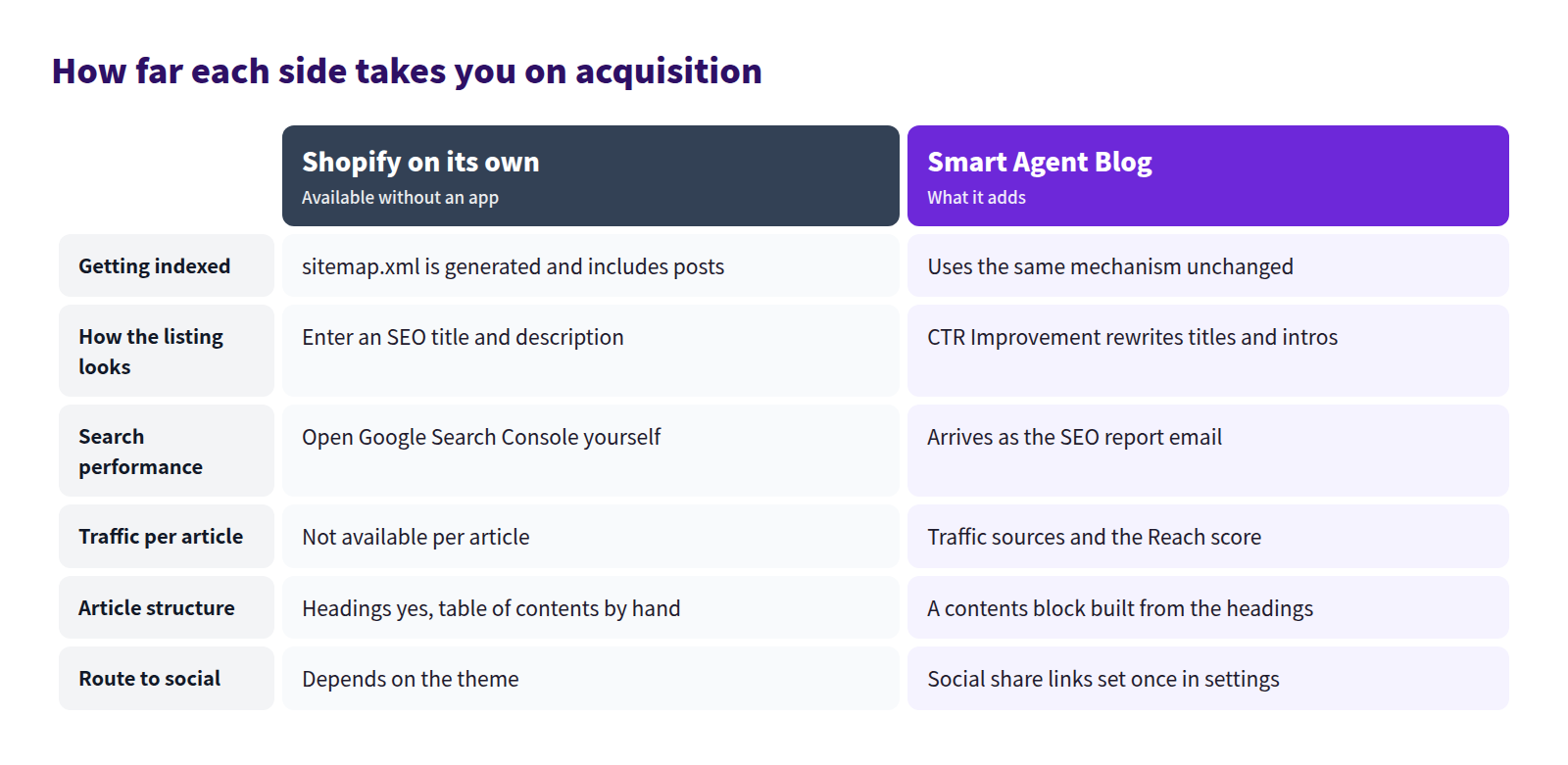
Four things stay out of reach with the built-in tools alone:
- Having search performance delivered to you on a schedule, instead of you going to fetch it
- Seeing, per article, whether readers arrived from search, social, direct, referral, or internal navigation
- Building a table of contents from your headings automatically
- Surfacing the articles that get plenty of impressions and almost no clicks
Start from the words your readers actually type
Acquisition starts with a phrase, not a topic. "New arrivals for spring" is a topic, and nobody searches for it. "How to waterproof a canvas tote" is a phrase people type.
Pick one phrase per article. Two phrases means ranking for neither. Put the chosen phrase in the article title, in one heading, and in the opening paragraph, in language that reads naturally.
The most reliable source of phrases is your own inbox. The wording customers use in support email, contact forms, social comments, and conversations at a market stall is, word for word, the wording they type into Google. Finding blog topics in customer questions covers how to collect them.
In Smart Agent Blog, registering those phrases under Theme and keywords in the AI Scheduled Blog Proposals settings keeps drafts anchored to them. Specific beats broad: "caring for a canvas tote in the rain" carries more intent than "bags."
Impressions without clicks
When an article appears in search but traffic stays flat, the problem is the title and description, not the body. Diagnosing that requires one specific fact: high impressions, low clicks. Google Search Console will tell you — but a routine that depends on remembering to open it every week does not survive a busy month.
Smart Agent Blog connects to Google Search Console from Settings → General Settings.
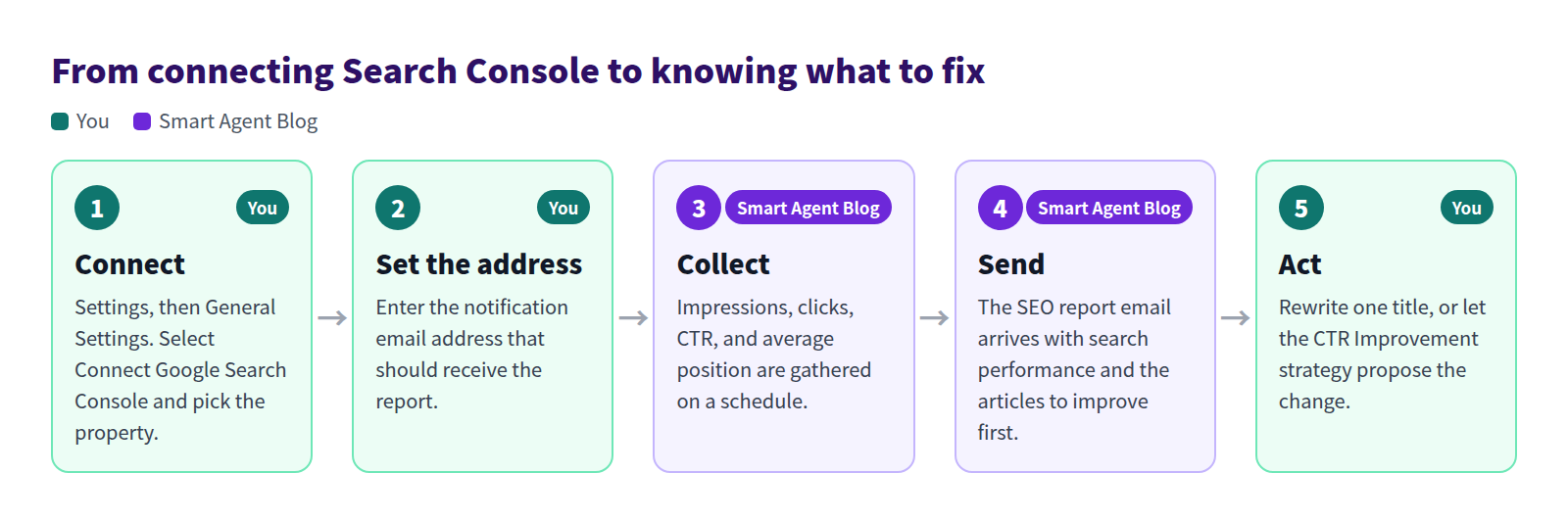
Once connected, impressions, clicks, CTR, and average position from Google Search appear in the SEO report email, which has three parts:
| Heading | Contents |
|---|---|
| Search performance | Clicks, impressions, average CTR, and average position for the period |
| Top 5 articles by clicks | The articles that earned the most clicks from search |
| Articles to improve first | AI-generated recommendations, ordered by priority |
How often it arrives depends on your plan: weekly on Pro, monthly on Basic, and monthly with a lifetime cap of three reports on Free. The send job runs every Monday at 22:00 UTC. It goes to the Notification email address in General Settings, so a blank field means no report.
One thing to be clear about: Google Search Console data is used by the SEO report email and by AI Rewrite. It does not appear on the article analytics screen. For impressions and position, read the report or open Search Console.
To keep title rewrites running on their own, enable AI Rewrite's CTR Improvement strategy. It targets articles with high impressions and low CTR and rewrites their titles and introductions.

The strategy requires the Google Search Console connection. Leave the publish mode on approval at first so you can compare before and after rather than letting rewrites go live unseen — see Use AI Rewrite. Improving search click-through rate covers the thinking behind the rewrites.
Connect the articles so nobody stops at one
A reader who arrives from search usually reads a single article and leaves. Whether they reach a second one decides how much the same traffic is worth.
Two habits cover it. Link to related articles from inside the body, not only in a list at the bottom. And when you publish something new, open the older articles it relates to and add a line pointing at it. Do that consistently and the archive starts supporting itself. Internal links in a Shopify blog has the detail.
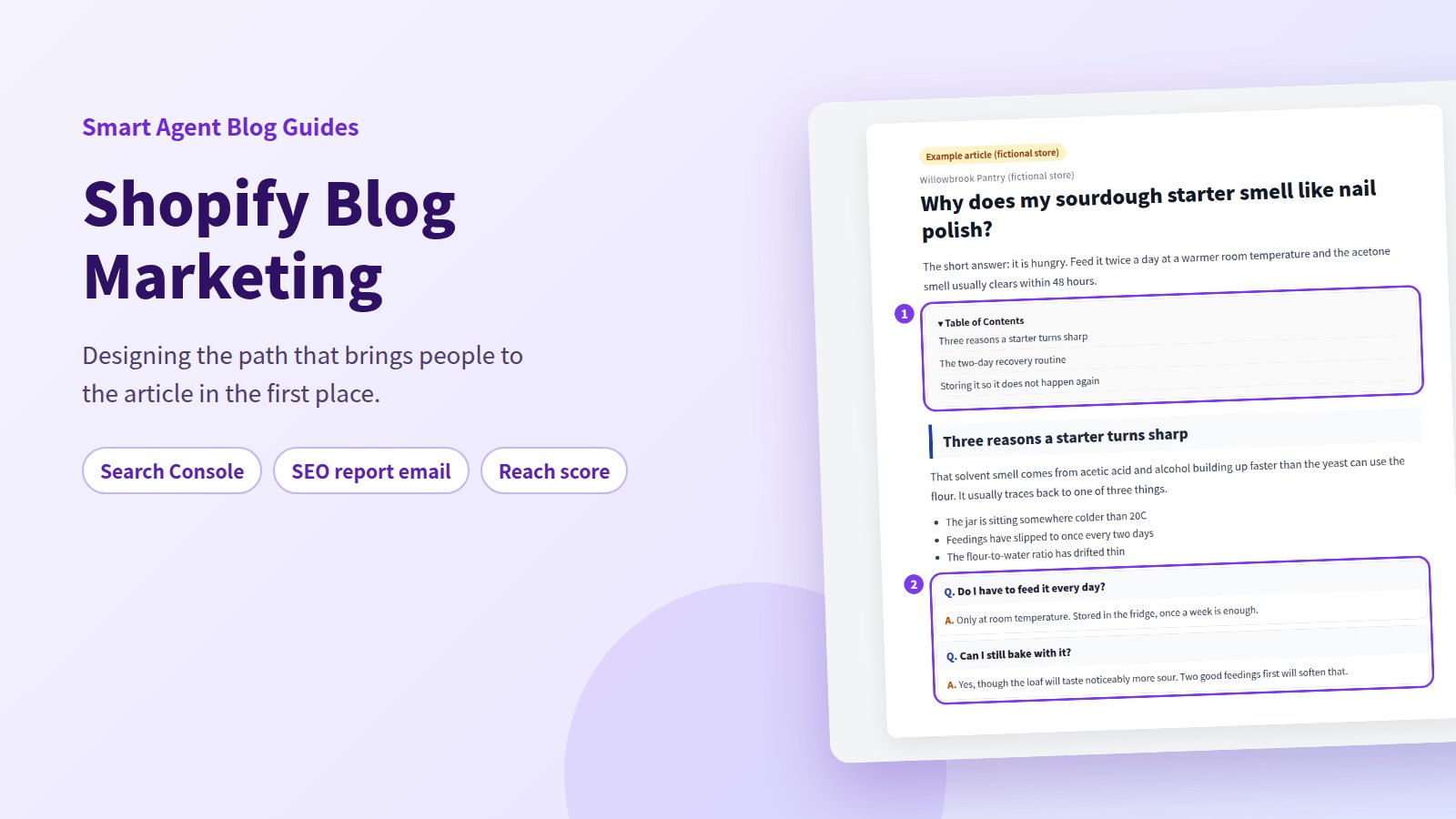
On longer articles, a table of contents works as an entry point too: readers scan it, decide the answer they want is in there, and only then start reading. Shopify leaves you to build one by hand. Smart Agent Blog's contents block builds itself from the article's headings and updates as you edit them, listing Heading 2, Heading 3, and Heading 4. See Adding a table of contents.
Treat social and email as re-delivery, not launch day
Search reaches people who are already looking. Social and email reach people who are not. That difference changes how you use them.
The mistake is treating publication day as the only moment to share. The same article earns a fresh reason to be sent every season — a care guide before the rainy months, a gift guide before the holidays. When you send a marketing email from the Shopify admin, pointing at an article you already have is far less work than writing something new for the message.
In Smart Agent Blog's General Settings, Social Share Links takes the URLs of your store's own accounts on X, Facebook, Instagram, and YouTube and shows links to them on your article pages. Leave unused services blank. Where the links appear is decided by your theme.
The same screen has Show estimated reading time on storefront. Readers arriving from social hesitate over articles of unknown length, and a visible estimate removes that hesitation. The estimate is calculated when an article is saved, so articles you have not saved since enabling it need to be opened and saved again.
What an article needs to be readable by AI answers
People increasingly ask a model instead of running a search. You cannot make an AI cite you. You can make your article easy to quote.
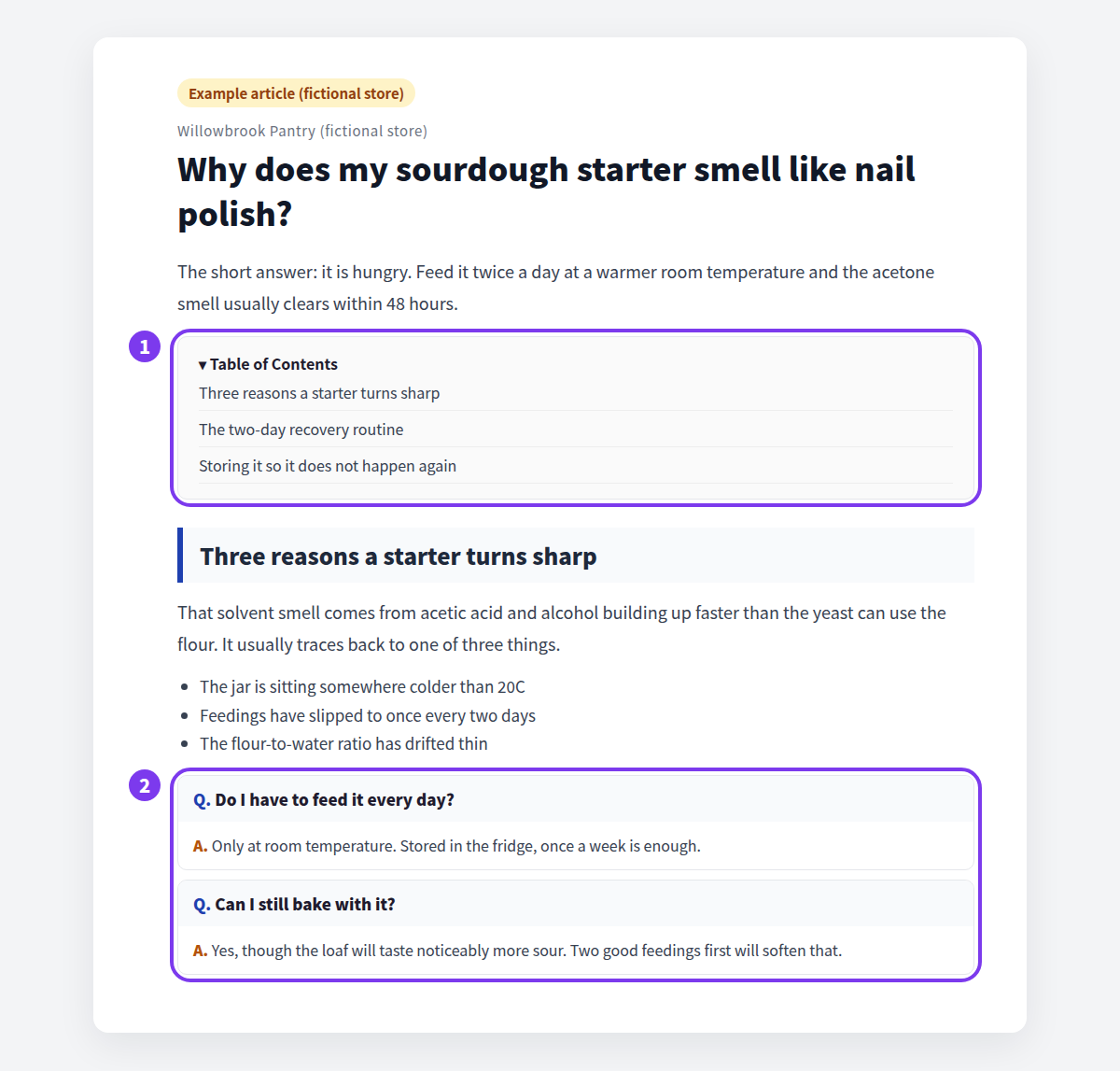
- Answer the question outright in the first paragraph
- Phrase headings as the questions readers actually ask
- Cover one idea per heading
- Put common questions and their answers together as a block
- Include a table of contents so the structure is explicit
All of which also happens to be what makes an article pleasant for a person to read. The 35% of recorded articles with no headings at all are working against themselves twice over.
Writing for AI search and FAQ articles for AI search go further.
Find out where readers come from before deciding what to grow
Shopify's own analytics show store-wide traffic, but not, per article, how many readers arrived from search versus social.
Smart Agent Blog's article analytics breaks it out: Search, Direct, Social, Referral, and Internal, with empty sources omitted.
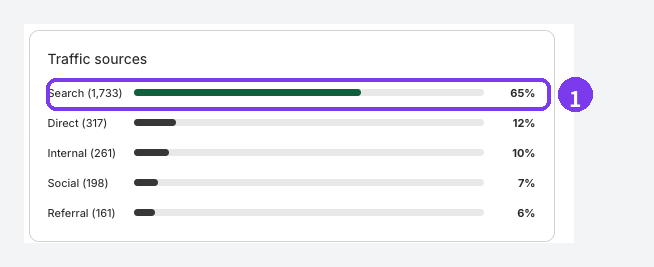
The split decides your next move. If search dominates an article, rewriting its title and description is the highest-leverage change. If internal navigation is high, the links pointing at it are working and deserve more of them. If social is zero, the likeliest explanation is that nobody ever shared it.
Among the four diagnostic scores, Reach is the one about how many people read the article.
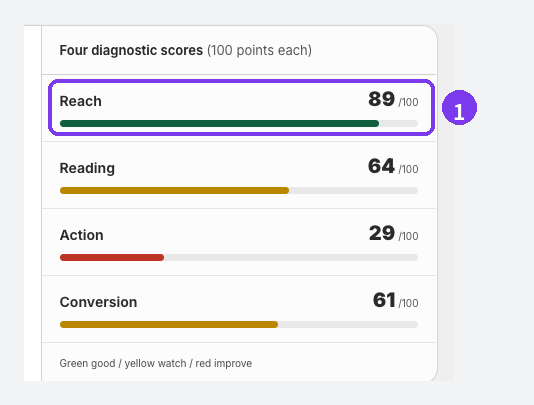
When Reach is low, the recommendations check whether the words readers would search for appear in the text, and whether your other articles link to it. Scores are calculated against your other articles with the same purpose, so an article shows Collecting data until enough comparable articles and measured views exist. Do not judge a post the week you publish it. Article analytics is a Pro plan feature.
Measuring blog improvements covers working from the numbers, and Refreshing old posts with AI covers maintaining the archive.
Where to start
Pick the column that matches you.
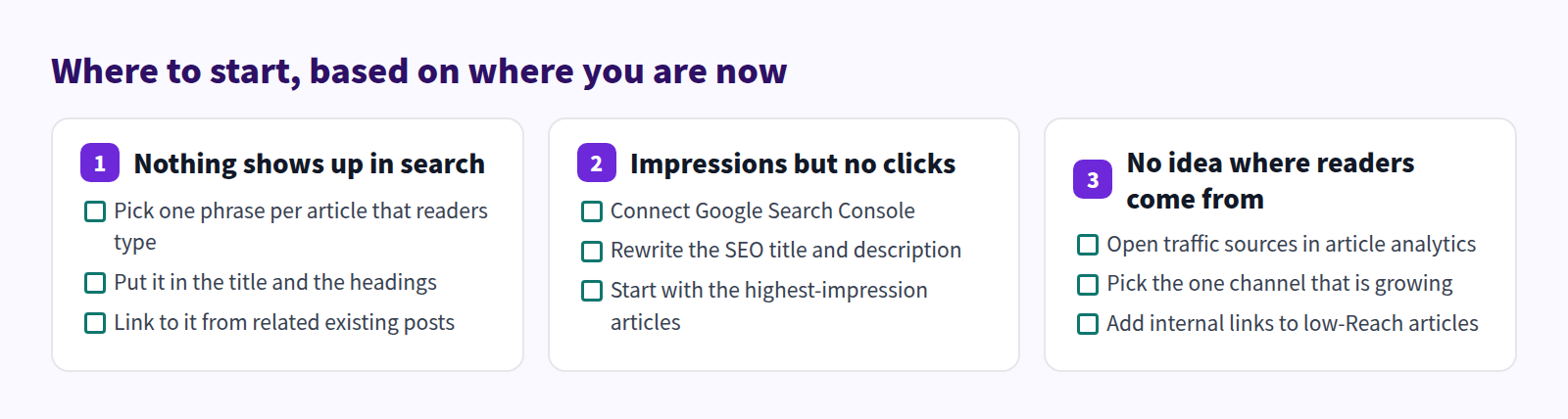
Whichever column you are in, change one thing at a time. Rewrite the title, the headings, and the internal links in the same week and you will never know which one moved the number.
For the full picture of running a Shopify blog, start with the Shopify blog guide.
Frequently asked questions
Does connecting Google Search Console put search positions in article analytics?
No. Google Search Console data feeds the SEO report email and AI Rewrite's CTR Improvement strategy. The analytics screen shows goal achievement, the four diagnostic scores, recommendations, and detailed metrics. There is no SEO score in article analytics. See Review article analytics.
The SEO report email is not arriving
Check that the notification email address in Settings → General Settings is filled in — a blank field stops the report entirely. Then check your plan's allowance: monthly and three in total on Free, monthly on Basic, weekly on Pro. Periods with nothing worth reporting are skipped and do not count against the total. See Change general settings.
Should I write new posts or fix the old ones first?
If you already have articles picking up impressions, fix those first. Impressions mean Google has the page and is willing to show it, so improving the title and description pays off faster than waiting for a brand new article to be evaluated. If impressions are near zero everywhere, you need more articles before anything else.
Summary
- About 4 in 10 of the 110 stores we reviewed had a stalled blog, and roughly 35% of recorded articles had no headings at all
- Shopify on its own covers automatic sitemaps, search engine listings, tags, excerpts, and scheduled publishing
- Connecting Google Search Console delivers search performance through the SEO report email — not through the analytics screen
- Read traffic sources and the Reach score first, then pick one channel to grow
Start with the Google Search Console connection. Once impressions and clicks are visible, the question of which article to work on next answers itself.