
What you will learn
On this pageContentsCloseOpen
Most write-ups about Shopify geolocation still open the same way: Shopify can only recommend a country, it cannot redirect, so you need an app. That was true when Shopify's own Geolocation app was the answer. It stopped being true when the app was retired.
As of February 1, 2025 the Geolocation app could no longer be installed, and on March 24, 2025 it was shut down and uninstalled from stores. Shopify's own documentation says what replaced it, and it isn't a banner: automatic domain redirection and automatic browser language redirection, both toggles in Online Store > Preferences.
So the real question in 2026 is not "how do I get a redirect." Shopify will redirect. The question is what the native redirect refuses to do, and whether the thing it refuses to do is something you actually want.
Research date: September 2, 2026. All prices are USD from the English (?locale=en) App Store listings. Where a listing does not state something, we say so rather than guessing.
What Shopify does natively today
Turn on Automatic redirection > Country/region in Online Store preferences and the behavior splits by how your markets are addressed.
If a market has a dedicated domain, subdomain, or subfolder, Shopify detects the visitor's geolocation and redirects them to the URL for their resolved market. A Canadian visitor landing on your .com gets sent to your .ca. Shopify's help center adds one line that matters enormously: "For markets that use dedicated domains, content is automatically indexed by search engines."
If markets share a domain, there is no redirect to a different URL. Shopify adjusts the page in place so prices show in the resolved market's currency. And the same page says: "For markets that use shared domains, content isn't indexed by search engines."
There is also a separate Language toggle that reads the browser language and switches the storefront when that language is published for the market.
Two carve-outs are the reason third-party apps still have a business. First, the EU: to comply with local legislation, customers from the EU who land on a localized experience with an EU country-code top-level domain are not automatically redirected. If your Germany market is on .de and your France market is on .fr, a French visitor on the .de domain stays there. Shopify's guidance is explicit that if you sell into the EU and hold an EU ccTLD, "then you still need a consent-based localization strategy" — and points you at the App Store. (A generic domain like .com or .shop is not affected; EU visitors can be redirected on those.)
Second, uninstalling was one-way. The Geolocation app can't be reinstalled, though Shopify notes you don't need to clean any leftover snippets out of your theme after removing it.
Orbe Geolocation, Shopify App Store listing header. Source: https://apps.shopify.com/orbe?locale=en (retrieved September 2, 2026)
The crawler carve-out is the whole SEO argument
Google's position on IP-based adaptation has not softened. The multi-regional guidance says to "Avoid automatically redirecting" users between language versions, because "these redirections could prevent users (and search engines) from viewing all the versions of your site," and states flatly: "Don't use IP analysis to adapt your content."
The mechanism is in a second Google document. On locale-adaptive pages — pages that return different content based on the perceived country or language of the visitor — "Google might not crawl, index, or rank all your content for different locales. This is because the default IP addresses of the Googlebot crawler appear to be based in the USA." Google's recommendation is separate locale URLs annotated with rel="alternate" hreflang.
Shopify's native redirect is built around exactly this objection. Its international SEO page states that "Automatic redirection applies to customers, but search engine crawlers are excluded," and that when a crawler visits, "it receives the content for the URL that it requested, without being redirected to a different market version." Only known crawlers are excluded, which is the load-bearing word.
So a native redirect on dedicated domains is roughly the configuration Google asks for: distinct URLs per locale, hreflang generated automatically, crawlers left alone. A redirect implemented by an app is only as safe as that app's crawler handling — and of the six listings we read, exactly one advertises it. Geo‑IP Country Redirect's feature list says "Exclude Google Bots. All versions of your store will be indexed by Google." The other five listings do not state a crawler exclusion either way.
If you want the hreflang side of this in detail, we covered it separately in Shopify Markets and hreflang: the international SEO limits.
Banner or forced redirect: this is the axis, and it's also the paywall
Every app in this category resolves the same tension — Google says don't redirect, merchandising says do redirect — by shipping both a consent banner and a forced redirect. What is genuinely consistent, and what nobody writes down, is which side of that line the money is on.
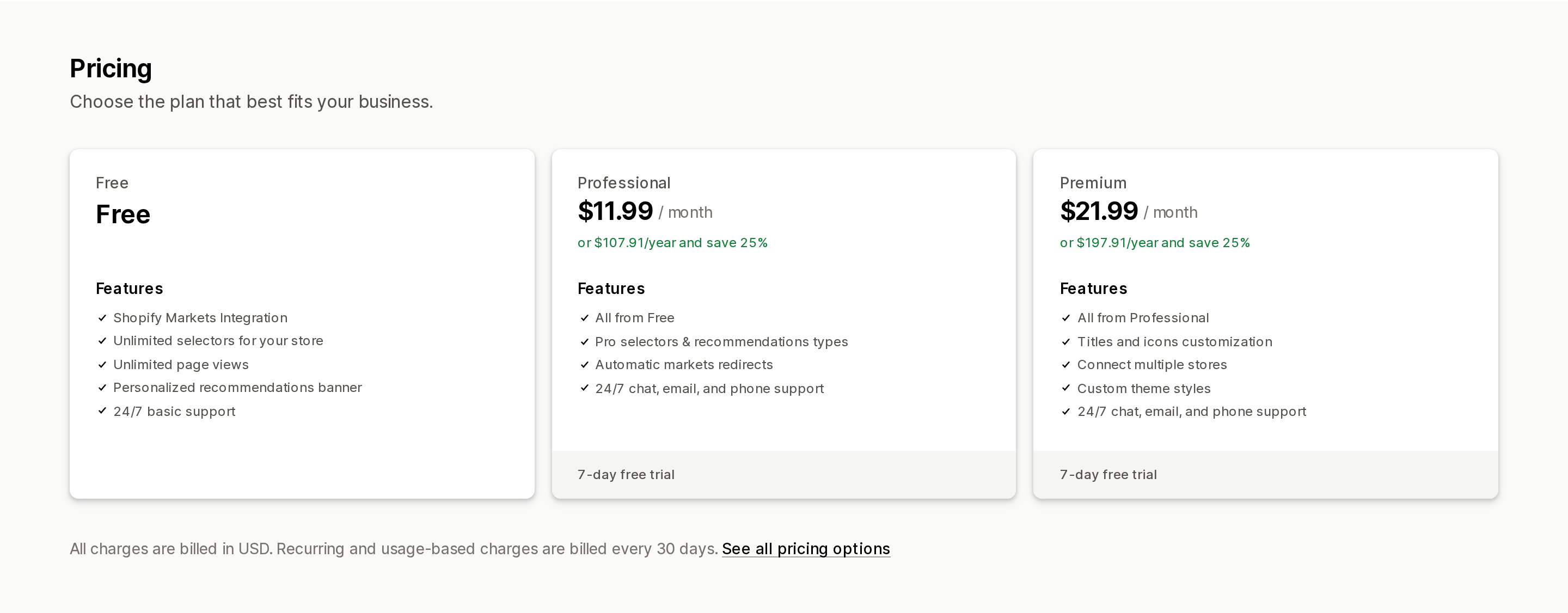
Geolocation & Markets—Selecty pricing. Source: https://apps.shopify.com/selectors?locale=en (retrieved September 2, 2026)
Geolocation & Markets—Selecty by DevIT gives away the banner and charges for the redirect, in as many words. The Free plan lists "Personalized recommendations banner" and "Unlimited page views." The $11.99/month Professional plan is where "Automatic markets redirects" appears.
Geos: Geolocation & Redirect draws the line in an even more explicit place. Its $19/month Essential plan lists the feature as "Automatic redirect without consent." The Free plan gets "Auto redirect with Geolocation Popup" — meaning the popup asks first.
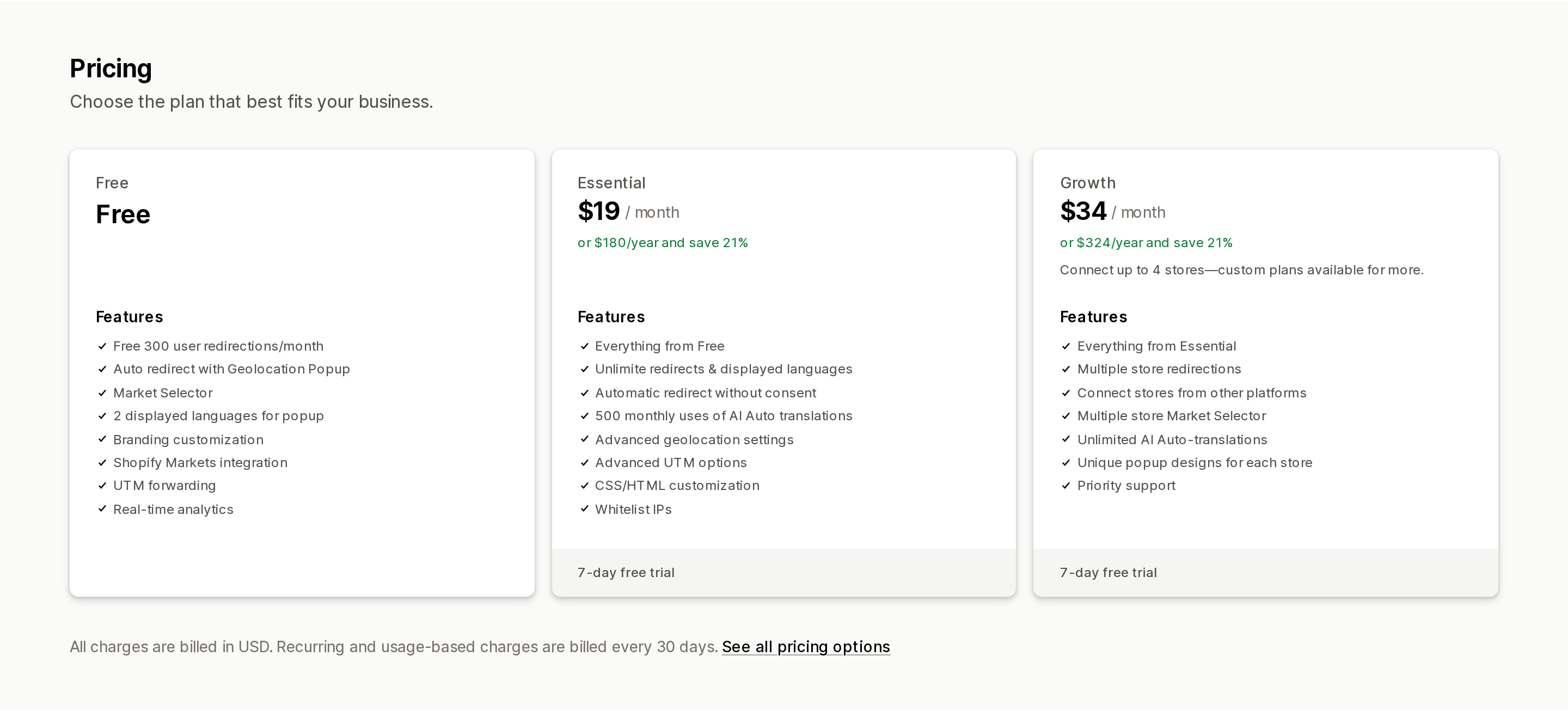
Geos: Geolocation & Redirect pricing. Source: https://apps.shopify.com/geos?locale=en (retrieved September 2, 2026)
Orbe Geolocation puts "Automatic Redirect" on its free tier, but meters it (see below) and reserves "SEO-friendly popups" for the $29/month Advanced plan.
Read that pattern in reverse and it is a decent proxy for risk. The vendors are pricing consent as the commodity and coercion as the premium feature, which is a reasonable read of what merchants ask for and an uncomfortable one next to Google's guidance.
What you are actually being metered on
Four different denominators are in play across six apps, and two of them scale with the traffic you are trying to grow.
| App | Entry price | What the free tier includes | What the meter counts |
|---|---|---|---|
| Orbe Geolocation | $29/month Advanced ($261/year) | Free up to 300 user redirections/month | User redirections, then flat; $59/month Plus connects up to 4 expansion stores |
| Geos: Geolocation & Redirect | $19/month Essential ($180/year) | Free 300 user redirections/month, 2 popup languages | User redirections, then flat; $34/month Growth connects up to 4 stores |
| Geolocation & Markets—Selecty | $11.99/month Professional ($107.91/year) | Free, unlimited page views, banner only | Nothing — flat, feature-gated |
| Geo‑IP Country Redirect | $7.50/month Basic | No free plan; 15-day trial | Your Shopify plan: $7.50 Basic, $19.99 Shopify/Advanced, $49.99 Plus |
| Blockify Fraud Filter, Blocker | $9.99/month Premium ($95.90/year) | Free to install: 4 block rules, 4 redirect rules, first 200 visitors tracked | Rules and visitors on the free tier; paid tiers are flat ($19.99 Enterprise), with a separate $39.99 tier for Shopify Plus stores |
| Blocky Fraud Filter IP Blocker | $9.99/month Basic ($83.92/year) | Free for development and partner stores only | Nothing — flat by feature tier; no plan offered for Shopify Plus stores |
Pricing quoted from each Shopify App Store listing, US locale, retrieved September 2, 2026. All charges billed in USD.
Two things fall out of that table. The redirection meter on Orbe and Geos is a growth tax in miniature: 300 free redirections a month is a rounding error for any store with real international traffic, so the free tier is a pilot, not a plan. And Geo‑IP Country Redirect is the only app here priced off your Shopify subscription rather than your usage, which makes it the cheapest entry here at $7.50/month on Basic and $49.99/month once you are on Plus — for a feature list its own listing prints identically across all three tiers.
Blocky's listing marks every paid tier "All stores except for Shopify Plus stores." No Plus plan is listed. If you are on Plus, that is a hard filter, not a negotiation.
Country blocking: read the Data access section, not the feature bullets
"Block a country" sounds like a firewall rule. In this category it usually is not, and the App Store gives you an unusually direct way to check.
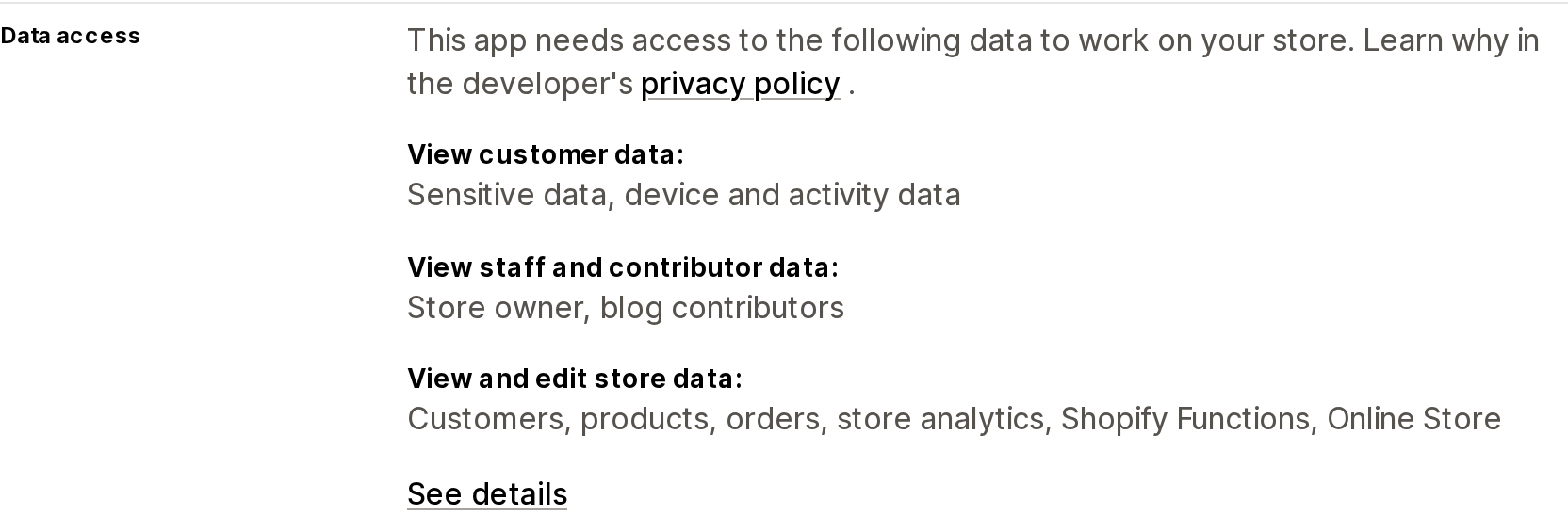
Blockify Fraud Filter, Blocker Data access section. Source: https://apps.shopify.com/blockify?locale=en (retrieved September 2, 2026)
Blockify Fraud Filter, Blocker requests Edit Shopify Functions: cart and checkout validations, cart transforms, alongside Online Store script tags and theme. Blocky Fraud Filter IP Blocker requests Edit Shopify Functions: cart and checkout validations plus Online Store theme and script tags. Both list Checkout and Checkout UI under "Works with." Blockify's $19.99 Enterprise plan advertises "Block checkout with conditions"; every paid Blocky plan says "Works inside your store's Checkout page."
That combination tells you the block has two layers: a storefront layer that runs in the browser, and a checkout validation that runs where the order is actually created. The first is a curtain. The second is a door.
What neither listing states is whether the block extends to the Storefront API, to headless front ends, or to direct requests that never load your theme. Nothing in either Data access section covers that, and we are not going to infer it. If your reason for blocking a country is fraud rather than aesthetics, ask the vendor which layer enforces before you buy. We went further into that enforcement gap — including what happens when a request POSTs straight to a cart URL and never runs the theme — in Shopify's bot protection is Plus-only, lasts 60 minutes, and most blocker apps run in the browser.
There is a second cost that no listing mentions. Google crawls from outside the USA as well as inside it, and its guidance is that "when Googlebot appears to come from a certain country, treat it like you would treat any other user from that country" — if you block users from a country, your server should block Googlebot when it appears to come from that country. Blocking a country is therefore not SEO-neutral. It is a decision to be invisible to some crawls, taken deliberately or not.
What the Data access sections cost you
Scope requests separate this category sharply, and the split does not follow price.
| App | Customer data requested | Notable scopes |
|---|---|---|
| Geolocation & Markets—Selecty | None | Store owner contact; view Online Store theme; edit Shopify admin Files; view Locales and Shopify Markets settings |
| Geos: Geolocation & Redirect | Sensitive data (name, email, phone, physical address) | View customers, view marketing events, edit web pixels, edit Online Store pages and theme, view Markets settings, locales, locations, translations |
| Blockify Fraud Filter, Blocker | Sensitive data; device and activity data (geolocation, IP, browser and OS, browsing behavior, client ID cookie) | Edit products, edit orders (last 60 days), edit web pixels, edit Shopify Functions, Online Store script tags and theme |
| Blocky Fraud Filter IP Blocker | Sensitive data; device and activity data | Edit customers, edit orders (last 60 days), edit web pixels, edit Shopify Functions, Online Store theme and script tags, metaobject definitions |
| Orbe Geolocation | Listing did not display a Data access section when retrieved | — |
| Geo‑IP Country Redirect | Listing did not display a Data access section when retrieved | — |
Scopes quoted from the Data access section of each Shopify App Store listing, US locale, retrieved September 2, 2026.
Selecty is the outlier worth naming: it does a job that is fundamentally about geography and requests no customer data at all. Geos does a comparable job and asks for sensitive customer data plus web pixels. If your legal review has an opinion about CCPA/CPRA and vendor data minimization, that row is where the conversation starts, and it is not visible anywhere in the marketing copy.
Decision rules
Your markets use dedicated domains, subdomains, or subfolders, and you have no EU ccTLD. Turn on native Automatic redirection first and buy nothing. It redirects, it excludes known crawlers, and dedicated-domain markets stay indexed.
You have an EU country-code top-level domain. Native redirection will not fire for EU visitors on that domain, by design. This is the case Shopify itself points at the App Store for. A banner-first app is the correct answer, and Selecty's free tier does exactly this at zero cost.
All your markets share one domain. Native redirection adjusts the page but that content is not indexed. If secondary-market search traffic matters, the fix is URL structure, not an app.
You run expansion stores or a non-Shopify storefront alongside Shopify. Native redirection only routes within your own Shopify markets. Orbe ($59/month Plus, up to 4 expansion stores) and Geos ($34/month Growth, up to 4 stores, including stores on other platforms) are priced for this and native is not.
You want to block, not route. Of the four listings in this set that display a Data access section, Blockify and Blocky are the only two requesting checkout validation scopes, which is where a block that matters is enforced. Accept that blocking a country also blocks crawls that originate there.
You are on Shopify Plus. Blocky lists no Plus plan at all. Blockify's Plus tier is $39.99/month, about four times its $9.99 entry plan, and Geo‑IP Country Redirect's is $49.99/month, about 6.7 times its $7.50 Basic plan for a feature list the listing prints identically.
Currency behavior is a separate question with its own trapdoors; we handled that in Local currency in Shopify Markets and where converter apps still earn their keep.
Sources
- Shopify Help Center, "Using the Geolocation app" — https://help.shopify.com/en/manual/international/geolocation
- Shopify Help Center, "Set up automatic storefront redirection for your customers" — https://help.shopify.com/en/manual/international/automatic-redirection
- Shopify Help Center, "International SEO for markets" — https://help.shopify.com/en/manual/markets/seo
- Shopify Help Center, "International domains" — https://help.shopify.com/en/manual/international/managing-international-domains
- Google Search Central, "Managing multi-regional and multilingual sites" — https://developers.google.com/search/docs/specialty/international/managing-multi-regional-sites
- Google Search Central, "How Google crawls locale-adaptive pages" — https://developers.google.com/search/docs/specialty/international/locale-adaptive-pages
- Google Search Central, "Tell Google about localized versions of your page" — https://developers.google.com/search/docs/specialty/international/localized-versions
- Shopify App Store listings (US locale), retrieved September 2, 2026: Orbe Geolocation, Geolocation & Markets—Selecty, Geos: Geolocation & Redirect, Geo‑IP Country Redirect, Blockify Fraud Filter Blocker, Blocky Fraud Filter IP Blocker
Six Shopify direct mail apps priced on incompatible denominators, normalized. Direct Mail Manager lists $0/$5/$10 per month on the App Store while its own pricing page shows $0 or $199 per month plus $0.686 to $0.873 per 4x6 postcard. PostPilot lists as free to install but charges $99 or $499 per month plus per-piece. Poplar Mail's App Store per-piece prices run 8 to 11 percent below its own page, and identity resolution is a separate line at $0.07 per match. Postage is stated as included by only three of the six. Shopify itself has no postal channel, no Flow mail action, and no ZIP code segment filter. Researched September 3, 2026.