
You know what you'd write about. You just don't have the hours to write it. That's the most common reason a store blog stalls. Hand the first draft to AI, and the job changes from writing from scratch to reviewing and editing.
The short answer: for one post at a time, Shopify's built-in Shopify Magic is enough. To keep a steady weekly cadence, Smart Agent Blog's AI Scheduled Blog Proposals drafts posts for you on a set day and time. Either way, a person reviews before anything goes live. This guide walks through both, using the actual settings screens.
- How to split the work between AI and you
- How to draft a post with Shopify Magic
- How to set up scheduled AI drafts in Smart Agent Blog, screen by screen
- Four things to check before publishing an AI draft
- How the two approaches compare
Blogs stall because of time, not ideas
While preparing proposals for Smart Agent Blog in August and September 2026, we reviewed the blogs of 110 Shopify stores in Japan. About 4 in 10 (42 stores) had no posts, had stopped after a handful, or hadn't posted in over a year.
Most of these stores clearly know their products and how customers use them. What's missing is the time to turn that knowledge into posts. That's the part AI can take on.
What AI handles, and what you check
Left alone, AI can describe features a product doesn't have or state things nobody verified. So split the work like this:
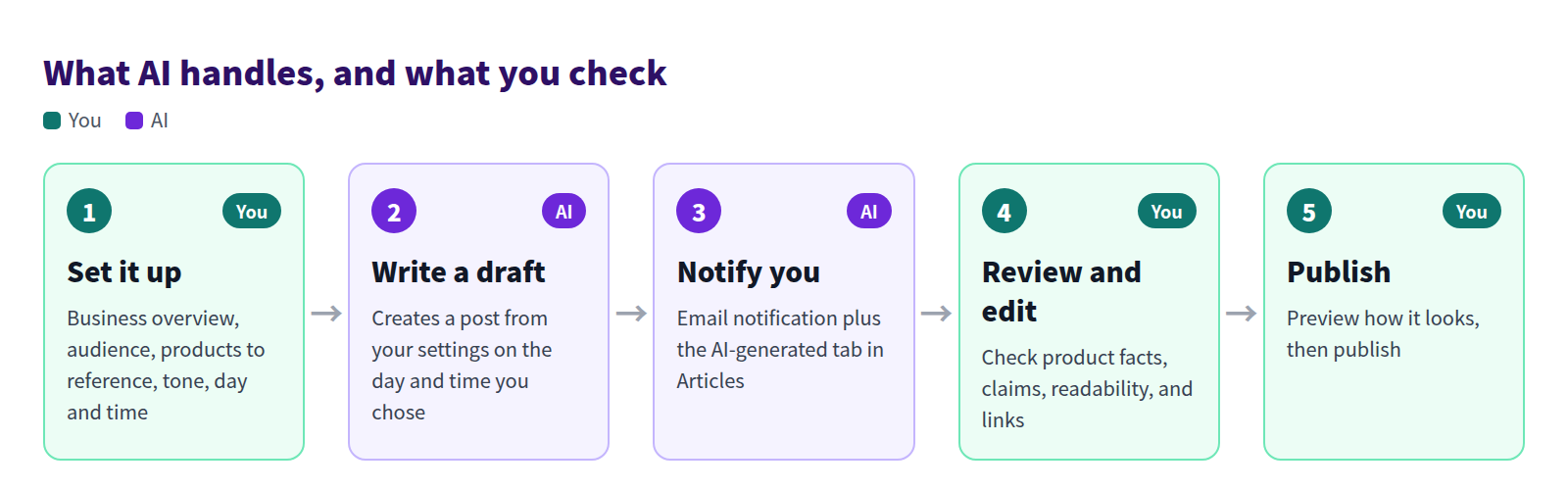
You own the setup, the review, and the decision to publish. AI writes the draft and tells you when it's ready.
Method 1: Draft one post at a time with Shopify Magic
Shopify includes Shopify Magic, which can write blog post text for you. If you have a specific topic in mind and one post at a time is enough, start here.
- In your Shopify admin, go to Content > Blog posts and click Add blog post.
- Click the Generate text icon in the title field, describe the post, and generate title ideas.
- Click the Generate text icon in the content editor and describe what you want. The more specific you are about product names, features, audience, and tone, the closer the draft gets.
- Read the result, fix anything that isn't accurate, and save.
It's quick, but you still have to:
- write a new prompt for every post,
- type product details into the prompt yourself, and
- handle headings, product cards, and a table of contents separately.
Shopify's Help Center also notes that you're responsible for the accuracy of generated content and should review it before publishing.
Method 2: Get scheduled drafts from Smart Agent Blog
Smart Agent Blog's AI Scheduled Blog Proposals uses your store and product information, set once, to create a post on the day and time you choose. No prompt to write each week, so it works as a system for keeping the blog going.
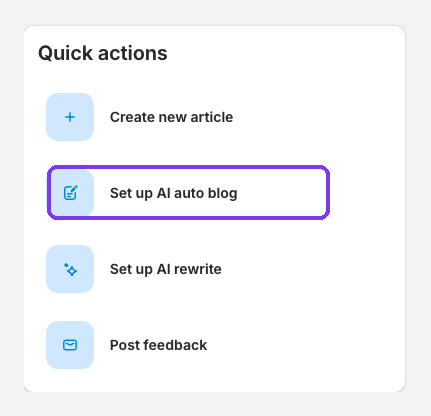
Open the settings
In Smart Agent Blog, open Setting, then select Manage for AI Scheduled Blog Proposals. Turn on Enable AI Scheduled Blog Proposals to show the settings.
Tell AI about your store
Start by telling the AI who it's writing for. These fields shape nearly every post it creates.
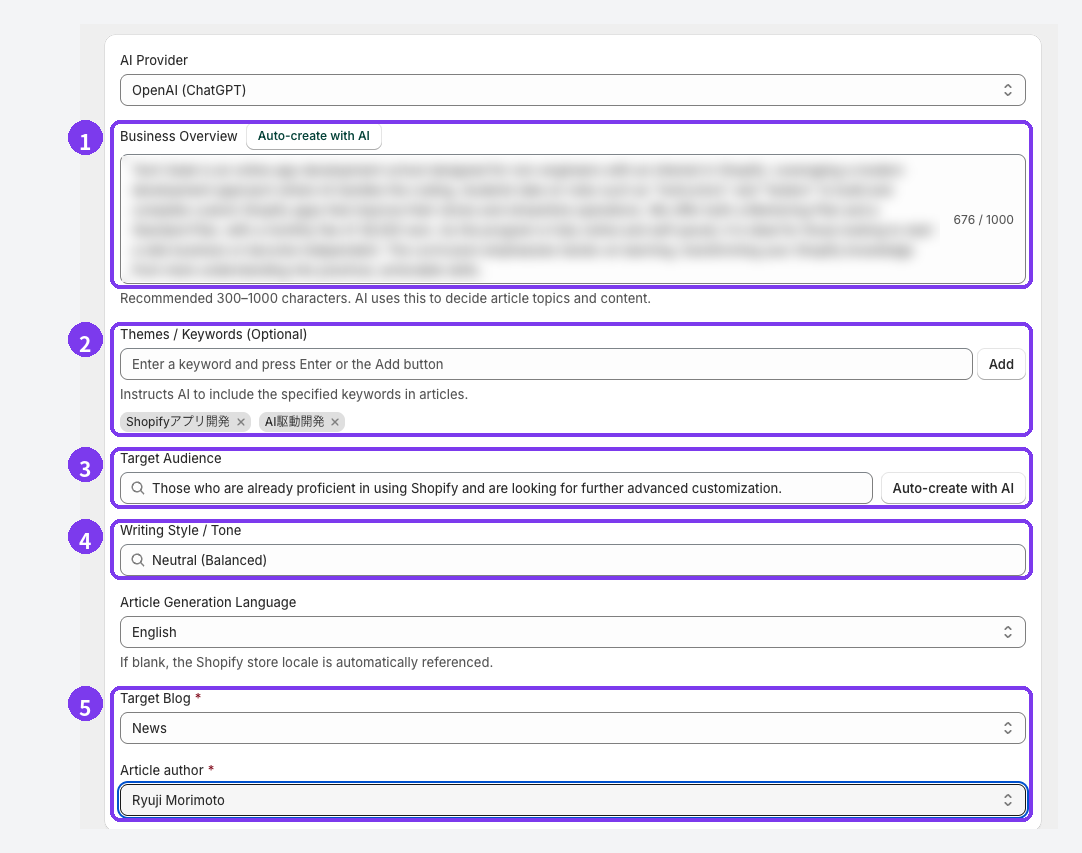
- Business Overview (required): what you sell, who usually buys, what you care about, and how you differ, in 300–1000 characters. Auto-create with AI drafts one for you, but edit it until it describes your real business.
- Themes / Keywords (optional): add topics one at a time. "Caring for a canvas bag in the rain" says far more than "bags."
- Target Audience: who should read the posts. Auto-create with AI suggests options you can pick and edit.
- Writing Style / Tone: Casual, Neutral, Professional, or your own wording. Match how you talk to customers.
- Target Blog and Article author (required): where posts are saved and under whose name.
Choose which products to reference
Product read mode sets which products the AI can draw on.
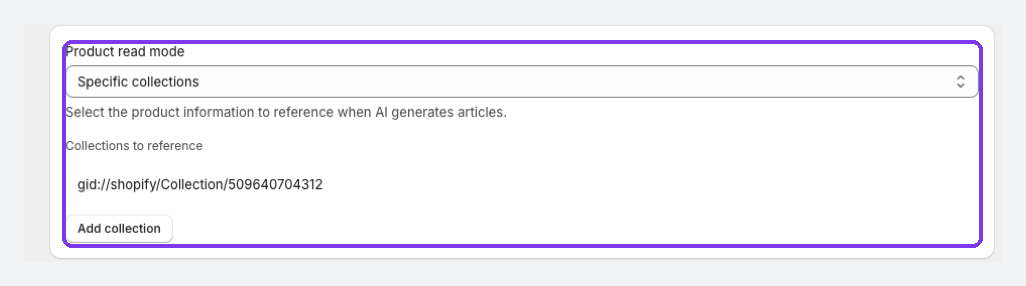
| Option | Best for |
|---|---|
| Do not read | General knowledge and brand stories |
| All products | An overview of the full catalog |
| Specific products | A particular product, how to use it, or how to care for it |
| Specific collections | Seasonal features and purpose-based roundups |
Too many products and the post loses focus. Start with a small set you actually want to feature.
Set how and when posts are created
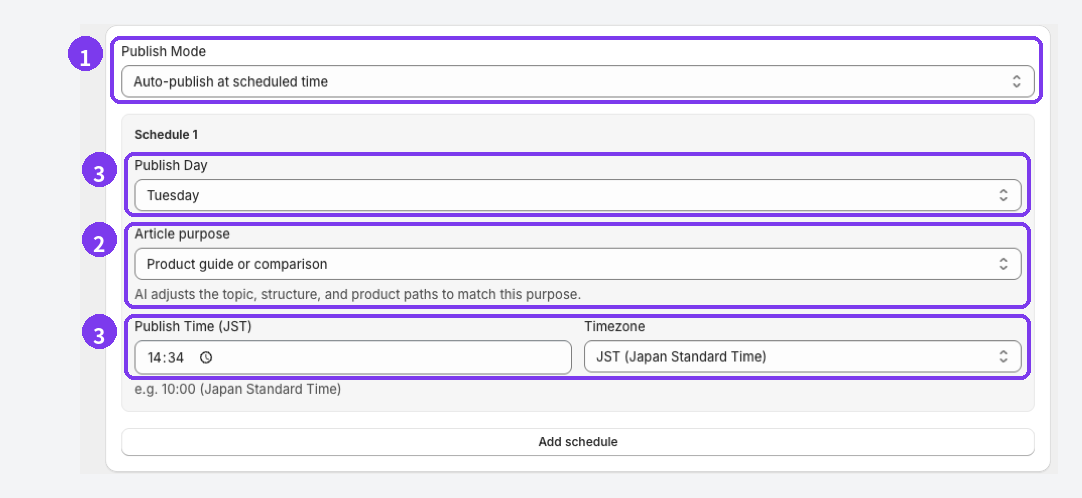
- Publish Mode: choose Save as draft (manual publish) or Auto-publish at scheduled time. Use draft mode for your first few posts. Consider auto-publishing only once you know what the output usually looks like.
- Article purpose: Let AI decide, SEO and acquisition, Education and editorial, Product guide or comparison, or Campaign. The AI adjusts the topic, structure, and paths to products to match.
- Publish Day, Publish Time, Timezone: one post is created each week at that day and time. Stores in Japan should pick JST; the other option is UTC.
Finally, turn on Enable email notifications, enter an address, and select Save Settings. The schedule is registered when you save, and you'll get an email each time a post is generated.
Review the draft, then publish
Find your drafts
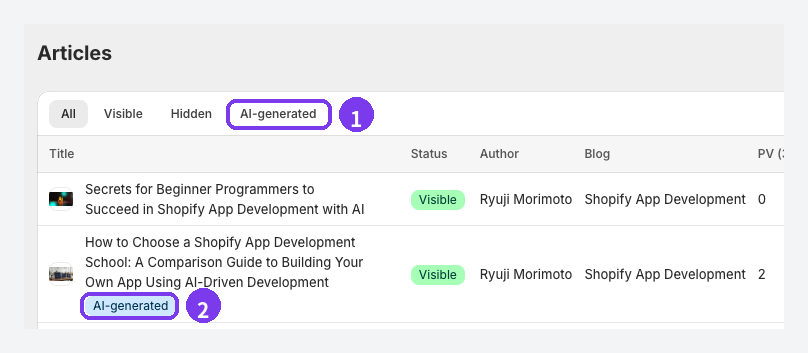
AI-written posts collect under the AI-generated tab in Articles, and each one carries an AI-generated label under its title, so you can tell them apart from posts you wrote. You can also open them from the AI Auto Blog history on the home screen.
Check four things before publishing
A draft can read smoothly and still be wrong. Check at least these four areas.
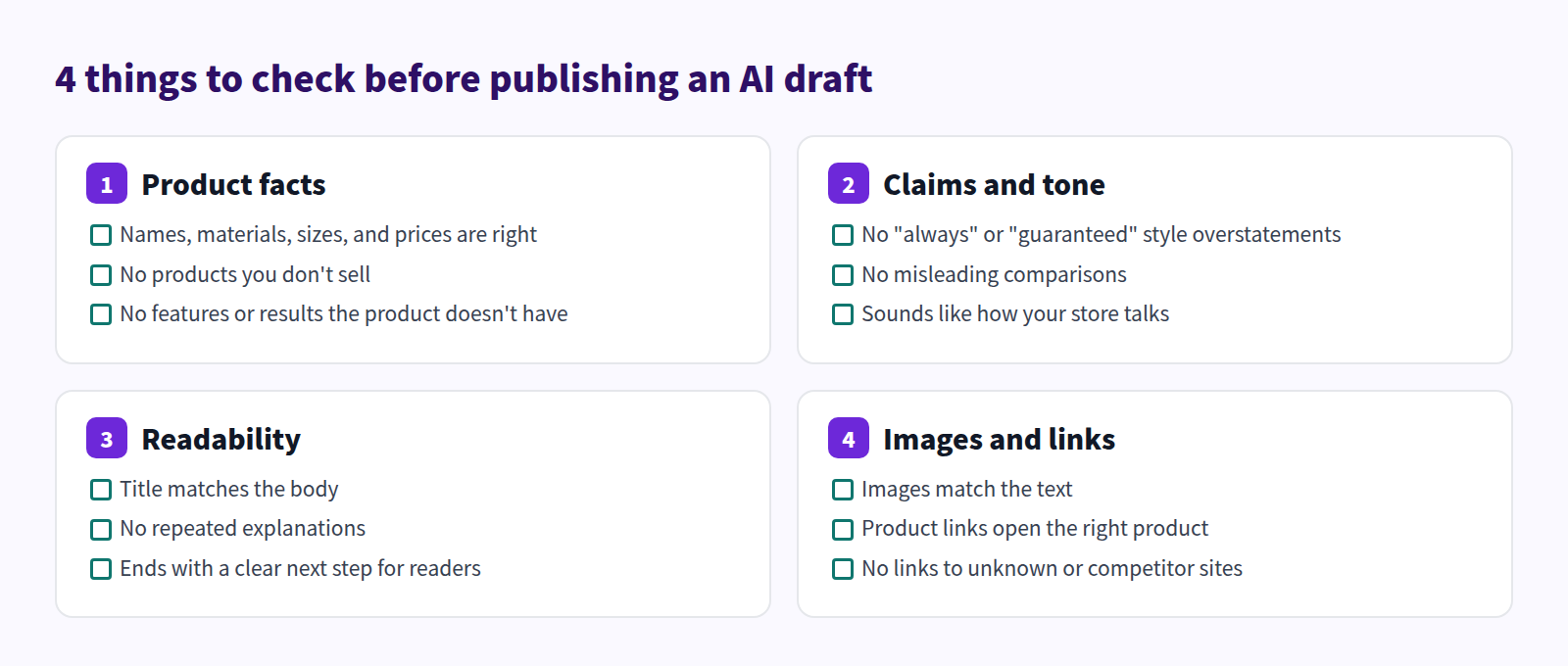
Plan on 10–20 minutes per post. When you're done, keep the post Hidden, save, and use Preview to check how it looks. Then choose Visible and select Save. Smart Agent Blog doesn't autosave, so save after every round of edits.
Add what only your store knows
One or two lines like these turn a generic draft into a post only you could publish:
- what your staff noticed after using the product,
- a question customers ask all the time, and your answer, and
- why you made or chose the product.
Adding product cards and a table of contents to make the post easy to read and shop from is your job too. See How to add products to your Shopify blog and How to Add a Table of Contents to Shopify Blog Posts.
If the same mistake keeps coming back, fix the settings
When drafts repeat the same error, change the inputs rather than editing every post:
- add accurate details to the Business Overview,
- make themes and keywords more specific,
- narrow the products the AI references, and
- define the target audience more clearly.
Shopify Magic vs. Smart Agent Blog
| Shopify Magic | Smart Agent Blog (AI Scheduled Blog Proposals) | |
|---|---|---|
| How posts are created | You write a prompt for each post | Set up once; posts are created on your schedule |
| Product information | You type it into the prompt | References all products, specific products, or collections |
| Saving | You save manually | Choose draft or auto-publish |
| Notification | None (generated on the spot) | Email when a post is ready |
| Finishing touches | Headings and layout handled separately | Add product cards, a table of contents, and tables in the same editor |
| Best for | A specific post you want to write now | Keeping a weekly publishing rhythm |
In Smart Agent Blog, AI article generation is limited to 2 articles in total on Free, 1 per month on Basic, and 15 per month on Pro, with up to 5 schedules on Pro. Separately from the plan, there's a limit of 3 generations per hour. See Plans and usage limits for details.
For the thinking behind splitting work with AI, see No time to blog? Build a practical writing workflow with AI.
For the habits that keep a store blog running month after month, see Shopify blog best practices.
FAQ
Will AI-written posts hurt my search rankings?
Google has said it rewards high-quality content however it's produced. Content generated mainly to manipulate rankings, though, violates its spam policies. Answer real customer questions and add information only your store has.
Can it write in English?
Yes. Article Generation Language sets the language. If you leave it blank, your Shopify store's locale is used.
Can I choose which AI writes the posts?
AI Provider lets you choose OpenAI (ChatGPT) or Anthropic (Claude Code). Whichever you choose, review before publishing.
The post wasn't there at the scheduled time
Generation can take a few minutes. Check whether the AI Auto Blog history on the home screen shows it as processing, and if you use draft mode, look under Articles → Hidden. If it still doesn't appear, see AI is not working.
Summary
- Most store blogs stall for lack of time, not ideas.
- Shopify Magic suits one-off posts; Smart Agent Blog's AI Scheduled Blog Proposals keeps a weekly rhythm going.
- Your Business Overview, audience, and product settings matter most. Start with Save as draft (manual publish).
- Before publishing, a person checks product facts, claims and tone, readability, and images and links.
Start by letting it write one draft and see what arrives for your store.