
"We don't know what to write" is the reason store blogs stall most often. Yet almost no store is actually short of material. The questions customers ask, the hesitation before choosing, the problems that show up after delivery — it's all there. What's missing is not the subject. It's the format to put it in.
This article is a catalog of those formats. Five situations, the post types that belong to each one, how far the Shopify admin takes each type on its own, and which Smart Agent Blog block does the work.
The process of writing a post is covered in How to write a Shopify blog post. This one is only about what to make.
- Five situations and the post types that fit each one
- How far Shopify on its own gets each type
- Which block to use for each type in Smart Agent Blog
- How to spot the situation your blog is missing
- Four posts to publish over your first eight weeks
What "we don't know what to write" really means
While preparing proposals for Smart Agent Blog in August and September 2026, we reviewed the blogs of 110 Shopify stores in Japan. About 4 in 10 — 42 stores — had no posts, had stopped after a handful, or hadn't published in over a year.
The 110 stores spanned homeware (24), apparel (23), food and drink (18), beauty and health (13), sport and outdoors (9), stationery and hobby (7), electronics (7), pets (2), and others (7). Different categories, same pattern in the stalled ones: new-arrival and sale announcements, and almost nothing else.
Announcements get written first because the material is obvious and anyone can write them. Which is exactly the problem — once there's nothing to announce, the blog stops.
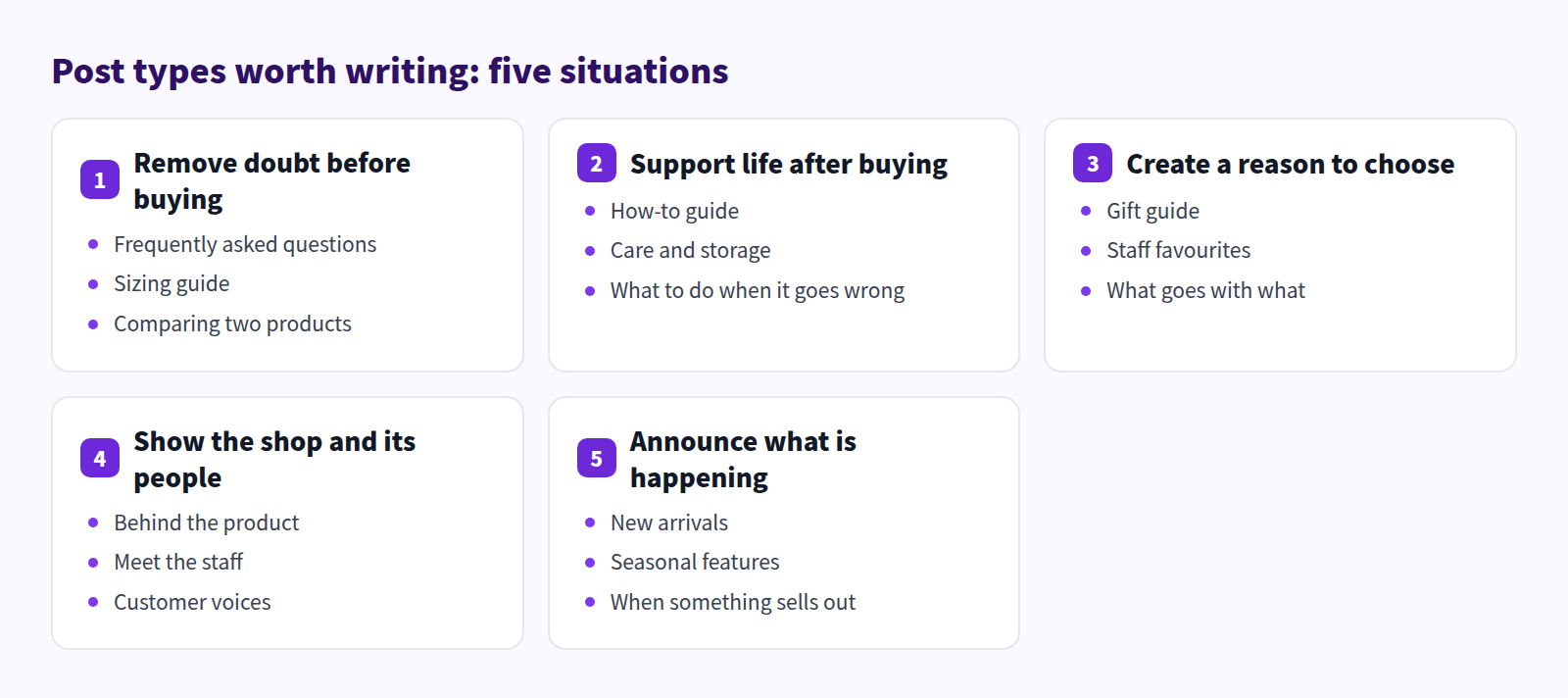
Formats divide by where the reader is standing:
Posts that remove doubt before buying
Online, nobody can touch the product. Every unanswered question becomes a reason to leave. "Will this size fit?" "Can I wash it?" "How is A different from B?" Posts that answer them also pull traffic from search.
Three formats carry this situation.
| Format | What goes in it | What it changes |
|---|---|---|
| FAQ post | Questions you're asked repeatedly, and your answers | Fewer enquiries to handle |
| Sizing guide | Measurements, how to measure, what to pick when unsure | Fewer returns and exchanges |
| Comparing two products | The differences, who each suits, why the prices differ | Fewer people leaving undecided |
The FAQ post is the easiest place to start. The answers already exist in your replies to customers — nothing needs researching. A question asked three times is one post.
In Shopify on its own
All three formats are buildable in the standard rich text editor.
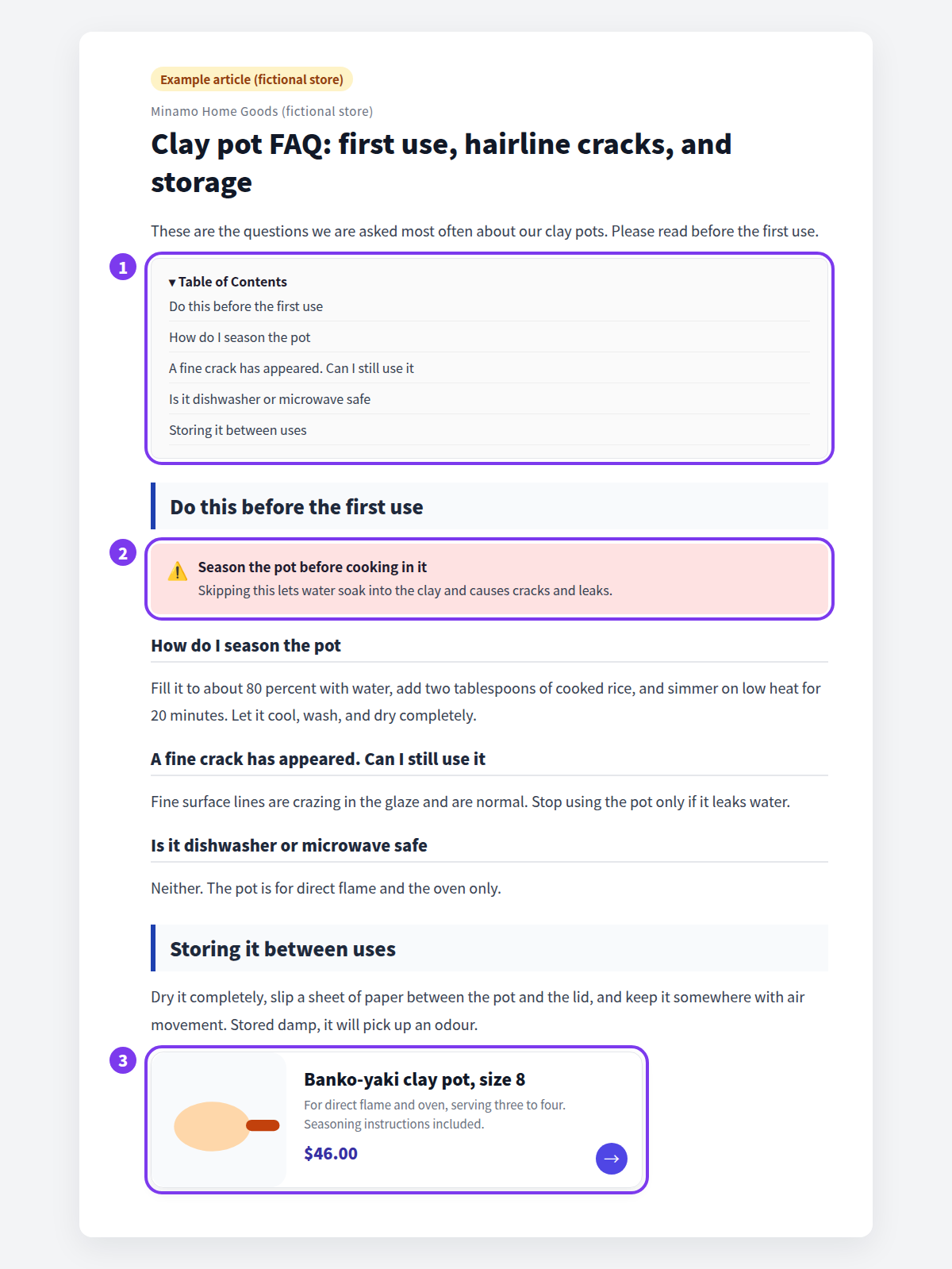
- FAQ post: make each question a heading and write the answer beneath it. Bold anything that matters.
- Sizing guide: use insert table for the measurements. The standard editor supports tables, so no outside tool is needed.
- Comparison: the same table, with links to each product page.
What falls short is how warnings read and how readers move on. Bold text still sits inside the paragraph, and links are URL-based, so any image or price has to be typed in by hand.
Which blocks to use in Smart Agent Blog
Questions still go in Heading 2 and Heading 3, answers in paragraphs. Three things change:
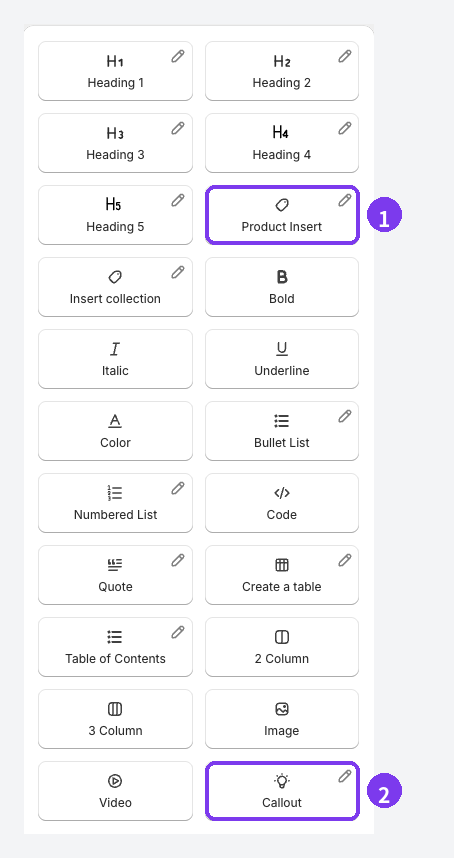
- Callout puts conditions and warnings in a panel that isn't the body text
- Create a table builds measurement and comparison tables in the editor
- Table of Contents builds itself from the headings, so a reader with ten questions in front of them jumps straight to theirs
Format by format: FAQ posts that answer real questions, Writing a sizing guide, and Putting a product comparison table in a post. For the split with product pages see Product page vs. blog post, and for warnings, Making important notes stand out with callouts.
Posts that support life after buying
These look like they earn nothing, and they do three things. Enquiries drop, products stay in use longer, and search brings new readers — because "how to clean X" is searched by people who haven't bought X yet, too.
Three formats:
- How-to guide — unboxing through the first use. A photo or video carries it.
- Care and storage — washing, drying, putting away, and what never to do.
- Troubleshooting — broken, stained, wrong size: the steps, and who to contact.
The leaflet in the box is fair game. Paper gets thrown away; a post gets found in search.
In Shopify on its own
Write the steps as a numbered list with an image per step. For video, upload to YouTube or Vimeo first, then embed it with insert video — the standard editor has no direct-upload video block, so that extra step is required.
Watch for one thing: images and text stack vertically. The standard editor gives little control over placing an image beside its caption, so a ten-step guide gets very long.
Which blocks to use in Smart Agent Blog
- Numbered List and Image for the steps
- 2 Column to put the photo beside its explanation — the more steps, the more this helps
- Video accepts a YouTube URL, a video file URL, an upload from your computer, or a video already in Shopify
- Callout for the one thing they must not do
See How-to guide posts, Product care guides, Embedding video in a Shopify blog post, and Two- and three-column layouts.
Posts that create a reason to choose
A product page serves someone who already knows what they want. Everyone else needs a reason to pick something. A present for a particular person, what the staff actually use, what goes with what — a blog is well suited to all three.
| Format | What goes in it | When it lands |
|---|---|---|
| Gift guide | Picks by budget and recipient, plus how to choose | Mother's Day, holidays, birthdays |
| Staff favourites | What your team uses, and why | All year. It shows character |
| What goes with what | Combinations that work together | Consumables and accessories |
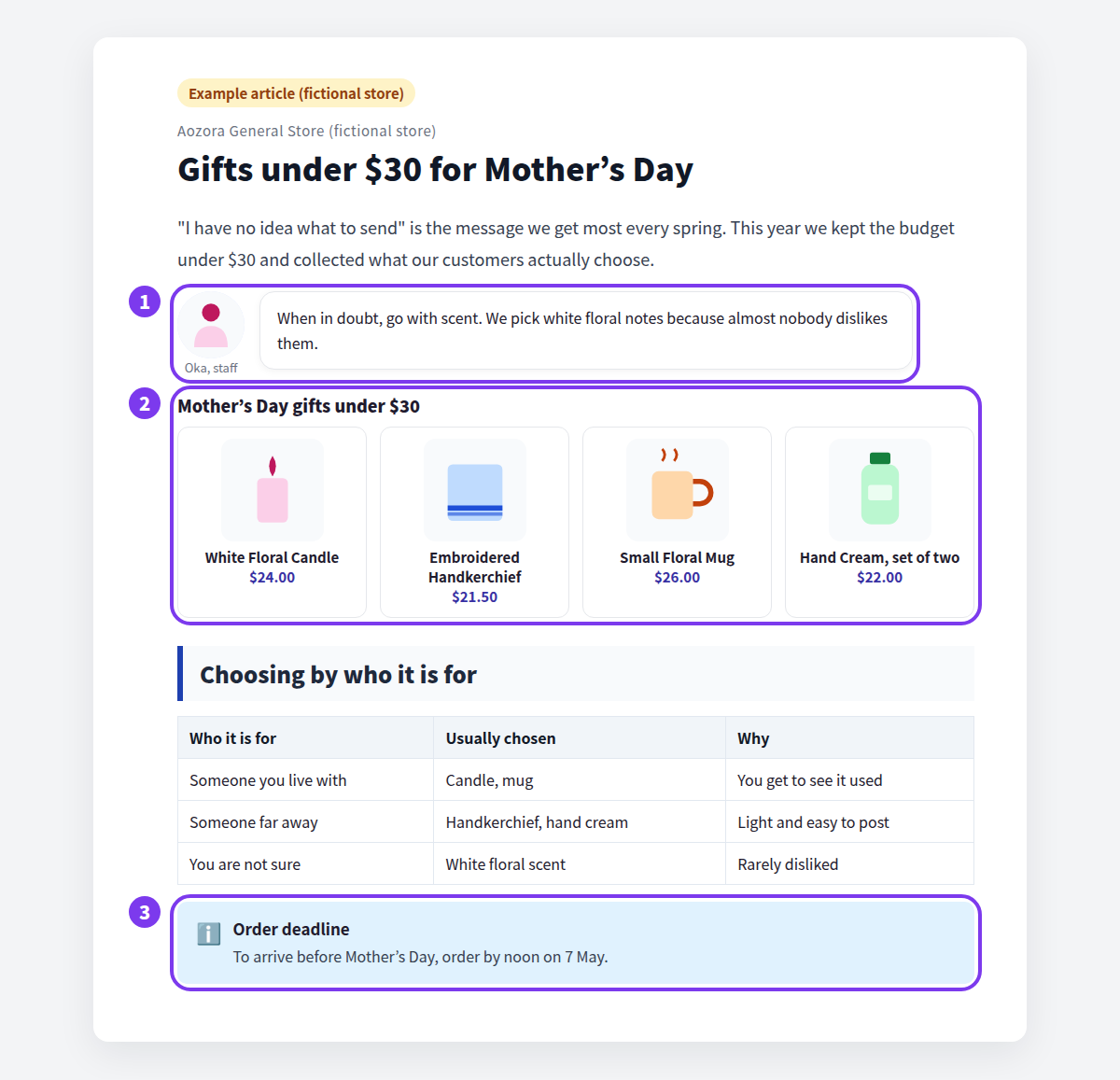
Here, whether you can present products together changes the post entirely. In our review, not one of the 113 posts we recorded used a card combining product name, image, and price.
In Shopify on its own
Lining up products is manual. For each one: insert the image, type the name, type the price, add the link. Twelve products means twelve rounds.
It is not impossible — plenty of hand-built gift guides are live right now. The cost arrives afterwards. When a price changes, an item sells out, or a product is swapped, the post has to be edited too. By the end of the season, most hand-built guides are out of date.
Even so, there's something to do today without an app: before the product list, write three lines on how to choose. By recipient, by budget, by scent or colour. A stated basis is what lets a reader decide.
Which blocks to use in Smart Agent Blog
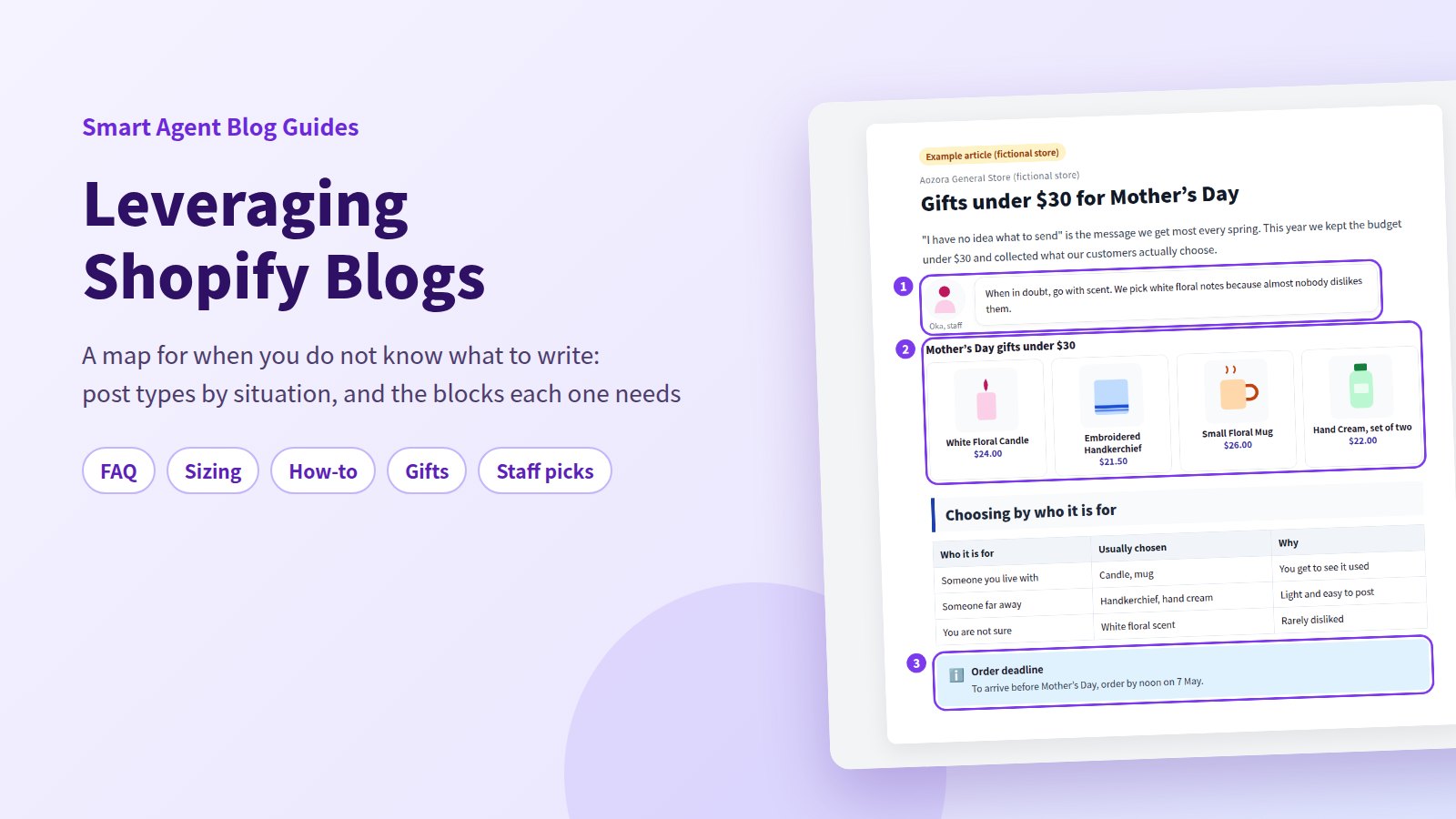
- Collection Insert takes one Shopify collection and renders the images, names, and prices together. Edit collection block sets the heading, description, product limit, and desktop and mobile columns. Product data is read from the collection, so a price change needs no edit to the post.
- Product Insert when one item deserves the spotlight. Out-of-stock items get a sold-out label.
- Speech Balloon for the staff comment — in a favourites post, that is the content.
Build the collection in Shopify first ("Mother's Day gifts", say), and the post assembles itself from one selection.
More: Building a gift guide, Staff favourites posts, Suggesting add-ons inside a post, Showing related products with a collection block, and Adding staff comments with speech balloons.
Posts that show the shop and its people
When other stores sell the same product, what decides the sale is price or the shop itself. These posts build the second one. They don't convert immediately; they work on repeat customers and on being remembered.
- Behind the product — why you made it or chose to stock it. Materials, origin, the maker.
- Meet the staff — who picks the stock and who packs the boxes.
- Customer voices — real feedback, quoted with permission.
The trap is writing about yourself. "What we care about" only works when it continues into "and here's how that shows up when you use it."
In Shopify on its own
Photos and text do the job, and quotes can use the blockquote style.
The constraint is authorship. In a standard Shopify blog post, the author can only be the store owner or staff with admin access. If you want a post to carry a sales assistant's name, that gets awkward.
Which blocks to use in Smart Agent Blog
- 2 Column for photo beside text, which reads more like an editorial piece
- Quote to set a customer's words or a maker's words apart from the body
- Author profiles are created under Settings > Authors with a name, image, role, description, and social URLs — independent of Shopify admin access, so the person who wrote it gets the byline
An author profile is written once and appears on every post by that person. See Register an author, Showing an author profile on blog posts, and Posts that tell the story behind a product.
Posts that announce what's happening
This is the format everyone writes first, and where most blogs stop — because announcements depend on something happening. No new product, no post.
So widen the definition:
| Format | What goes in it |
|---|---|
| New arrival | Launch date, what it does, how it differs from what you already sell |
| Seasonal feature | How products suit the season. Reusable every year |
| When something sells out | Restock outlook, and what to buy instead |
| Price or spec change | The reason, and the date it takes effect |
Seasonal features belong in an annual plan. Reworking last year's post is usually enough.
In Shopify on its own
Shopify blog posts can be scheduled, so a launch-morning post can be written and queued the day before.
For a seasonal post you reuse, decide up front whether to update the existing post or create a new one. Updating keeps the URL, so links you have already shared keep working.
Which blocks to use in Smart Agent Blog
Setting the status to Schedule lets you set a publish date, an unpublish date, or both. Setting both gives you a post that takes itself down when the campaign ends.
Put a Product Insert in the launch post so that the moment it goes live, readers can reach the product. Draft, hidden, and archived products can't be selected, so publish them in Shopify first.
See What to write besides sale announcements, New product launch posts, A seasonal content calendar, and Handling sold-out products in posts.
How far Shopify on its own gets you
Every format above is buildable with Shopify's built-in tools. Headings give structure, tables carry comparisons, images show steps, links reach the product, and scheduling handles the timing. None of that needs an app.
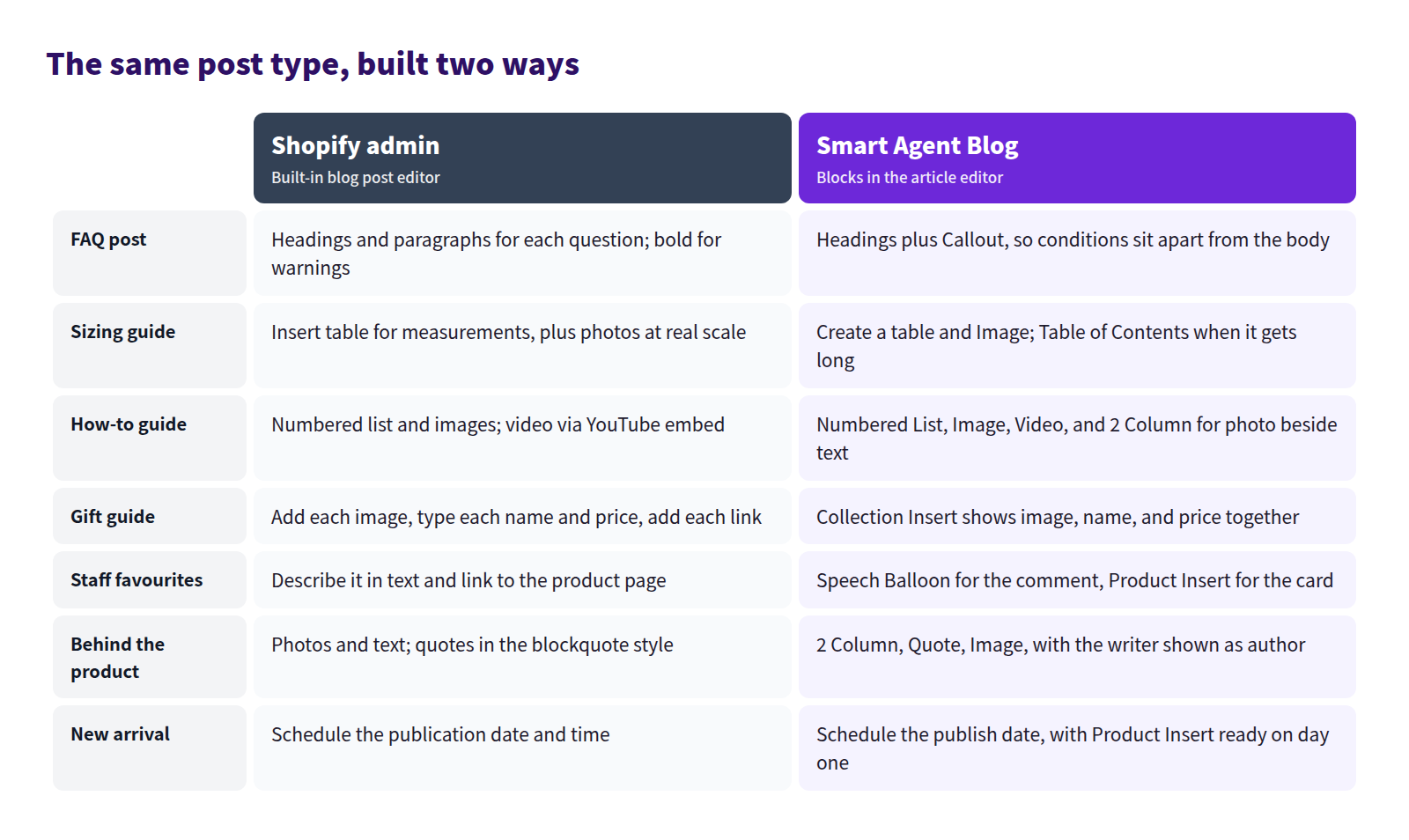
The gap shows up in two places: formats that present products, and formats you repeat.
Gift guides and add-on posts are assembled one product at a time and re-edited whenever a price moves. The collection block replaces that work entirely.
And in long formats — FAQs, sizing guides — a table of contents decides whether the post is usable. Building one in Shopify alone means editing HTML, and every new heading means editing it again.
Formats that don't list products — behind the product, meet the staff, troubleshooting — are perfectly buildable with the standard editor. That's the fastest place to start.
Where to start
First find the situation you're missing. Sort your existing posts by where the reader is, and by whether the subject is the product or the shop.
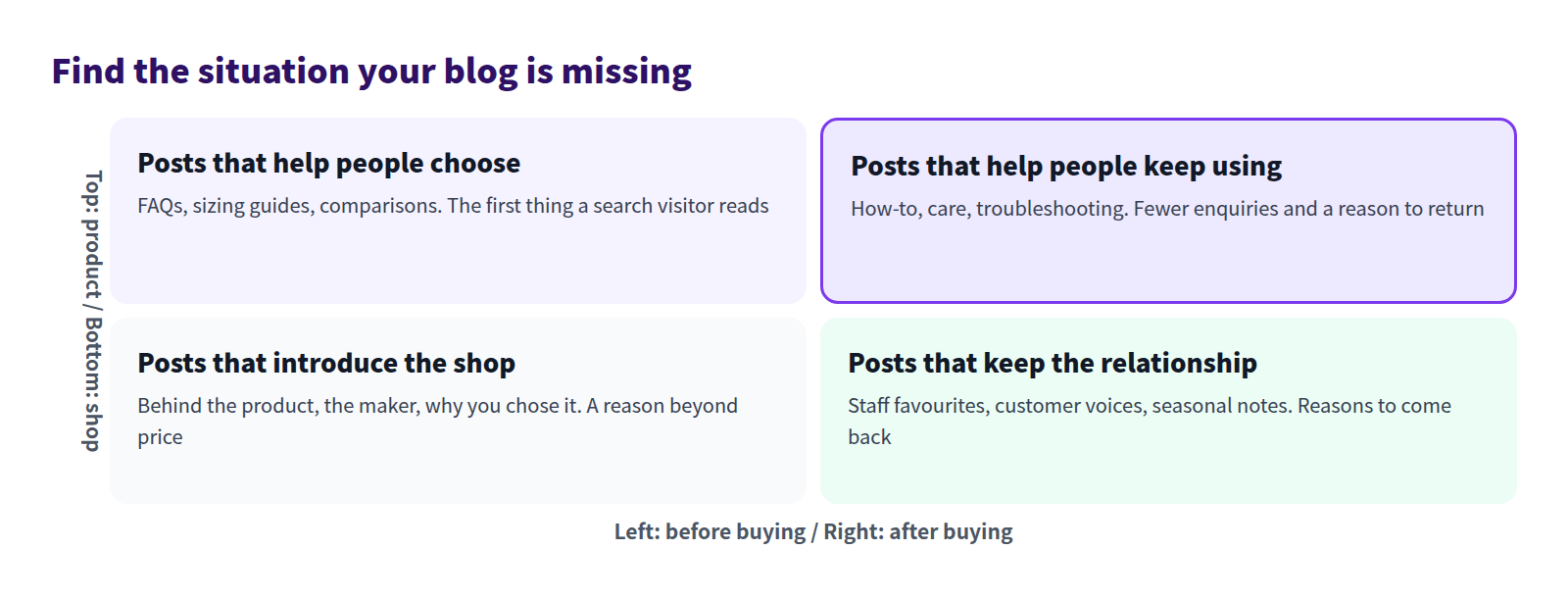
For most stores, the top-left quadrant holds a few announcements and the other three are empty. Writing into an empty quadrant guarantees you won't repeat an existing post.
If the order is what's stopping you, take this one:
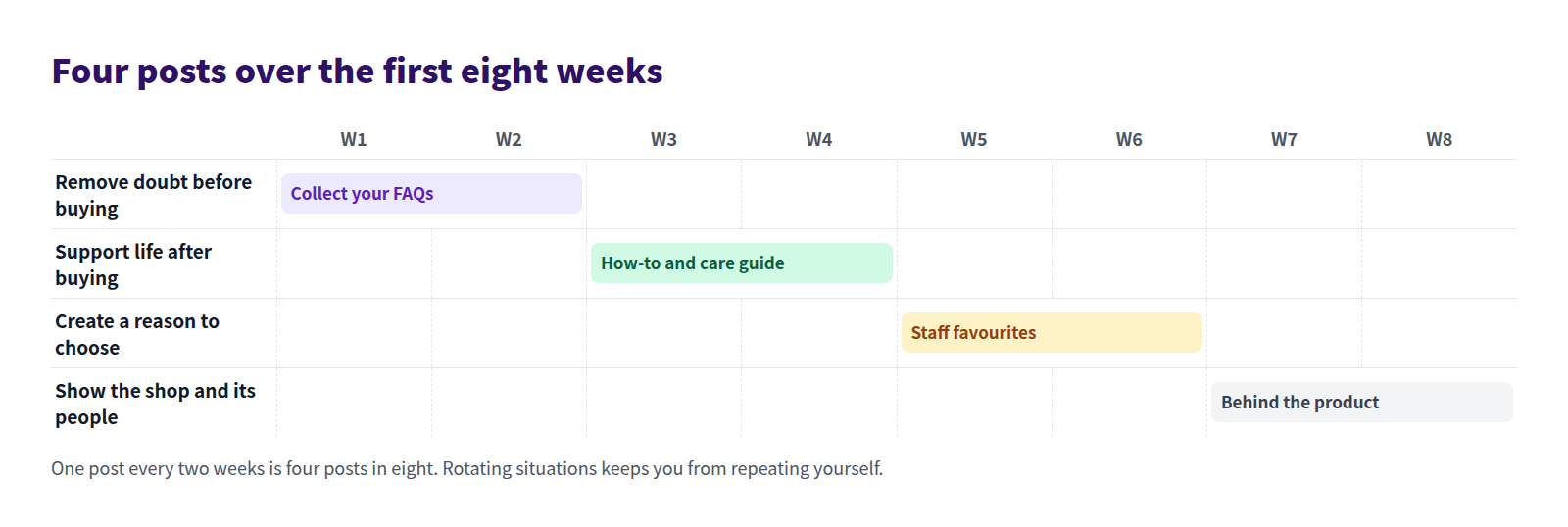
Three reasons for those four. The FAQ needs no research. How-to and care posts bring people in from search. Staff favourites and the story behind a product are the two nobody else can copy.
For the writing process, see How to write a Shopify blog post; for keeping it going, Shopify blogging best practices.
FAQ
We only sell a handful of products. Are there enough formats?
Yes. Five products still give you four angles each — questions, how to use, how to care for it, how to choose. A small catalogue is an advantage here: you can go deeper on every item.
Can I publish several posts in the same format?
Yes, as long as the subject changes. Three sizing guides work if each covers a different category. Two posts in the same format about the same thing compete with each other and both get buried. When near-duplicates pile up, merge them or rewrite one from a different angle.
Which formats suit an AI draft?
Formats built largely on general knowledge — how-to, care, seasonal features — give the most usable drafts. Formats whose substance is something a person saw or heard, like staff favourites and customer voices, stay mostly human work. In Smart Agent Blog, Article purpose offers SEO and acquisition, Education and editorial, Product guide or comparison, and Campaign; pick the one closest to the format you want. See Get scheduled AI article proposals.
Summary
- The problem isn't a shortage of material. It's having only one format: the announcement.
- Formats sort into five situations: before buying, after buying, reasons to choose, the shop and its people, and what's happening.
- All of them are buildable in Shopify alone. What turns manual is any post that lists products, and any post long enough to need a table of contents.
- Filling the empty situations one post at a time keeps new posts from overlapping the old ones.
Start with a question you've answered three times. That's post one.