
Your team has favorites they genuinely use every day, and you'd like to share them on the blog. But the draft keeps coming out as "We love it!" and "So easy to use!", which says nothing the product page doesn't already say.
What makes a staff pick worth reading isn't enthusiasm. It's the facts of real use: who uses it and how, for how long and in what situations, what works, what doesn't, and who it isn't for. Write it in that order and readers can tell whether it fits the way they'd use it, and they'll believe the good parts.
This guide lays out that pattern with a fictional store's post. It also shows how to feature a staff member's own words with Smart Agent Blog's speech balloons, and how to show who wrote the post with author profiles.
- Why "we love it" doesn't persuade anyone
- A five-part pattern for staff picks that feel real
- What the finished post looks like, with a fictional example
- How to keep facts and fiction apart
- How to use speech balloons and author profiles in Smart Agent Blog
Why "we love it" doesn't persuade
People read staff picks to find out what the product is like for someone who actually uses it. Posts like these don't answer that:
- They never say who uses it or how.
- There's no time frame, so you can't tell a first impression from long-term use.
- They list only good points, so they read like ads.
When readers know the user's situation, they can compare it to their own. A review from "someone who's used it for daily notes for six months" helps people who write every day, and people who write occasionally can adjust for that. And once a post admits a drawback, the praise becomes believable.
Staff picks are also one of the easiest topics to keep a blog going with. While preparing proposals for Smart Agent Blog in August and September 2026, we reviewed the blogs of 110 Shopify stores in Japan. About 4 in 10 (42 stores) had no posts, had stopped after a handful, or hadn't posted in over a year. Even a store stuck on what to write already has material in the products its staff use every day.
Staff picks are one of the easier topics to sustain; the full set of store blog topics shows what else you can run.
A pattern for staff picks
Build a staff pick from five parts:
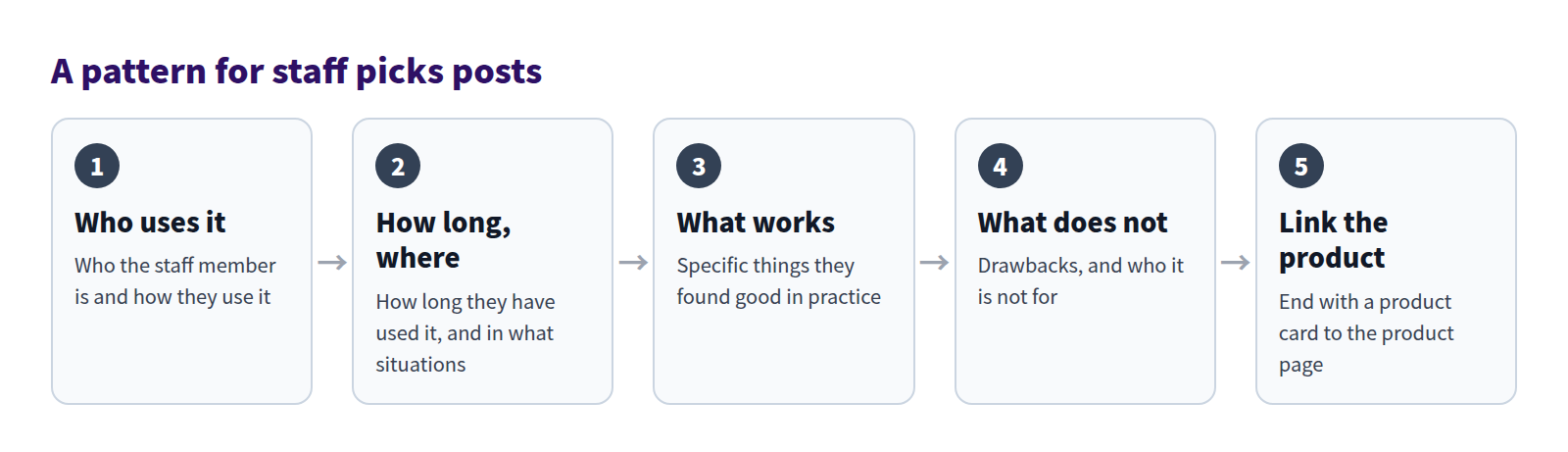
Who uses it
Start with who the staff member is and how they use the product: their role, what they use it for, and what they use it with. For a notebook: "A shop staff member, for daily notes, with a 0.5 mm gel pen."
If you include personal details such as age or body type, get the staff member's permission and keep it to what readers need to judge fit.
How long, and in what situations
Give the time frame in numbers, like "about six months" or "on my second notebook." Then describe the situation: "Every morning I write the day's tasks on one page." Specifics let readers picture it in their own routine.
What works
Don't just say it's easy to use. Say what's good and why: "The dots make tables and lines easy without a ruler." Three points is about right.
What doesn't, and who it's not for
Include at least one drawback, then say who it won't suit. Being clear about who it's not for makes the post more trustworthy for the people it does suit, and cuts down on "not what I expected" returns.
Link the product
End with a product card so readers can check the product right away. If you also mention things the staff member uses with it, see How to suggest products that go together.
Generic praise vs. a real staff review
The same product can come across very differently depending on how it's written.
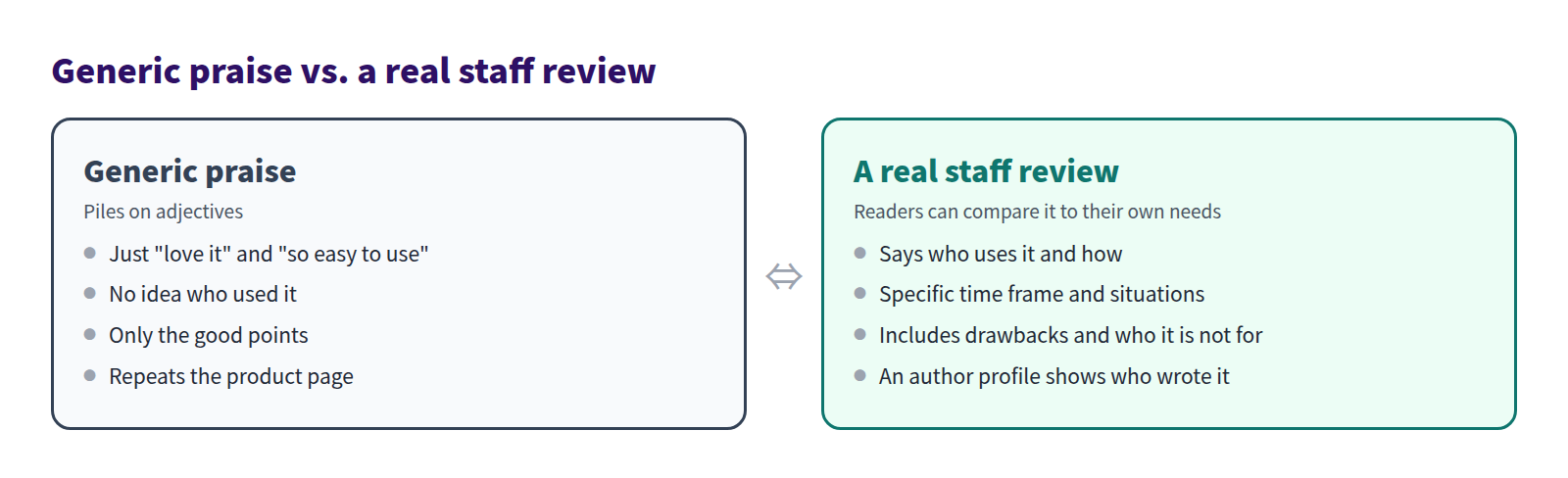
However enthusiastic, the left gives readers nothing to measure against their own needs. The right lets them decide for themselves.
What the finished post looks like
Here's a staff pick from a fictional stationery store. The staff member and the comments are also fictional, for illustration only.
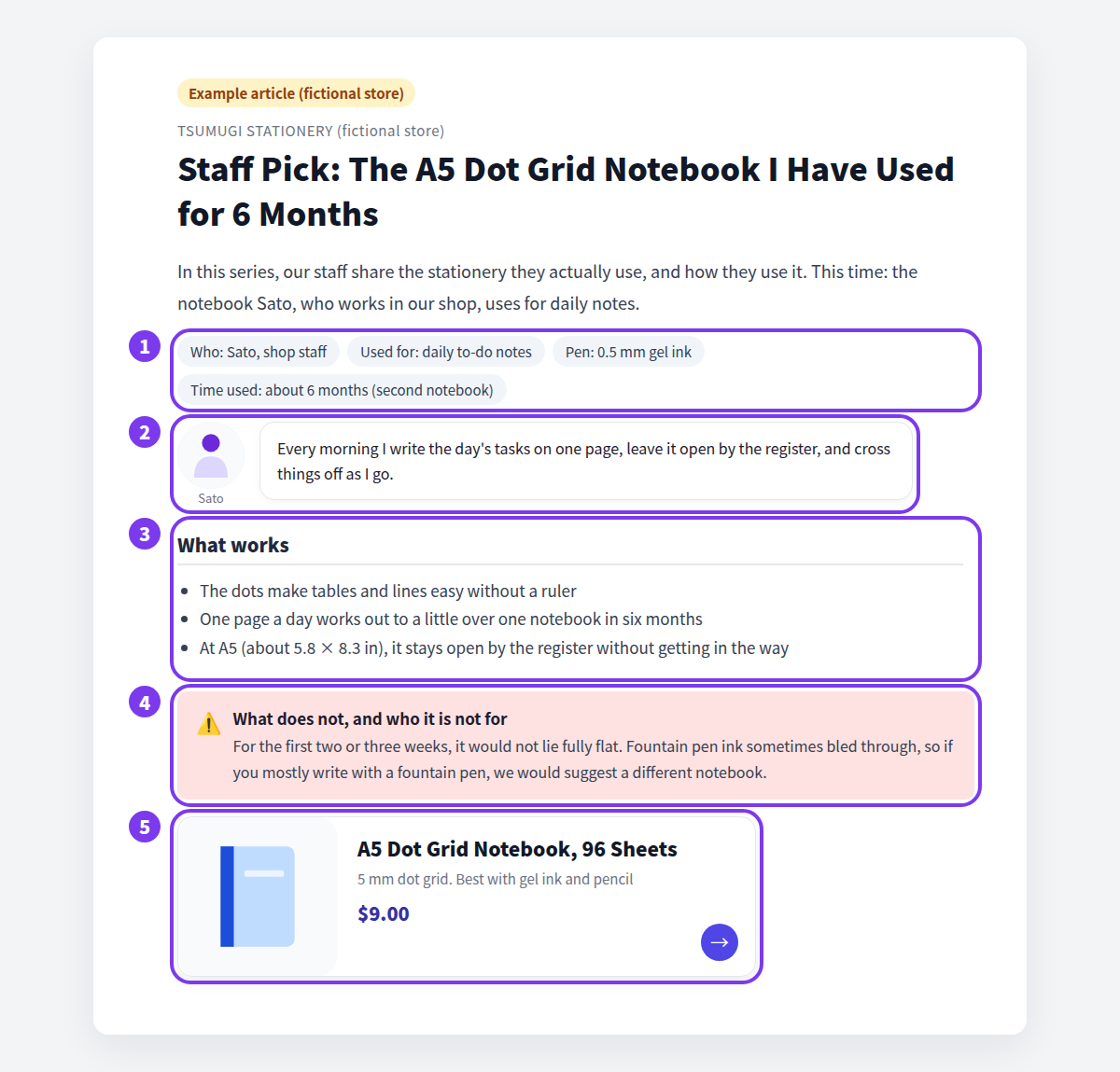
- Who uses it. The user, what it's used for, the pen, and how long, in a short row at the top.
- The staff member's words. A speech balloon quotes the situation in their own words: "Every morning I write the day's tasks on one page."
- What works. Three good points, each with a reason.
- What doesn't, and who it's not for. It didn't lie flat at first, and fountain pen ink sometimes bled through, so "if you mostly write with a fountain pen, we'd suggest a different notebook."
- Product card. The notebook's card closes the post.
You might worry that saying who it's not for will cost sales. But a sale to someone it doesn't suit rarely ends in a happy customer. A post the right people can trust builds trust in the whole store.
Keep facts and fiction apart
A staff pick is valuable because it's real. Stick to these rules:
- Never invent customer quotes. Don't dress up a post with made-up reviews presented as real. If you quote customers, use real comments, with their permission.
- Only write what the staff member actually experienced. No opinions on features they haven't used or uses they haven't tried.
- Don't promise results. For beauty, health, and food products especially, don't state effects as fact. Keep to what the person experienced, such as how it feels, smells, or fits into their day.
- Match the product page. Sizes, materials, and other specs should agree with the product listing.
If a staff member isn't comfortable writing, turn each part of the pattern into an interview question and have someone else write it up. Then have the staff member read it and confirm nothing was added that they didn't say.
What Shopify's standard editor can do
Standard Shopify blog posts let you choose an Author for each post. But the dropdown only lists the store owner and staff members with admin access; POS-only staff and collaborators don't appear.
The standard rich text editor also has no speech balloon block for showing a staff member's face next to a quote, so you'd need to write HTML for that. And product mentions become text links to the product URL rather than product cards.
How to build it in Smart Agent Blog
Add the staff member's words with a speech balloon
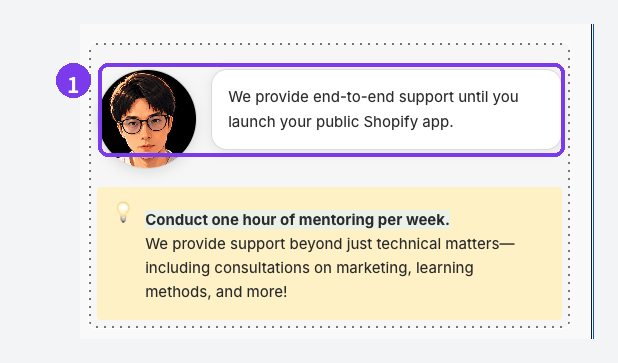
Type / at the start of a new line, narrow the list by typing a few letters of Speech Balloon, and select it. The block, highlighted as 1, shows the staff member's photo beside their comment like a conversation. Use it for the situation in their own words.
To switch the photo to the other side, hover over the block, select the handle on its left, and choose the option in the menu. Design editing (the pencil icon), which changes the balloon's look, requires a paid plan.
Show who wrote it with an author profile
Register the staff member who wrote the post as an author.
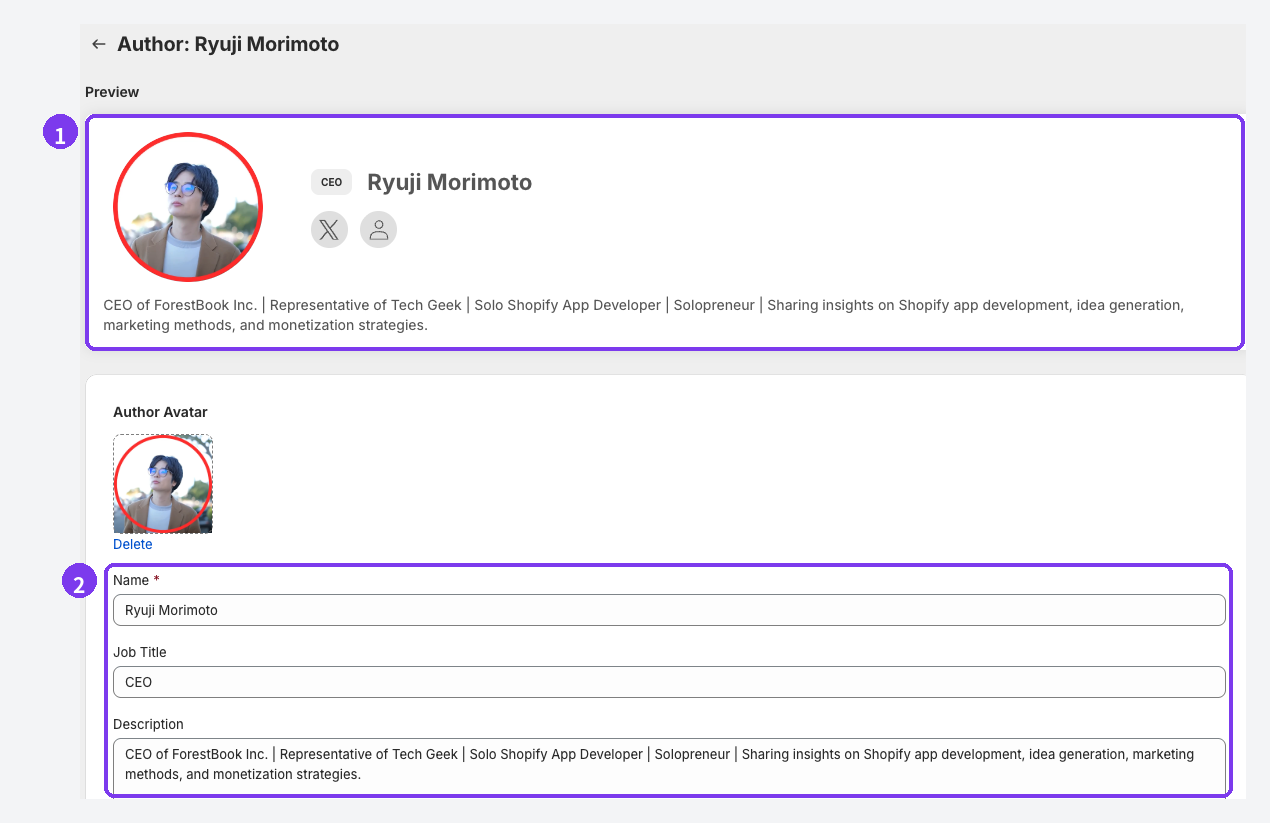
- Preview. The top of the edit screen shows how the profile will look on your store.
- Name, Job Title, Description. Only the name is required. For staff picks, add a job title (such as Product Development) and a description of what they work on and how they use your products, so the profile backs up the post.
To create an author:
- Open Settings in Smart Agent Blog, then open Authors.
- Select Create Author and enter a name.
- Add a photo, job title, description, social links, and tags as needed, then select Save.
Then choose the staff member under Author in the article editor and save. Create New Author in the editor opens the same form in a new tab; reload the editor after adding the author.
To show authors on your store, open the blog post template in the Shopify theme editor, select the Smart Agent Blog article section, and choose a position under Select Author Display Method: Hidden, Show as Sidebar, Show below Article, or Show above Article. Authors are hidden until you choose. The profile shows the photo, job title and name, tags, social icons, and description, and leaves out empty fields. Only articles saved in Smart Agent Blog with an author selected show a profile. See Register an author and Show articles on your store.
Standard Shopify vs. Smart Agent Blog
| Standard Shopify | Smart Agent Blog | |
|---|---|---|
| Choosing the writer | The store owner or staff with admin access | Any profile registered under Authors |
| Writer details | A name | Photo, job title, description, social links, and tags |
| Staff comments | Write HTML | Speech Balloon block |
| Linking to the product | Text link to the product page | Product Insert adds a product card |
If only the owner writes, the standard author field is enough. If several staff members take turns sharing their picks, a profile for each person makes it much easier to show who's behind every post.
What to check before publishing
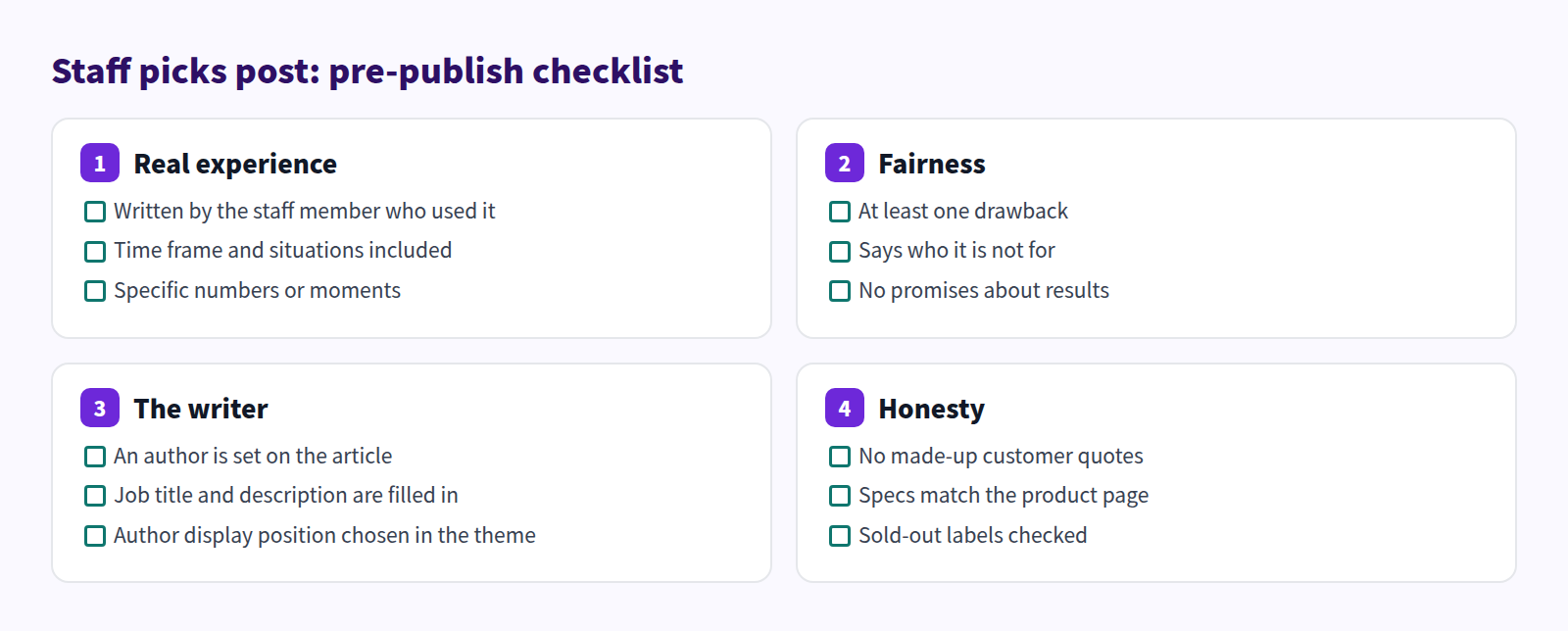
The Honesty column matters most. Before publishing, make sure there are no made-up customer quotes and no promises about results.
FAQ
Can staff who don't like writing still contribute?
Yes. Turn each part of the pattern (who uses it, for how long and where, what works, what doesn't and who it's not for) into a question, interview them, and write it up. Put their own words in a speech balloon so their voice comes through, and have them check the final text.
Will adding authors help my search rankings?
Author profiles help readers understand who wrote a post. Registering an author doesn't guarantee higher rankings, though. Accuracy and readability matter too.
What happens to posts when a staff member leaves?
Deleting an author can't be undone, and posts that used that author lose the profile (photo, description, and links) on your store. Before deleting, find the posts that use the author and move them to another author, or review the content.
Summary
- A staff pick should share the facts of real use, not just enthusiasm.
- Write who uses it, for how long and where, what works, what doesn't and who it's not for, then add a product card.
- Never invent customer quotes, and don't promise results.
- Use speech balloons for staff voices and author profiles to show who wrote the post.
Start by asking one staff member which of your products they use every day. With that answer and one situation where they use it, you have the material for your first post.